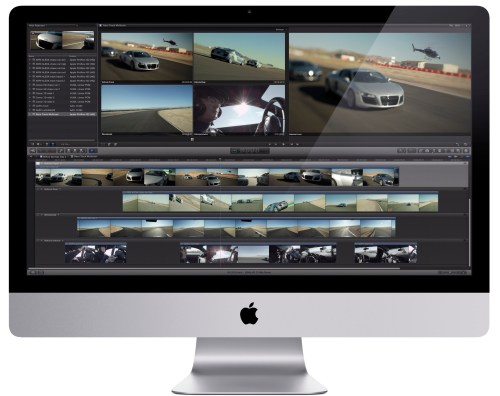
Category Archives: Video

The Scream by Edvard Munch

A PHOTO CALL

This timelapse shows what a large photo call looks like; there are there waves of some of the country’s top photographers being brought into the room to see the $80 million, guarded painting.

Apart from the opening and closing photographs which were taken on a Leica M9, the entire timelapse was shot on an HD Hero. All images were processed in Aperture and the video was made in FCP X.

Canon C300 V 5D MkII

Comparing Footage From the C300 & 5D MkII

A short clip showing a quick comparison between a Canon C300 and Canon 5D MkII. The cameras were set up as identically as possible, using the same settings. Please note that this was shot during an open day event, so not ideal conditions as the settings were constantly being changed on both cameras by attendees to the event! Lastly, there’s a clip from the C300 which is ungraded. Many have asked to see footage which hasn’t been touched, so all of these clips are straight from camera.

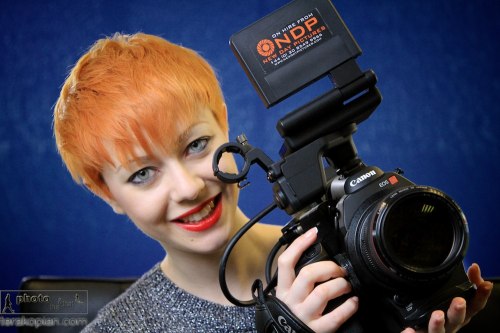
Featuring model Vicki Blatchley  Shot at New Day Pictures

Thoughts

Putting aside for a moment that the Canon C300 is actually a proper video camera with all the video functions, flip screen and audio abilities, not to mention the form factor, that one needs for professional video (all of which are lacking on the 5D MkII) and looking at purely the image quality, at first glance, there appears to be little difference between the two.

It’s only when we brought the image into the full editing suite that the huge dynamic range and masses of detail in the extreme highlight and shadow areas started to show the C300 as vastly superior. Even on the non flat settings, the file was just lush with detail. Although I love the 5D MkII, the C300 is just on a completely different level.

The 5D MkII does have an edge in two ways; it has that gorgeous full frame sensor as opposed to the Super 35mm of the C300 (crop factor of x1.6) and is many, many times cheaper, even when taking into account finders / EVFs, rigs and external audio that’s needed to make it usable.

The C300 does have it all though. I for one am extremely impressed by this camera; it really is rather good.

Model Vicki Blatchley at the Canon C300 Open Day and New Day Pictures, Surrey. January 26, 2012. Photo ©

Photographer and film maker Edmond Terakopian at the Canon C300 Open Day at New Day Pictures, Kingston Upon Thames, Surrey. January 26, 2012. Photo ©Model Vicki Blatchley at the Canon C300 Open Day and New Day Pictures, Surrey. January 26, 2012. Photo ©

You can see my longer, graded, demo reel from the Canon C300 below:

Multimedia, As It Should Be

MediaStorm

I had the pleasure of attending a workshop by MediaStorm‘s executive producer, Brian Storm, at the Frontline Club in London. It was an amazingly inspiring day, lots of information and an array of really powerful and moving work. I’ll be posting projects put together by the talented crew at MediaStorm, and will start by sharing these two astonishing projects. Astonishingly, both of these projects were created during MediaStorm’s Advanced Storytelling Workshops! Such an amazing fusion of photography, video and audio and storytelling as it should be done.

A Thousand More

Take Care

DSLR Video Viewing Accessories

Marshall V-LCD50-HDMI,

Zacuto Z-Finder EVF Pro

& Cineroid EVF4L

For all the advantages associated with shooting HD video on DSLR cameras, ergonomics isn’t one of them. While they provide visually rich and cinematic video, DSLRs just don’t have the right form factor for video, especially if you need to “run and gun”. The development of dedicated rigs by the likes of Zacuto and Redrock Micro has made up for some of this, but while they make it easier to use a DSLR without a tripod, they have never been perfect. The main reason is that the rear LCD of the camera is used for viewing, so it has to be placed in front of the user’s eye, ruining the balance and bringing the weight off the right shoulder to the centre, which in turn makes the whole setup a little unsteady for longer takes.
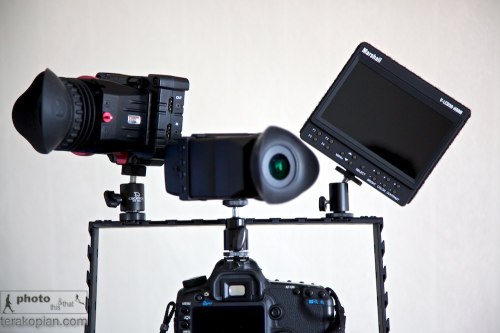
L-R: Zacuto Z-Finder EVF Pro, Cineroid EVF and the Marshall V-LCD50-HDMI, all mounted on a cage and a Canon 5D MkII. Photo: Edmond Terakopian

Electronic viewfinders (EVFs) have been developed to compensate for this problem. A small LCD screen with a magnifier loupe that plugs into the HDMI port on a camera, they prove pretty versatile when coupled with a magic arm that can be placed anywhere. This allows the camera to be kept to the right where the rig and load bearing right arm are, and only mount the relatively lightweight EVF in front of the user’s eye.

Having tried this setup with the Zacuto Striker, I am now of the conclusion that you need a bigger rig when you’re shooting with an EVF, using a weighted shoulder section to hold the camera and viewfinder more comfortably. Using a lightweight rig with something like a Z-Finder Pro and standard or wide-angle lens worked, as the finder was part of the camera body and it formed a point of contact allowing for steadier shots. But an EVF is mounted away from the camera so does not add to stability in the same way. However, it does provide for much more intuitive handling, not to mention its uses for low-level work, where the finder can be mounted at a more comfortable height.

Side By Side

For this review I tested two popular EVFs; one from Cineroid, and the other from Zacuto. Physically, the two units are of similar dimensions (with the Cineroid being slightly longer and the Zacuto a little fatter), and both have HDMI passthrough (mini HDMI only on the Cineroid), which can handle additional viewing accessories, such as a Marshall monitor (reviewed below) to be plugged in for a focus puller or a director to use.

Both also have hinged magnifiers that allow them to be flipped out of the way for longer working distances and for use as a mini monitor. And each has a peaking feature that overlays sharp edges and is a superb focusing aid (with red lines an option on the Cineroid), along with zebra settings and a false colour mode, which are both used to judge exposure. The pixel-to-pixel feature on each is especially handy for EOS 7D and 1D Mk IV users as it allows for precise focus check during recording, while on a 5D Mk II it can be used for precise pre-focusing. Lastly, a monochrome feature helps with focusing and judging exposure, and anyone from a broadcast video camera background will welcome this. In addition, both units allow a number of their buttons to be programmed to use common functions needed by the user.

The Cineroid EVF has a built-in speaker and headphone jack, used only for playback, as DSLRs cannot be monitored during recording. For power, the unit comes with an NP-F compatible battery, but can also use official Sony NP-F batteries of differing sizes, and with the PA01 adapter, can be mains powered, or make use of the Canon LP-E6, the same battery found in the EOS 5D Mk II and 7D. It also has a very neat battery cover for smaller batteries.

The Zacuto is available in four identical EVF models with differing magnifier options. The Snap and Flip models come without the magnifier, being ideal for anyone who already has a Z-Finder, while the Z-Finder EVF and Z-Finder EVF Pro come with the Z-Finders included. The Snap model allows the magnifier to be snapped on and off whilst the Flip allows the Z-Finer to be flipped up or down. With the magnifier out the way, the EVF acts a small screen.

For power, it uses Canon’s LP-E6 batteries, which sits securely, but I wish it had a cover to help keep out the elements.
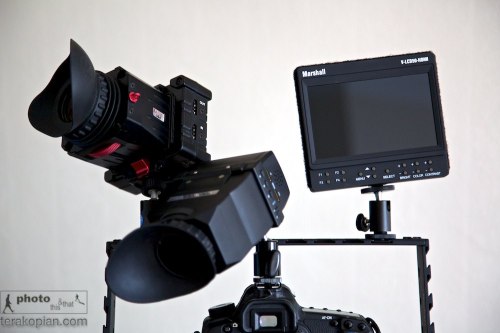
L-R: Zacuto Z-Finder EVF Pro, Cineroid EVF and the Marshall V-LCD50-HDMI, all mounted on a cage and a Canon 5D MkII. Photo: Edmond Terakopian

Both these units work well, improving the filmmaking experience on a HDSLR, but there is one clear EVF winner. The Zacuto has a much sharper display with vibrant colours – it makes the picture jump out. Part of this is down to the superb Z-Finder magnifier, which allows quicker focusing and is more comfortable on the eyes. It’s also better built with superior accessories.

The Alternative

Another option is to use an external field monitor. Traditionally these come in seven-inch screen formats, but Marshall, the leader in this field, recently launched a five-inch version that is better suited to HDSLR filmmakers.

The V-LCD50-HDMI is small and light enough to be used like an EVF, and can be easily mounted onto a rig (a larger shoulder rig that is weighted would provide the best comfort and balance). The unit comes with a hood so it can even be used outdoors in bright light, although probably not as effectively as an EVF with an eyecup magnifier, but can be used with more accuracy from a distance.

Its feature set is rather impressive; a backlit LED screen delivers up a sharp and vivid picture, and it has a peaking feature that allows for precise and fast focusing by firstly turning the image monochrome and then drawing on red lines where the image is in focus. It’s a little odd to use at first, but proves to be a great tool once you get used to the system. The monitor also has the false colours feature for setting correct exposure that turns the image into a range of different colours; with pink and green showing correct exposure, various tones of red, over-exposure, and blues, under-exposure. The unit also has various colour temperature settings as well as markers.

The only connector is HDMI, so it is aimed firmly at the HDSLR market. For power, it uses four AA batteries, coming with a set of rechargeable AAs and charger. The Marshall is rather power hungry, so thankfully there is also a mains adapter for when shooting indoors. Along with a hood, the kit also comes with an HDMI cable and a ball head hotshoe mounting foot.

I used the unit while making a fundraising film for the Royal national Orthopaedic Hospital in Stanmore. We had an interview scene inside an operating theatre with a surgeon, and it allowed for a very quick set up, helping precisely set up lights and props within the frame. A huge bonus this screen has over an EVF is that a director or client can also see what is being filmed, which in certain circumstances is an absolute must.

But it has one major flaw – it’s power switch. Unlike other Marshall monitors, the five-inch version uses a rear-mounted rocker switch that can very easily be switched on by accident (when being stored, it’s essential to remove it’s batteries). I also feel that Marshall has missed a trick by not powering the unit using the Canon LP-E6 battery designed for the EOS 5D Mk II (SEE BELOW).

Despite these shortcomings, the Marshall V-LCD50-HDMI would still be my choice over an EVF.

Addendum

I have just been contacted by Marshall with some rather good news; they have recently (after this article was written) launched a set of battery adapters (Click the Optional Battery Adapters tab). This makes the 5″ Marshall V-LCD50-HDMI much more usable and leads me to recommend it even more highly.

An optional battery plate. Photo: ©Marshall USA

Edelkrone Pocket Rig

Absolute Design Genius!

I’ve just come across this product from a company I had not heard of before; the Edelkrone Pocket Rig and I am mightily impressed by it’s design and apparent functionality. Sadly I have not used this nor seen it for real, but it strikes me absolute genius!

FCP X 10.0.3 Update

Massive Update For FCP X

Apple today (January 31, 2012) announced a rather big update for it’s professional video editing software, FCP X, rather modestly, calling it version 10.0.3. Having seen what the update has, I would have thought it was more like a full digit update, something more along the lines of 10.1.0!

This update made me realise just how far things have come; an email press release from Aple announcing it’s launch and moments later I was on the Mac App Store downloading the updates for the suite; Compressor, Motion and of course, FCP X.

Much has been said about FCP X not being ready for the pro environment and a bandwagon of people not really knowing what this means have joined in. Certainly before this update, editors working within a broadcast house or film company where lots of collaboration, specialist PCIe cards for monitoring on reference broadcast monitors, waveform displays and vectorscopes, multi cam work and so on are part of the workflow, were definitely left wanting.

Version 10.0.3 though goes a long way to answer these needs. After attending a press briefing and demo at Apple’s London HQ, I am very impressed with all that has been done. FCP X was launched in June 2011 and had it’s first update in September of the same year. Now on January 31, 2012, it has had what I consider a huge update and one which should bring it in favour with professional editors. FCP X was pretty much perfect for smaller productions and sole video DSLR shooters already, but with this update, it’s even more capable.

FCP X showing it's Multicam abilities. Photo: © Apple

The biggest news for me personally is that it is now fully Multicam capable, offering up to 64 angles! What’s more, all the cameras used (angles) and external audio, can all be synchronised and lined up in seconds! You can even choose the method of synching; audio, time code, markers or time of day from EXIF. With audio, one can even specify the separate audio clip (one often records audio separately on an audio recorder for best results) to be used as the main audio and the audio from the various cameras is then ignored when you come to edit. There is also a very useful and easy to use Angle Editor to handle the multi cam clips. Genius.

Another huge update is the way plugins are used and this has opened the doors for companies like Red Giant with their superb Magic Bullet Looks and GenArts popular Sapphire Edge to bring out their plugins. This is due to the updating of the FxPlug architecture. Rather surprisingly and very much welcome, updates in the XML has also led to Intelligent Assistance launching 7toX –  a way to transfer your FCP 7 Projects to FCP X! I had to question this several times as it was completely unexpected; to say this is absolutely useful would be putting it mildly!

Another new ability which brought a smile to my face as I realised the creative possibilities is FCP X’s ability to now handle layered Photoshop PSD files. The image is imported as a compound clip and each layer can be edited independently; an easy and fast way of achieving After Effects effects.

FCP X showing an image graded using Red Giant's Magic Bullet Looks. The logo on the bottom left of the viewer shows which filters were used and also has an edit button for opening up the Magic Bullet grading window.

Revisiting the ability to run Broadcast monitors, on non Mac Pro setups that cannot use PCIe cards, there are Thunderbolt boxes from various suppliers which will allow such equipped Macs to also take advantage of this feature, allowing the use of Vectorscopes, Waveform Displays and calibrated specialist Broadcast Monitors.

Red Giant's Magic Bullet Looks on FCP X. A closeup view showing the logo on the bottom left of the viewer which shows which filters were used on this shot of model Vicki Blatchley, which also has the all important edit button for opening up the Magic Bullet grading window.

There are also advanced Chromakey capabilities too which not only work accurately, but surprisingly quickly too.

All in all, this is a huge update and has really elevated FCP X from it’s earlier version 10.0.0 which I reviewed on launch. This update hasn’t only made it even more ideal for the solo film maker and editor, perhaps working with DSLRs, but also brought it much, much closer to being suitable for the professional video editor working in a collaborative studio and having specialist hardware needs.

I for one do not miss FCP 7; roll on FCP X!