Category Archives: Canon 5D MkII Video

Behind The Scenes

The RNOH Appeal Film

I was very honoured when Neil Patience (an extremely talented video editor) invited me to take part in a project he was going to be involved in. He mentioned it was the RNOH, a hospital which I had already done several assignments in (photographing Princess Diana and on a separate occasion my first ever award winning picture; a wheel chair basketball game, to mention a couple).

In April 2011 we had a meeting with Rosie Stolarski (Head of Fundraising, RNOH Charity) and Professor Tim Briggs (Consultant Orthopaedic Surgeon), the subject of which was to make a fundraising appeal film. The original brief was for a very short, straightforward appeal type film, but after the first few days of shooting, Neil and I had decided to go for more of a documentary feel. Neil put together a rough cut of what we had already and we were overjoyed when the RNOH went for it and changed the brief.
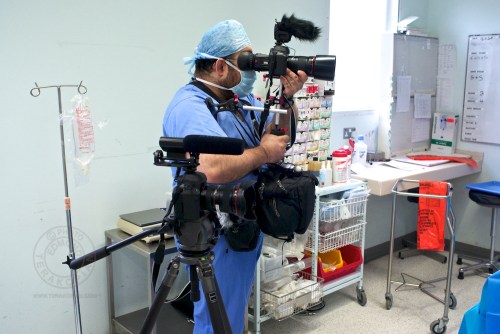
Photographer and film maker Edmond Terakopian filming at the Royal National Orthopaedic Hospital in Stanmore. Filming in an operating theatre with two Canon 5D MkII camera, one on a Gitzo (GT3531LSV + G1380 head) and the other on a Zacuto Striker with the Zacuto Z-Finder Pro attached). Both cameras have Rode microphones attached for ambient sound recording. The VideoMic (closer) and VideoMic Pro. A Think Tank Photo Multimedia Wired Up 10 belt pack is also being used. May 16, 2011. Photo: Neil Patience

We spent a long time planning various aspects of the film, including the patient interviews. With the hospital team, we chose a cross section of their previous patients who had had the full gamut of operations, thus transforming their lives. We covered a wide age range and conditions to paint a full picture.

Photographer and film maker Edmond Terakopian filming at the Royal National Orthopaedic Hospital in Stanmore. Filming in an operating theatre with a Canon 5D MkII camera on a Zacuto Striker with the Zacuto Z-Finder Pro attached and the Rode VideoMic Pro. A Think Tank Photo Multimedia Wired Up 10 belt pack is also being used. May 16, 2011. Photo: Neil Patience

The flip side to these life changing stories though was the conditions in which this amazing staff have to work. Huts that serve as wards dating back to the 1940s, crumbling, leaking building, sloping corridors that require special locomotives to pull beds along. A truly extreme juxtaposition of amazing medical work in such atrocious conditions.

Photographer and film maker Edmond Terakopian filming at the Royal National Orthopaedic Hospital in Stanmore. Filming in a prosthetic limb manufacturing section run by Blachleys. A Canon 5D MkII camera, on the Gitzo (GT3531LSV + G1380 head) tripod, with a Rode VideoMic Pro microphone. Extra equipment needed for the shoot is carried in a Think Tank Photo Multimedia Wired Up 10. May 16, 2011. Photo: Neil Patience

Having an amazing client though is the start of great work and I really must thank the RNOH in helping us be creative, change the brief to make it a more powerful film and for all the logistical help. All the coordination by Rosie Stolarski for the entire project and the patience of her team members Jenny Blyth and Sam Bowie when they accompanied us on site was paramount. A huge word of thanks goes to head of communications Anna Fox who spent the most time with us on site, making sure everything was planned and helping us get the shots we needed. We’d like to thank all the amazing surgeons who invited us into their operating theatres and all the physiotherapists, nurses, prosthetics team and other medical staff for their help. A big thanks also go to the ushers and the security team for all their help.

The biggest words of thanks go to the former patients who let us into their lives and inspired us with their strength and courage. Our thanks go to HRH Princess Eugenie of York, Molly Poole, Carol West, Phil Packer, Phil Coburn, Kat Reid and the amazing Caitlin Kydd.
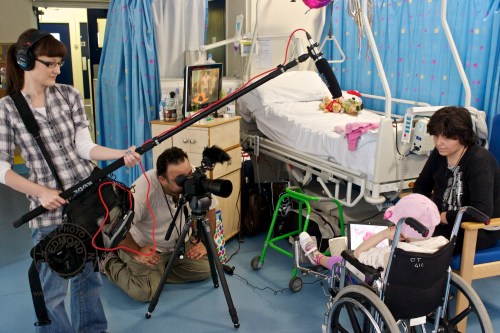
Camera assistant Nicola Taylor recording audio, using a Rode NTG3 on a Rode Mini Boom pole, onto a Zoom H4n audio recorder. This is in a Think Tank Photo Multimedia Wired Up 10. Edmond Terakopian uses a Canon 5D MkII and 135mm f2L and Rode VdeoMic Pro on a Gitzo (GT3531LSV + G1380 head) tripod. RNOH Children’s Ward, Stanmore. July 19, 2011. Photo: Neil Patience

Along with the invaluable help of my assistant Nicola Taylor (an amazingly creative photographer in her own right), Neil and I shot the project over a nine month period.

If you haven’t yet seen the film, you can watch it HERE.

Techniques & Technical

Behind the scenes photographs of the filming of the appeal DVD. Showing film maker Edmond Terakopian & Editor and Producer Neil Patience. An iPad is used for interview questions. RNOH, Stanmore. Photo: Nicola Taylor

I shot the entire video using two Canon 5D MkII cameras, using a range of Canon lenses; 15mm f2.8, 16-35mm f2.8L II, 24-105mm f4L, 35mm f1.4L, 50mm f1.2L and a 135mm f2L. My main tripod was a fluid head Gitzo (GT3531LSV + G1380 head). For the locked off shots with the tighter lens (135mm f2L) I used a carbon fibre photographic Manfrotto tripod. For the handheld shots, I used a Zacuto Striker and Z-Finder Pro eyepiece. Having to cover long distances across the hospital grounds and wards with the kit meant needing to plan not only the right and relevant kit, but the right bags too. We used a Think Tank Photo Airport Internal v2 and also a Multimedia Wired Up 10. On the last interview with Consultant Orthopaedic Surgeon Professor Briggs, I also used a Marshall 5” monitor (V-LCD50-HDMI).

Behind the scenes photographs of the filming of the appeal DVD. Showing film maker Edmond Terakopian, editor and producer Neil Patience, Rosie Stolarski (head of fundraising) and ex-patient Phil Packer. RNOH, Stanmore. Photo: Nicola Taylor
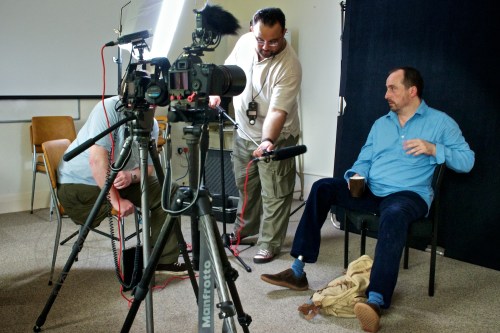
Behind the scenes photographs of the filming of the appeal DVD. Showing film maker Edmond Terakopian and ex-patient Phil Coburn. RNOH, Stanmore. Photo: Nicola Taylor
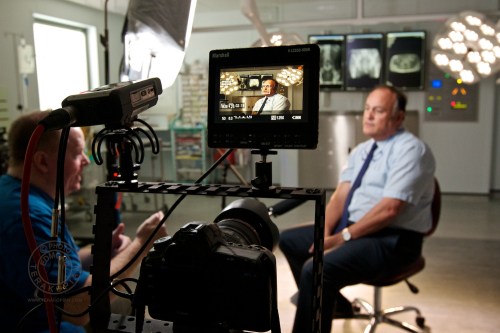
Operating Theatre 4 with Prof Tim Briggs. A Marshall 5″ monitor (V-LCD50-HDMI) is used to check focus, lighting, composition and exposure). The light on the left is a Kino Flo Diva Light supplied by New Day Pictures. September 21, 2011. Photo: Edmond Terakopian

To keep the same feel and uniformity with the ex-patient interview scenes, we decided to shoot them against a black background. One of the problems though was that although some interviews would be done at the hospital, these were at different days and in different rooms. The other interviews would be on location at ex-patients’ homes. We needed a proper light absorbing black, but also a background which was sturdy and stable. On top of these requirements, it also needed to be highly collapsible and portable. After having a chat with our friends at Lastolite, we found just the trick. The Lastolite Plain Black Velvet Collapsible Background (which has a collapsible frame) and the Lastolite background support (1109).
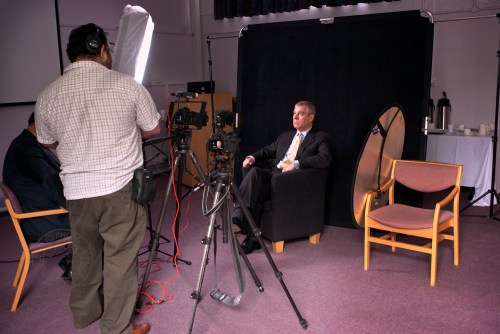
Royal visit to the Royal National Orthopaedic Hospital (RNOH), Stanmore, Middx. HRH Prince Andrew being filmed by Edmond Terakopian. For this shot two Canon 5D MkII cameras were used. One on a Gitzo (GT3531LSV + G1380 head) tripod. The other is on a lightweight Manfrotto carbon fibre tripod. The camera further away (Camera A) is mounted inside a K-Tek Norbert cage (mount frame) and has a Zoom H4n audio recorder mounted on it. This in turn is plugged into a Pinknoise splitter cable, with one end going to camera (to record audio in camera) and the other to headphones. A Rode NTG3 microphone is used for the main audio which is recoded onto the Zoom H4n in WAV format with the passthrough recording in camera. The B camera also has a Rode VideoMic Pro recording audio onto it. The black background and supports are Lastolite and were used in all the interviews. The lighting is by a single Kino Flo Diva Light (supplied by New Day Pictures) and a Lastolite reflector. June 02, 2011. Photo: Nicola Taylor

The other aspect to keeping this consistency was to make sure the lighting was as identical as possible. After consulting with the specialist hire company New Day Pictures, we went for a Kino Flo Diva Light (shot through it’s softbox diffuser). This has been the most amazing light I’ve ever worked with.

Audio

For audio, I used Rode microphones throughout. The cameras where fitted with the Rode VideoMic and VideoMic Pro for all of the cutaway and GV scenes. Although we had originally thought that all their audio would be replaced with the interviews with Professor Briggs, Neil ended up using a fair amount of the audio from them. The main audio, which was for all the interviews, was done using a Rode NTG3, recoding onto both camera A (using a Pinknoise splitter cable) and onto the Zoom H4n (in WAV format). We mounted the mic on a mic stand and had it just outside shot.

The Royal Connection

Royal visit to the Royal National Orthopaedic Hospital (RNOH), Stanmore, Middx. HRH Prince Andrew being filmed by Edmond Terakopian. For this shot two Canon 5D MkII cameras were used. One on a Gitzo (GT3531LSV + G1380 head) tripod. The other is on a lightweight Manfrotto carbon fibre tripod. The camera further away (Camera A) is mounted inside a K-Tek Norbert cage (mount frame) and has a Zoom H4n audio recorder mounted on it. This in turn is plugged into a Pinknoise splitter cable, with one end going to camera (to record audio in camera) and the other to headphones. A Rode NTG3 microphone is used for the main audio which is recoded onto the Zoom H4n in WAV format with the passthrough recording in camera. The B camera also has a Rode VideoMic Pro recording audio onto it. The black background and supports are Lastolite and were used in all the interviews. The lighting is by a single Kino Flo Diva Light (supplied by New Day Pictures) and a Lastolite reflector. June 02, 2011. Photo: Nicola Taylor

The first of our interviews was with HRH Prince Andrew, who not only only was the patron of the hospital, but is also the father of a former patient; Princess Eugenie. We also did an interview with the Princess and both pieces added so much to the film. These weren’t only essential, but were also an absolute joy to shoot.

Royal visit to the Royal National Orthopaedic Hospital (RNOH), Stanmore, Middx. HRH Princess Eugenie being filmed by Edmond Terakopian. For this shot two Canon 5D MkII cameras were used. One on a Gitzo (GT3531LSV + G1380 head) tripod. The other is on a lightweight Manfrotto carbon fibre tripod. The camera to the left (Camera A) is mounted inside a K-Tek Norbert cage (mount frame) and has a Zoom H4n audio recorder mounted on it. This in turn is plugged into a Pinknoise splitter cable, with one end going to camera (to record audio in camera) and the other to headphones. A Rode NTG3 microphone is used for the main audio which is recoded onto the Zoom H4n in WAV format with the passthrough recording in camera. The B camera also has a Rode VideoMic Pro recording audio onto it. The black background and supports are Lastolite and were used in all the interviews. The lighting is by a single Kino Flo Diva Light (supplied by New Day Pictures) and a Lastolite reflector. June 02, 2011. Photo: Nicola Taylor

Editing Workflow

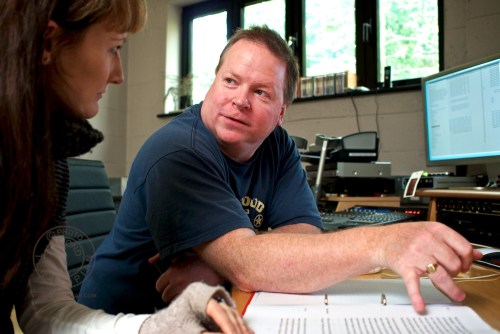
Editing the fund raising video for RNOH at New Day Pictures’ Final Cut Pro editing suite in Surrey. Assistant Nicola Taylor and video editor Neil Patience at work, discussing the interview transcripts. November 08, 2011. Photo: Edmond Terakopian

After every day’s shoot, we would make copies of all the CF cards (video) and SD card (audio) onto both Neil and my MacBook Pros. Once back at our respective offices, we would both also make backups onto our Mac Pros and RAID systems. On top of this, I also made multiple off-site backups. With a project that has so much data and is shot over such a long period of time, it’s not worth risking losing something before delivering the final cut to the client. With this workflow we had multiple copies (RAID 1 and RAID 5) across three geographical locations.

Editing the fund raising video for RNOH at New Day Pictures’ editing Final Cut Pro suite in Surrey. L-R: Cameraman Edmond Terakopian, assistant Nicola Taylor and video editor Neil Patience at work. November 08, 2011. Photo: Edmond Terakopian

Once Neil had put together a long assembly, Nicola and I met with Neil at the New Day Pictures’ editing suite. Although able to edit video myself, I never thought of myself as anything but having rudimentary skills. Watching Neil at work was an amazing education. The philosophy behind editing is the most crucial thing; watching him operate the keyboard, mouse and various break out boxes full on knobs and sliders like a concert pianist was amazing, but understanding the reason behind constructing edits was just mind blowing. The three days that I spent with Neil were invaluable. The film naturally did take much longer than that to do though. If you’ve never worked with a professional editor, I highly recommend it; in fact, it’s essential.

To find out more about the editing, have a read of Neil’s post, Making The RNOH Appeal Film.

The Premiere

Our first screening was for the RNOH fundraising team. The silence and sniffles, combined with the teary eyes confirmed for us that we had succeeded in making a powerful and emotive documentary. It’s always difficult to fully judge a project until you’ve shown it to someone outside of the team. Close colleagues who had seen it had all been positive, but it was only when our clients at RNOH approved, that we were completely happy.

The premiere of the film was at the launch of the RNOH Funding Appeal at St James’s Palace, at an event hosted by HRH Prince Andrew and Princess Eugenie. Along with the screening was also a photographic exhibition of my work documenting the hospital. I must admit to being quite nervous when the film was shown; it’s again the fear of not knowing how it will be received. The huge room (bigger than a typical hall) fell quite and stayed quite for the entire length of the film, the silence only being broken by the occasional sniffle. As the film approached it’s end, the sniffles grew not only more frequent, but louder. A gentleman in front of me, who is the father of the amazing Caitlin who is featured in the film was in fact crying fully. It’s hard not to be moved and humbled when witnessing such an amazing reaction to one’s work. After the film finished, there was silence; a silence which carried on for a good five seconds and then the room burst into applause. Later, Neil and I shook hands.

Proud. This is one word which kept coming up between the TAPTV team; we were all proud of what we achieved with this project. When I look back at my career which started in 1989, although I give my all to everything I do, certain assignments stand out and I feel proud; this is certainly one of them.

My hope is that we have helped this amazing hospital to raise some of the money they need; they do amazing work there. I hope that you will help by making a donation HERE.
RNOH Appeal Film Launch

Film Premiere & Exhibition

What an amazing evening. We had the launch of our RNOH appeal film; a project we have been working on since our first meeting in April 2011. The film was premiered at a special event at St James’s Palace by HRH Prince Andrew and HRH Princess Eugenie. I shall be posting a in-depth article on the project with some behind the scenes photographs and technical briefing on techniques and equipment used. Firstly tough, it is my pleasure to show you our film:

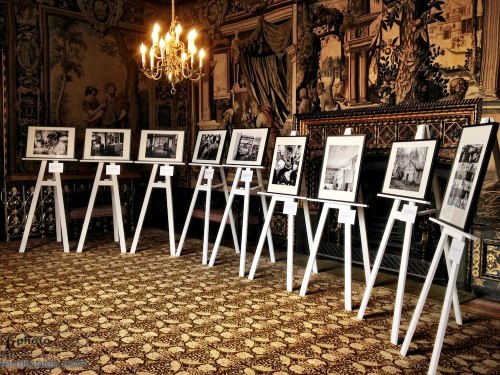
Alongside the film was also a photographic exhibition of images I had taken around the hospital, documenting the amazing work that goes on there, despite the conditions of the fabric of the hospital.

The RNOH launch their funding appeal at St James’s Palace in London. Photographer Edmond Terakopian’s exhibition of photographs documenting the state of the hospital. April 26, 2012. Photo: Edmond Terakopian

The RNOH launch their funding appeal at St James’s Palace in London. Photographer Edmond Terakopian with his exhibition of photographs documenting the state of the hospital. April 26, 2012. Photo: Theodore Wood / http://www.theodorewood.com

Here are some images of the exhibition of prints, and some photographs by Theodore Wood from the event, showing Princess Eugenie viewing the exhibition and being presented a print on her departure from the event.

The RNOH launch their funding appeal at St James’s Palace in London. Photographer Edmond Terakopian shows HRH Princess Eugenie a series of photographs documenting the state of the hospital. April 26, 2012. Photo: Theodore Wood / http://www.theodorewood.com

The RNOH launch their funding appeal at St James’s Palace in London. Photographer Edmond Terakopian and Rosie Stolarski (head of fundraising), present HRH Princess Eugenie with a portrait of herself (taken by Edmond Terakopian). April 26, 2012. Photo: Theodore Wood / http://www.theodorewood.com

To make donations to this extremely worthwhile project to rebuild one of the world’s top three orthopaedic hospitals, please visit the RNOH Charity website. Thank you.

HRH Princess Eugenie of York who had spinal surgery at the RNOH. RNOH Fundraising Film stills grabs from the film. June 02, 2011. Photo: Edmond Terakopian

HRH Princess Eugenie of York is also helping raise funds for the hospital by taking part in 100km bike ride; please pop by her page and make a donation if you can.

Making The RNOH Appeal Film

Neil Patience, Editor & Producer on the film, shares his thoughts about the project and also talks of his philosophy behind the editing as well as his workflow.

My own journey with the RNOH began in June 2004 when I was diagnosed with chondrosarcoma, a rare bone cancer. If it was not for Professor Tim Briggs and his staff I would not be here today. I literally owe them my life.

During one of my regular check ups in early 2011, Professor Briggs asked me if I would be willing to make an appeal film for the then upcoming RNOH redevelopment appeal. Of course I agreed without hesitation.

Behind the scenes photograph of the filming of the appeal film. Photographer Edmond Terakopian, Rosie Stolarski (head of fundraising), Editor Neil Patience and ex-patient Phil Packer. RNOH, Stanmore. Photo: Nicola Taylor

I had been an admirer of Edmond Terakopian’s work for some time and we had already briefly worked on a couple of minor projects and camera tests with the Red One together.

I knew his skill with a 5DMKII and journalistic instincts would be perfect for a project.

From our first meeting with the RNOH it was clear that the brief was a little complex as the film was to serve several purposes.

It needed to illustrate the ground breaking world class work that is carried out at RNOH but at the same time reflect the run down infrastructure of the hospital (the reason behind the fundraising appeal).

Patients and their families invariably spoke very highly of the staff at all levels and unsurprisingly had nothing but praise for the often life changing or indeed life saving treatment. Their feelings about the surroundings where that treatment was delivered was another story. So it was somewhat of a paradox that had to be addressed in making the film.

Edmond and I along with Professor Briggs and Rosie Stolarski, head of the hospital charity, decided to make the film in a documentary style to be able to intertwine patients stories, the work the hospital does. the new building projects and the reasons behind the appeal.

With the help of the hospital we selected seven patients who’s conditions, ages and treatments reflected the range of RNOH’s work. They, like me, all agreed to take part without any persuasion.

Tim Briggs was going to be the backbone of the film, his interview was key to providing the  information about the hospital, the appeal, and the aims of the redevelopment.

The patients would tell their own stories, and the GV’s around the hospital grounds and wards spoke for themselves.

So essentially we went into the edit with broadly 3 elements, Tim’s Interview, the patient interviews and the shots of the hospital both interiors and exterior.

We have both Avid and FCP editing options but I decided to edit the film using Final Cut Pro as I wanted the option to use Apple Color to grade and that gives me the easiest workflow.

I used the basic FCP Log and Transfer tool to transcode all the rushes to ProRes HQ (and made a back-up of all the media.)

Editing the fund raising video for RNOH at New Day Pictures' Final Cut Pro editing suite in Surrey. Assistant Nicola Taylor and video editor Neil Patience at work, discussing the interview transcripts. November 08, 2011. Photo: Edmond Terakopian

Initially I had to sync up all the audio recorded on the Zoom H4n with the 2 Canon 5D MKII cameras. I was going to use PluralEyes for this but quickly realised that the audio recordings for each interview were continuous and the cameras only stopped recording two or three times during each interview (due to limitations set in video length on DSLRs).

So it was very easy and quick to lay the pictures against the Zoom sound manually, matching the waveforms, and creating a multicam sequence for each interview.

Once all were assembled we had them transcribed (by UK Transcription in Brighton) which made editing them much easier.

First I made several long assembles of all the sync interviews that we wanted to include from Tim Briggs and each patient, editing and re-editing to get the most powerful comments as they each told their stories and spoke of their experiences at RNOH. Having two cameras meant that it was much easier to cut down without worrying about finding cutaways or having to re-order shots to get cuts. It gave me a lot of flexibility.

Once I had a long assembly I was happy with Edmond and photographer Nicola Taylor, who had been our assistant though-out, to join me in the edit suite.

We spent 2 more days cutting and recutting, slowly getting the duration down, selecting cutaways and GV’s. We revisited the transcriptions many times adding and replacing shots, interview segments and selecting music until we had our film.

I had intended to grade the whole film using Color but the rushes looked fabulous and needed less work than I had imagined at the outset. Instead I decided to use a combination of Color on some shots that required several secondary corrections and mask layers to get sky and foreground nicely graded and Gen Arts Sapphire plug-ins on other shots, namely the interviews and to provide some subtle vignettes here and there.

Sapphire Film Effect provided a lovely gamma curve while adding a very subtle softness to the shots. It also allows for some colour balancing and the trusty FCP 3 way colour corrector also played a part here and there.

The audio mix was quite straight forward as it was essentially sync sound, atmos and music. I mixed the audio directly in FCP. The suite at New Day Pictures has broadcast monitoring for both audio and video (Leader rasterizer and PPM’s) so everything was completed to UK HD broadcast spec.

We made Bluray DVD’s using Adobe Encore and standard def DVD’s using DVD Studio Pro. Transcodes were completed using a combination of Compressor, MPEG Streamclip and Telestream Episode.

By Neil Patience

Stay tuned as we launch the film on the TAPTV website and more behind the scenes posts, right here.

Canon C300 V 5D MkII

Comparing Footage From the C300 & 5D MkII

A short clip showing a quick comparison between a Canon C300 and Canon 5D MkII. The cameras were set up as identically as possible, using the same settings. Please note that this was shot during an open day event, so not ideal conditions as the settings were constantly being changed on both cameras by attendees to the event! Lastly, there’s a clip from the C300 which is ungraded. Many have asked to see footage which hasn’t been touched, so all of these clips are straight from camera.

Featuring model Vicki Blatchley  Shot at New Day Pictures

Thoughts

Putting aside for a moment that the Canon C300 is actually a proper video camera with all the video functions, flip screen and audio abilities, not to mention the form factor, that one needs for professional video (all of which are lacking on the 5D MkII) and looking at purely the image quality, at first glance, there appears to be little difference between the two.

It’s only when we brought the image into the full editing suite that the huge dynamic range and masses of detail in the extreme highlight and shadow areas started to show the C300 as vastly superior. Even on the non flat settings, the file was just lush with detail. Although I love the 5D MkII, the C300 is just on a completely different level.

The 5D MkII does have an edge in two ways; it has that gorgeous full frame sensor as opposed to the Super 35mm of the C300 (crop factor of x1.6) and is many, many times cheaper, even when taking into account finders / EVFs, rigs and external audio that’s needed to make it usable.

The C300 does have it all though. I for one am extremely impressed by this camera; it really is rather good.

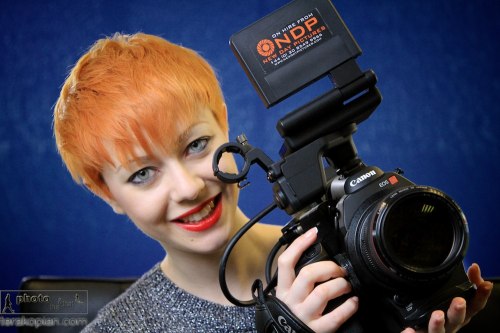
Model Vicki Blatchley at the Canon C300 Open Day and New Day Pictures, Surrey. January 26, 2012. Photo ©

Photographer and film maker Edmond Terakopian at the Canon C300 Open Day at New Day Pictures, Kingston Upon Thames, Surrey. January 26, 2012. Photo ©Model Vicki Blatchley at the Canon C300 Open Day and New Day Pictures, Surrey. January 26, 2012. Photo ©

You can see my longer, graded, demo reel from the Canon C300 below:

DSLR Video Viewing Accessories

Marshall V-LCD50-HDMI,

Zacuto Z-Finder EVF Pro

& Cineroid EVF4L

For all the advantages associated with shooting HD video on DSLR cameras, ergonomics isn’t one of them. While they provide visually rich and cinematic video, DSLRs just don’t have the right form factor for video, especially if you need to “run and gun”. The development of dedicated rigs by the likes of Zacuto and Redrock Micro has made up for some of this, but while they make it easier to use a DSLR without a tripod, they have never been perfect. The main reason is that the rear LCD of the camera is used for viewing, so it has to be placed in front of the user’s eye, ruining the balance and bringing the weight off the right shoulder to the centre, which in turn makes the whole setup a little unsteady for longer takes.

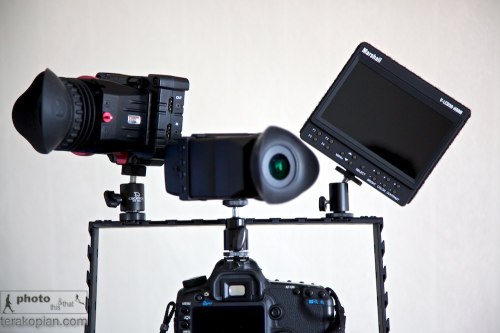
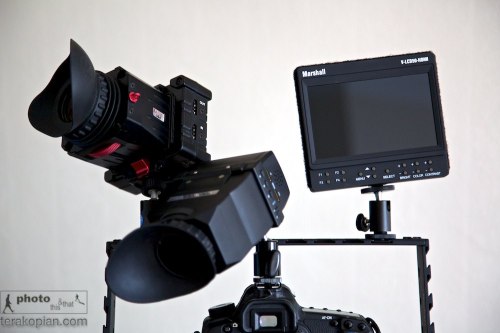
L-R: Zacuto Z-Finder EVF Pro, Cineroid EVF and the Marshall V-LCD50-HDMI, all mounted on a cage and a Canon 5D MkII. Photo: Edmond Terakopian

Electronic viewfinders (EVFs) have been developed to compensate for this problem. A small LCD screen with a magnifier loupe that plugs into the HDMI port on a camera, they prove pretty versatile when coupled with a magic arm that can be placed anywhere. This allows the camera to be kept to the right where the rig and load bearing right arm are, and only mount the relatively lightweight EVF in front of the user’s eye.

Having tried this setup with the Zacuto Striker, I am now of the conclusion that you need a bigger rig when you’re shooting with an EVF, using a weighted shoulder section to hold the camera and viewfinder more comfortably. Using a lightweight rig with something like a Z-Finder Pro and standard or wide-angle lens worked, as the finder was part of the camera body and it formed a point of contact allowing for steadier shots. But an EVF is mounted away from the camera so does not add to stability in the same way. However, it does provide for much more intuitive handling, not to mention its uses for low-level work, where the finder can be mounted at a more comfortable height.

Side By Side

For this review I tested two popular EVFs; one from Cineroid, and the other from Zacuto. Physically, the two units are of similar dimensions (with the Cineroid being slightly longer and the Zacuto a little fatter), and both have HDMI passthrough (mini HDMI only on the Cineroid), which can handle additional viewing accessories, such as a Marshall monitor (reviewed below) to be plugged in for a focus puller or a director to use.

Both also have hinged magnifiers that allow them to be flipped out of the way for longer working distances and for use as a mini monitor. And each has a peaking feature that overlays sharp edges and is a superb focusing aid (with red lines an option on the Cineroid), along with zebra settings and a false colour mode, which are both used to judge exposure. The pixel-to-pixel feature on each is especially handy for EOS 7D and 1D Mk IV users as it allows for precise focus check during recording, while on a 5D Mk II it can be used for precise pre-focusing. Lastly, a monochrome feature helps with focusing and judging exposure, and anyone from a broadcast video camera background will welcome this. In addition, both units allow a number of their buttons to be programmed to use common functions needed by the user.

The Cineroid EVF has a built-in speaker and headphone jack, used only for playback, as DSLRs cannot be monitored during recording. For power, the unit comes with an NP-F compatible battery, but can also use official Sony NP-F batteries of differing sizes, and with the PA01 adapter, can be mains powered, or make use of the Canon LP-E6, the same battery found in the EOS 5D Mk II and 7D. It also has a very neat battery cover for smaller batteries.

The Zacuto is available in four identical EVF models with differing magnifier options. The Snap and Flip models come without the magnifier, being ideal for anyone who already has a Z-Finder, while the Z-Finder EVF and Z-Finder EVF Pro come with the Z-Finders included. The Snap model allows the magnifier to be snapped on and off whilst the Flip allows the Z-Finer to be flipped up or down. With the magnifier out the way, the EVF acts a small screen.

For power, it uses Canon’s LP-E6 batteries, which sits securely, but I wish it had a cover to help keep out the elements.

L-R: Zacuto Z-Finder EVF Pro, Cineroid EVF and the Marshall V-LCD50-HDMI, all mounted on a cage and a Canon 5D MkII. Photo: Edmond Terakopian

Both these units work well, improving the filmmaking experience on a HDSLR, but there is one clear EVF winner. The Zacuto has a much sharper display with vibrant colours – it makes the picture jump out. Part of this is down to the superb Z-Finder magnifier, which allows quicker focusing and is more comfortable on the eyes. It’s also better built with superior accessories.

The Alternative

Another option is to use an external field monitor. Traditionally these come in seven-inch screen formats, but Marshall, the leader in this field, recently launched a five-inch version that is better suited to HDSLR filmmakers.

The V-LCD50-HDMI is small and light enough to be used like an EVF, and can be easily mounted onto a rig (a larger shoulder rig that is weighted would provide the best comfort and balance). The unit comes with a hood so it can even be used outdoors in bright light, although probably not as effectively as an EVF with an eyecup magnifier, but can be used with more accuracy from a distance.

Its feature set is rather impressive; a backlit LED screen delivers up a sharp and vivid picture, and it has a peaking feature that allows for precise and fast focusing by firstly turning the image monochrome and then drawing on red lines where the image is in focus. It’s a little odd to use at first, but proves to be a great tool once you get used to the system. The monitor also has the false colours feature for setting correct exposure that turns the image into a range of different colours; with pink and green showing correct exposure, various tones of red, over-exposure, and blues, under-exposure. The unit also has various colour temperature settings as well as markers.

The only connector is HDMI, so it is aimed firmly at the HDSLR market. For power, it uses four AA batteries, coming with a set of rechargeable AAs and charger. The Marshall is rather power hungry, so thankfully there is also a mains adapter for when shooting indoors. Along with a hood, the kit also comes with an HDMI cable and a ball head hotshoe mounting foot.

I used the unit while making a fundraising film for the Royal national Orthopaedic Hospital in Stanmore. We had an interview scene inside an operating theatre with a surgeon, and it allowed for a very quick set up, helping precisely set up lights and props within the frame. A huge bonus this screen has over an EVF is that a director or client can also see what is being filmed, which in certain circumstances is an absolute must.

But it has one major flaw – it’s power switch. Unlike other Marshall monitors, the five-inch version uses a rear-mounted rocker switch that can very easily be switched on by accident (when being stored, it’s essential to remove it’s batteries). I also feel that Marshall has missed a trick by not powering the unit using the Canon LP-E6 battery designed for the EOS 5D Mk II (SEE BELOW).

Despite these shortcomings, the Marshall V-LCD50-HDMI would still be my choice over an EVF.

Addendum

I have just been contacted by Marshall with some rather good news; they have recently (after this article was written) launched a set of battery adapters (Click the Optional Battery Adapters tab). This makes the 5″ Marshall V-LCD50-HDMI much more usable and leads me to recommend it even more highly.

An optional battery plate. Photo: ©Marshall USA

Rode VideoMic Pro Review

The Perfect DSLR Microphone?

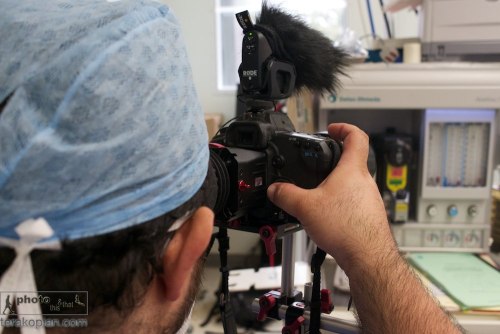
Photographer and film maker Edmond Terakopian filming at the Royal National Orthopaedic Hospital in Stanmore, using a Canon 5D MkII on a Zacuto Striker with the new Rode VideoMic Pro (with a windshield fitted). In the foreground is the original Rode VideoMic. Filming in an operating theatre. May 16, 2011. Photo: Neil patience

When I reviewed Canon’s 5D MkII in 2009, I concluded that the easiest way to get good audio on the camera was to use Rode’s VideoMic. I’ve been personally using this microphone since and have been getting pretty good results. However in situations where I need to travel compact or when shooting in news type situations, I did wish the VideoMic was smaller.

Rode seems to have been listening and recently launched the much smaller VideoMic Pro. It’s 10cm shorter in length than the VideoMic, 2.2cm lower in height but 0.7cm wider. It’s also lighter with the new model being 85g compared to the VideoMic’s 176g. It is just the right size now and when mounted, it doesn’t stick out the back.

Price wise, the VideoMic Pro is more expensive. Studiospares have the VideoMic Pro at £124.17 exc VAT compared to the older VideoMic at £65.83 exc VAT.

In Use

I did a set of extensive listening tests comparing the VideoMic and VideoMic Pro, using a Canon 5D MkII with it’s audio gain set on automatic. The subject was in an enclosed area and recorded from a distance of 2 meters as well as one meter. I listened to the results playing back the video on a MacPro using Aperture 3. Initially I used a pair of speakers and then headphones. No matter how hard I tried to find differences between the two, I couldn’t. The larger VideoMic was already a superb microphone, and the VideoMic Pro, although much smaller, was as directional in it’s sound gathering and just as clear in picking up all the detail in the voice. If anything, the VideoMic Pro seemed to make a little less background hiss in the quite times, as the camera turned up the gain automatically.

As a result, it later came as no surprise when comparing the specifications of the two microphones to see that Rode have somehow managed to make them identical, even though the VideoMic Pro is so much smaller.

Photographer and film maker Edmond Terakopian filming at the Royal National Orthopaedic Hospital in Stanmore, with the Rode VideoMic Pro. Filming in an operating theatre. May 16, 2011. Photo: Neil patience

In listening tests, although I didn’t do a side by side comparison with it’s closest rival, the more expensive Sennheiser MKE 400 (£136.00 exc VAT), although I had previously tested the Rode VideoMic and in comparative listening tests, the Rode was the clear winner.

The new microphone is a completely different design, with a completely new suspension rig, which ensures camera noise doesn’t vibrate up to and get recoded by the microphone. I’m extremely glad to see that the on switch and all the filter controls are still at the back of the camera, where they are easily seen. There’s nothing worse that making a video recording and not switching on the microphone; with the Rode, an LED clearly shows when it’s on. The Sennheiser has these controls on it’s side where they are easily missed.

The smaller size naturally has it’s conveniences; it’s much harder to snag the microphone and naturally it takes up less room when packed. The shorter size also means that it’s now much easier to use ultra wide angle lenses.

Conclusions

If absolute quality is needed in audio, then currently with the video DSLRs on offer, one’s only answer is to record the audio separately and then sync it up afterwards when editing. I personally use a Zoom H4n audio recorder and Rode’s excellent NTG-3 microphone. However, this is extra equipment and expense, and demands a lot of extra time and expertise when editing. Even when doing dual audio, I still use the VideoMic Pro on a second body when shooting dual cameras (which I often do); this allows for a sound backup but also for a much cleaner audio track to synchronise externally recorded audio with. For the simpler and straight to camera audio recording, Rode’s VideoMic Pro has kept the superb sound of it’s older brother and packed it into a much smaller package. I highly recommend this to anyone wanting to use their DSLRs for video.