Final Cut Pro X Review

Is FCP X right for the DSLR filmmaker?

Reviewed July 2011, FCP X version 10.0.0 

Depending who you speak to, the world is either about to end or something wonderful happened when Apple launched it’s professional video editing program (June 2011), Final Cut X. Not so much of an upgrade but a completely new 64-bit program. I’ve never seen so much hysteria about a computer program; some it purely misinformed, others from individuals blindly following what the pro editors are saying and some from very justified sources.
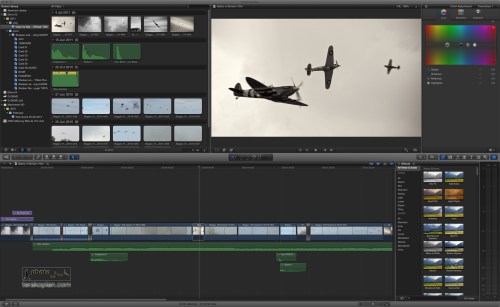
FCP X, showing the Event Library, Clips, Viewer, Inspector (Colour Adjustment), Timeline, Effects Browser and Audio Meters.

The professional editors who rely on Final Cut Pro to make a living do have a point and FCP X is not ready to meet all of their needs. To get an understanding of the issues faced, I contacted Editor and Colourist Neil Patience. “Its fair to say that FCPX received a very negative reaction from many sections of the editing community. The ones who seemed to be shouting “foul” the loudest were those working in TV facilities houses and broadcast environments. As someone who has been working in broadcast television for about 20 years I can understand why they were unhappy”.

“Making television programmes is rarely a solitary endeavour. Collaboration is a key part of the process. TV facilities need to be able to move media along the stages of post production process as efficiently and seamlessly as possible. Shoot, ingest, rough cut, fine cut, finishing, visual FX colour grading and audio dubbing and layback is a common path for many TV shows. Different people bring different skill sets along the way, kit wise, Avid, Apple, DaVinci, Baselight, ProTools and Fairlight are just a few that are used. Getting all those to integrate uses a combination of EDL, XML and OMF files depending on what is going where. The ability to open archive projects is also critical and with no support for opening FCP7 projects, FCPX is again left wanting.”.

“Tape is not dead in our world, we wish it was, but the archive of tape is huge. Apple’s tapeless utopia is no where near a reality. Fifty odd years of worldwide tape based acquisition and mastering adds up, not to mention all the film that was transferred to tape.

Final Cut X, in its current incarnation, literally allows none of the above to happen.

All the tools we need daily to collaborate with our colleagues are missing and the hardware to allow critical external monitoring and measuring to ensure technical compliance is not supported”.

“But it is not all doom and gloom. Not everyone has to meet broadcast delivery requirements or needs elaborate collaborate workflows. The first things that struck me about FCPX is that it feels quick and the timeline feels smooth. The 64 bit architecture is certainly a performance boost. DSLR film makers, for example, can take advantage of this speed and the easy file based importing, everything is geared towards the single user operator. Effects and “looks” can be quickly and easily auditioned and FCPX guides the less technically skilled editors along the way, automatically creating tracks as needed, avoiding clip collisions and keeping things in sync. Background render is a big advantage too. If your main skill is shooting, these features will initially make your life easier as you develop your editing skills”.
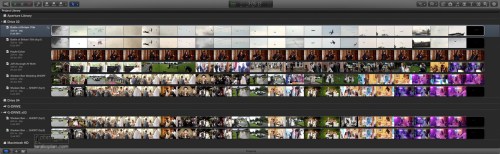
Projects Library in FCP X.

I think it’s important to understand all the issues and negativity from parts of the editing community as it will help make an informed decision on FCP X. I would imagine that the majority of the readership of the BJP will be from a background of photography and of creating photographs and video and like me, working on projects on their own or within a small team. For me, the Canon 5D MkII opened up a whole new world of creativity in film making; one that I thoroughly enjoy. Whilst I enjoy the editing process, it’s not my favourite thing. In fact the first time I ever opened up FCP 6, I had to shut it down and only returned to it days later after mustering up enough courage. FCP X is different; the interface is radically different and no longer looks or feels like an ageing OS 9 program. It’s 64 bit which means it can access all of your system’s RAM. It’s also designed to utilise all CPU cores and also use the GPU. I’ve found it to be super fast and stable. It’s also a bargain compared to the £850 or so FCP 7 Studio cost; FCP X is £179.99 and the two other modules, Motion and Compressor, are both £29.99 each and are all available from the App Store.

Armed with Larry Jordan’s brilliant FCP X Complete Training course (which I thoroughly recommend), I downloaded FCP X and began my exploration. Not having much of an iMovie background, it did initially take me a short while to grasp FCP X but it’s so intuitive that I took to it very easily and quickly. This review addresses whether FCP X is right for the DSLR filmmaker. As always, I decided to do real world tests and spent several days editing a project involving video, photographs, music and recorded audio. For another test, I edited from scratch using native Canon 5D MkII files a piece on the 70th Anniversary of the Battle of Britain; the entire process took around four hours:


What’s New?

One of the biggest things is the new magnetic timeline. FCP X has done away with tracks and it’s just a canvas that let’s you drag your video, audio and photographs onto and they just snap on and into place. It lets you move and insert clips and automatically moves the other clips around for you without the need for modifier keys like previously. You can easily connect clips together (such as effects, titles and so on) so when they are moved around, they always stay together and in sync. Compounding clips takes this a step further allowing various elements to be consolidated into a single clip and as such, edited as one clip. All of these make entire process easier, quicker and much less prone to user error. As a bonus, it also takes up much less space which means working on a smaller screen is so much easier. On the subject of photographs, the previous version’s 4000 pixel limit no longer applies; larger photographs can be imported and used.

The Inline Precision Editor lets you do very intricate and accurate trimming straight on the timeline. With Auditions, you can take a segment and try various clip edits, grading and so on until you have got it spot on.

Importing files has also radically improved, especially for the DSLR video user; the import dialogue lets you not only import, but have your video transcoded to Pro Res 422 and have both the video and audio analysed. All of this happens in the background, so even when these processes are occurring, you can still begin your rough cuts, saving a huge amount of time. A misconception is that FCP X won’t work with tape at all; if you have a firewire controlled video camera which is supported (check with manufacturer for a driver), you can import from tape. Importing from professional broadcast decks or exporting to tape is not supported though. A point to note is that you can always use FCP 7 to log and capture your tape, export this as a Quicktime file (say Pro Res 422) and then import that into FCP X for editing.

The transcoding is optional but recommended. If you’re on deadline and editing a small piece, you can just import your DSLR movie files and edit them natively. For best results though, transcoding is always best; with this happening in the background, it’s no longer such a time waster. Another feature is that all rendering is also done in the background, making the entire editing process fluid as you no longer have to keep stopping to wait for rendering to finish.

Another massive improvement is media organisation; the Event Library is where imported clips are saved; you can choose to have Event Libraries on various connected hard drives. The browser lets you easily look through clips and the skimming feature lets you very quickly skim through a clip to find the segment you are looking for. The ‘I’ and ‘O’ let you easily add In and Out points or you can just use the mouse to click drag a selection straight onto the clip. Once you’ve created your Project, it’s then a simple question of adding (by dragging, keyboard shortcuts or clicking on the relevant button on screen) these clips to the Timeline to begin your rough cut. The whole system, of Events and Projects makes it very easy to share or backup your work through the Duplicate function (which can included source and render files too). This new structure has made organising and backing up extremely simple and manageable. Tagging of clips with ‘favourite’ or ‘reject’ tabs in the browser helps speedily locate useful clips and hiding the ‘rejects’ makes for a tidier workspace. Keywords and smart collections help organise your archive as it grows.

There’s also an abundance of control over audio editing, effects, titles and colour corrections and grading with helpful export presets for commonly used sites for the solo filmmaker like Vimeo as well as export to DVD and even BluRay.

All’s Not Perfect

For me, perhaps the biggest disappointment is that previous FCP projects are not compatible, which means that I must keep FCP 7 installed. I do wish that either Apple or a third party comes up with a translator but it doesn’t seem likely as FCP X has an entirely new project architecture and trackless timeline. I’m also puzzled to why Soundtrack Pro was dropped, although there are more audio facilities built in to FCP X. Although not a user of it myself, I think dropping Colour may have been a mistake.

As far as plugins (such as Magic Bullet), camera and video card support and so on, it’s only a matter of time until 64bit compatible plugins and drivers are released. Most of the big name plugin manufacturers have already openly said they are working on upgrades.

Conclusions

I spent a while discussing FCP X with a photographer colleague on Twitter. He was enraged, quoting video editors as to how bad this release is and he can’t trust Apple and is switching to Adobe Premiere and so on. Funny thing was, two days later, this DSLR using colleague actually tried FCP X and had nothing but praise.

With FCP X, Apple has done what Apple does best; it’s looked into the future (remember the outrage when it dropped the floppy drive?). FCP X seems to be designed for the coming decade and not for what went before it. It has revolutionised the ageing look, feel and workflow of FCP 7 and really brought it in line with OS X; it’s intuitive, elegant, solid and stable. With multi-cam and XML support on the way from Apple, with OMF, AMF and EDL support on the way from third parties, I feel that even the video editing community with all their specific needs will begin using FCP X in 8-12 months.

If you rely heavily on plugins or use specific hardware, my advice is wait a month or two until the upgrades for FCP X arrive. It can co-exist with FCP 7 anyway, so you can carry on using it and begin learning FCP X. One thing is for sure though, FCP X is definitely the future and for the indy filmmaker and DSLR shooter, FCP X is absolutely ideal. Having used it for all of the past week, I dread ever having to open FCP 7 again. I rather like it!

Reviewed, July 2011

Don McCullin On Documentary Photography

An absolutely brilliant interview with Don McCullin on social documentary photography, where he talks of his work in the East End of London during the 1970s.

The Canon C300 Review

Hands On With The Canon C300


I recently had the pleasure of shooting some video on the new Canon C300 during the C300 event at New Day Pictures. The aim being to show off the camera’s abilities to the guests by supplying footage for editor and colourist Neil Patience to showcase during the day. Our model for the day was the extremely talented and wonderful Vicki Blatchley.

For this video I used the C300 PL, which as it’s name suggests, has the PL mount. During the shoot I used the RED 50mm and 85mm PL lenses. Lighting was by two LED panels with the main light coming from a Kino Flo Diva-Lite. I also had the pleasure of trying out a Miller tripod for the first time and must say, I was rather impressed. All equipment was supplied by New Day Pictures (whom I highly recommend for any video, lighting and accessory rentals).

An ungraded, straight from the C300 stills capture, using Quicktime. The colourspace on the camera was set to EOS for this clip. Image: Edmond Terakopian

Firstly, I need to clarify that the C300 was a pre-production model; having said this, it performed flawlessly. Having never seen, let alone used this camera, after a few minutes of training by Canon’s staff at the event I was ready to shoot. It’s an amazingly simple camera to get to grips with with a clear menu system and extremely clearly market keys dotted around the camera; I found it ergonomically brilliant. A very comfortable camera to hold and use. I was also surprised that it was lighter than I anticipated. For any prolonged handheld use though, I would probably suggest a shoulder rig. All the shots in their short film where done on the Miller tripod. My only disappointment was the microphone holder needed a spacer and so I couldn’t use my trusty Rode NTG3 to test out the camera’s audio abilities.

Vick Blatchley with the EF mount version of the Canon C300. This image is a screengrab from a Canon C300 video file. Photo: Edmond Terakopian

After the first shoot, I was impressed by the camera but was extremely keen to see what the footage looked like on the editing station. Once the files were transcoded from MXF files to Pro Res 422 (using the free Canon XF FCP plugin) we looked at them in FCP 7. Straight out the camera the files were amazingly lush. Full of detail, vivid with accurate colours and pin sharp. The most astonishing aspect was the dynamic range; the camera has it’s widest range at 850 ISO. Not only was this apparent in all the extreme highlight and shadow detail, but equally apparent was just how clean the files looked. This camera is the available light shooters’ dream. Along with it’s built in optical ND filters, shooting to achieve maximum dynamic range in outdoor situations is going to be a walk in the park. In use, the fold out LCD monitor was an absolute joy to use. For handheld use, the built in viewfinder makes things more comfortable, taking on the form factor of a DSLR and providing another point of contact to steady the shot.

Using the Canon C300 at the NDP open day event. Photo ©

For my edit here, I used FCP 7 and the Canon XF plugin to transcode the files and imported them into FCP X for my edit. Initial grading was done in FCP X and finished off using Magic Bullet Mojo. This workflow is a bit annoying (and is the first time I have used FCP7 since upgrading to FCP X) but I’m guessing it’s only a matter of time until there’s full compatibility).

My half day with the camera was an absolute joy. My nervousness at perhaps jumping in at the deep end having to produce footage on a brand new camera were unfounded. I took to it like it was a familiar piece of kit. Judging by how well it performed (running for around six hours solid) and how amazing the footage looks, I wouldn’t hesitate in recommending the C300. The only snag is the £10,000+VAT asking price. If I find my video work increasing as it has done over the last few years, I won’t hesitate in getting one of these, but until then, alas it will remain out of reach. So far, it is the most capable video camera I have worked on, and that includes the RED One and my beloved Canon 5D MkII. In fact, why not rent one from the folks at New Day Pictures and see what the fuss is about!

Rode VideoMic HD

A Game Changer In DSLR Audio?

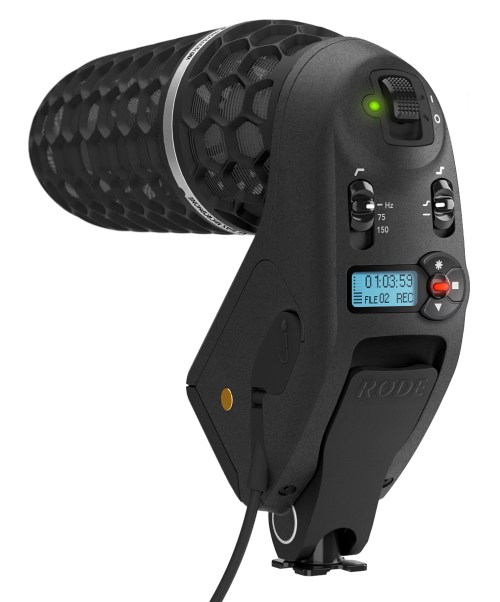
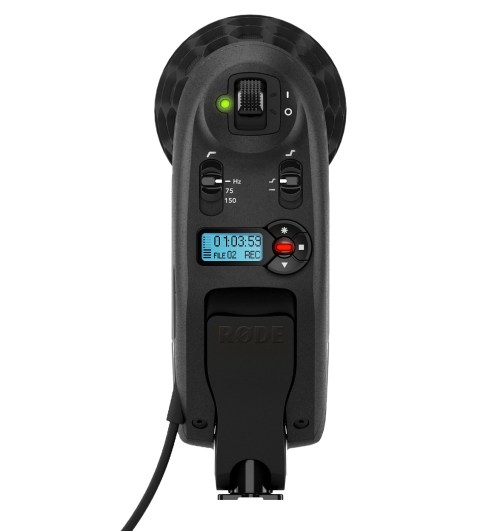
I must admit that since seeing the press release from Rode for the VideoMic HD, I’ve been a tad excited about the product! It’s still at a development stage so I have yet to see or use the VideoMic HD, but on paper and judging by these pictures, I think those who use their DSLRs for video are in for a treat.

Firstly, it uses a microphone based on the technology from my absolute favourite microphone, the Rode NTG3. Not only that, but it has a built in blimp which means it’ll be shielded from wind noise and vibration. The big game changer though is that it marries this amazing microphone to a built in digital recorder, allowing recording of high quality WAVs, and has a headphone socket for monitoring audio. It also has a display for monitoring audio levels. All of this packaged in a metal hosing that sits in your hotshoe. Very neat, tidy and compact.

To make it even more versatile, it also has an input for another microphone via 3.5mm audio jack. This means if you wanted to boom another microphone, say the superb VideoMic Pro, you could. You would get the shielded extension cable back from the boomed VideoMic Pro back to the VideoMic HD, thus being able to fully monitor the audio. Genius!

In operation, as far as I can tell, one would record onto the device (Micro SDHC, up to 32Gb in size) as high quality WAVs or compressed MP3s. The built in 3.5mm jacked cable then plugs into your camera and passes the monitored audio through. By setting a correct level on the camera and on the microphone, one could even just use the camera’s recorded track for quick and dirty edits in the field and later substitute the better quality WAV from the VideoMic HD when back in the office.

I for one can’t wait to get my hands on this and see how it sounds and performs. I think we’re all in for quite a special microphone.

Snapseed

Nik Software Does It Again

Once in a while, a company comes up with a product that just amazes me and once I begin using it, wonder how on earth I ever did without it. One such example is Nik Software’s Viveza plugin which did away needing complicated layers and masks for colour image processing. It made the process much more natural and saved time with it’s point, click and slide approach. To my utter amazement, Nik has managed to bring a version of this to the iOS (Apple iPad, iPhone and iPod Touch) platform and it’s called Snapseed.

The iPad is definitely heading to becoming an ideal tool for photographers. It was already a great piece of equipment to use as a portfolio for photographs and video, as well as a great tool for researching stories and reading newspapers and magazines via the various Apps available. As I covered in a previous article, there are already some great image processing Apps available and once these mature and the iPad becomes more powerful and hopefully gets built in USB or an SD card reader, it will definitely become a tool more capable of image processing for the pro on the go.

Snapseed has just taken the bar set previously and raised it by a phenomenal amount. This App is practically why the iPad was invented. The touch interface works so well, that within minutes of using it, the most complex of image processing is done in a matter of seconds. User control is basically based around an up or down swipe for choosing an adjustment and a side swipe for a plus or minus value (or strength value, depending on the adjustment chosen). This way one can very quickly run through the adjustments needed and set a value. It’s so natural, simple and intuitive, with so much fine control that the user interface is simply a work of pure genius.

After the image is loaded into Snapseed, there are two sets of adjustments available; the first set are Automatic, Selective Adjustment, Tune Image, Straighten and Rotate and Crop. This set gives absolute control on the processing. The second page brings more set filters; Black and White, Vintage, Drama, Grunge, Centre Focus and Frames. Although the latter set are an automated looks, they do offer several Styles and variables that can be adjusted, with each filter having it’s own applicable set. These include Filter Strength, Saturation, Brightness, Texture Strength, Centre Size and so on.

Snapseed absolutely comes into it’s own when the Selective Adjust is used. Using the Add (a circle with a plus sign along the bottom of the screen), a spot is selected. This can for example be some blue sky, dark storm clouds, a road surface, a face in shadow and so on. This spot is where the colour to be adjusted is chosen and creates a circle, to show the area that will be adjusted. This circle can be increased or decreased using a ‘pinch’ gesture. Very usefully, as the circle size is adjusted, a red mask appears, showing which the size of the area and also which segments of the image will be covered when adjustments are made.

After the area is defined, the first setting shows a ‘B’ in a blue circle at the centre of the area, standing for Brightness. To make an adjustment, one simply touches the screen and slides left, for darker, or right, for a brighter setting. Once done, a slide upwards reveals the available adjustments available; in this case, Contrast and then Saturation. These are adjusted in a similar way. All of these adjustments only work within the defined circumference and only to the colour of the control spot chosen. If for example a blue sky over woodland is the chosen point, all the adjustments will only effect the blue sky and regardless of how complex the detail in the trees are, non of these is effected, leaving a natural and real look, without the tell tale signs of dodging and burning. It’s as simple as that and within a minute or two, a perfect image can be produced. Snapseed also has a Share button once the image is saved and will Email, Print or send the image to your Flickr or Facebook page.

The only downside to this App is what plagues all iOS photo Apps; there isn’t a single solution that does all. One has to use various Apps together to achieve the desired outcome, for example a RAW processing App (although iOS & app updates have added some RAW functionality, such as Canon and Nikon RAW file support), Snapseed and then an App that can add metadata and FTP. Depending on how many Apps are needed, the constant saving after saving of a jpeg will eventually start to degrade the image. Having said this, as an App, this is by far the most amazing photography software I have seen on the iPad, by far.

The Desktop

In January 2012 Nik Software also brought Snapseed to the Mac desktop. This standalone app works beautifully. Allowing all of the iOS adjustments but on a large desktop with huge files. It’s an absolute must have for any photographer.

Rode VideoMic Pro Review

The Perfect DSLR Microphone?

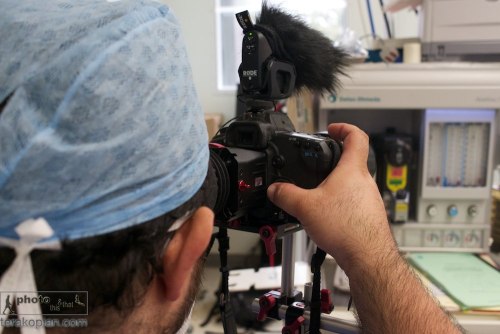
Photographer and film maker Edmond Terakopian filming at the Royal National Orthopaedic Hospital in Stanmore, using a Canon 5D MkII on a Zacuto Striker with the new Rode VideoMic Pro (with a windshield fitted). In the foreground is the original Rode VideoMic. Filming in an operating theatre. May 16, 2011. Photo: Neil patience

When I reviewed Canon’s 5D MkII in 2009, I concluded that the easiest way to get good audio on the camera was to use Rode’s VideoMic. I’ve been personally using this microphone since and have been getting pretty good results. However in situations where I need to travel compact or when shooting in news type situations, I did wish the VideoMic was smaller.

Rode seems to have been listening and recently launched the much smaller VideoMic Pro. It’s 10cm shorter in length than the VideoMic, 2.2cm lower in height but 0.7cm wider. It’s also lighter with the new model being 85g compared to the VideoMic’s 176g. It is just the right size now and when mounted, it doesn’t stick out the back.

Price wise, the VideoMic Pro is more expensive. Studiospares have the VideoMic Pro at £124.17 exc VAT compared to the older VideoMic at £65.83 exc VAT.

In Use

I did a set of extensive listening tests comparing the VideoMic and VideoMic Pro, using a Canon 5D MkII with it’s audio gain set on automatic. The subject was in an enclosed area and recorded from a distance of 2 meters as well as one meter. I listened to the results playing back the video on a MacPro using Aperture 3. Initially I used a pair of speakers and then headphones. No matter how hard I tried to find differences between the two, I couldn’t. The larger VideoMic was already a superb microphone, and the VideoMic Pro, although much smaller, was as directional in it’s sound gathering and just as clear in picking up all the detail in the voice. If anything, the VideoMic Pro seemed to make a little less background hiss in the quite times, as the camera turned up the gain automatically.

As a result, it later came as no surprise when comparing the specifications of the two microphones to see that Rode have somehow managed to make them identical, even though the VideoMic Pro is so much smaller.

Photographer and film maker Edmond Terakopian filming at the Royal National Orthopaedic Hospital in Stanmore, with the Rode VideoMic Pro. Filming in an operating theatre. May 16, 2011. Photo: Neil patience

In listening tests, although I didn’t do a side by side comparison with it’s closest rival, the more expensive Sennheiser MKE 400 (£136.00 exc VAT), although I had previously tested the Rode VideoMic and in comparative listening tests, the Rode was the clear winner.

The new microphone is a completely different design, with a completely new suspension rig, which ensures camera noise doesn’t vibrate up to and get recoded by the microphone. I’m extremely glad to see that the on switch and all the filter controls are still at the back of the camera, where they are easily seen. There’s nothing worse that making a video recording and not switching on the microphone; with the Rode, an LED clearly shows when it’s on. The Sennheiser has these controls on it’s side where they are easily missed.

The smaller size naturally has it’s conveniences; it’s much harder to snag the microphone and naturally it takes up less room when packed. The shorter size also means that it’s now much easier to use ultra wide angle lenses.

Conclusions

If absolute quality is needed in audio, then currently with the video DSLRs on offer, one’s only answer is to record the audio separately and then sync it up afterwards when editing. I personally use a Zoom H4n audio recorder and Rode’s excellent NTG-3 microphone. However, this is extra equipment and expense, and demands a lot of extra time and expertise when editing. Even when doing dual audio, I still use the VideoMic Pro on a second body when shooting dual cameras (which I often do); this allows for a sound backup but also for a much cleaner audio track to synchronise externally recorded audio with. For the simpler and straight to camera audio recording, Rode’s VideoMic Pro has kept the superb sound of it’s older brother and packed it into a much smaller package. I highly recommend this to anyone wanting to use their DSLRs for video.