Category Archives: viewpoint

My Workflow Using Aperture and Nik Software Plugins

My Workflow Using Aperture and Nik Software Plugins from Edmond Terakopian on Vimeo.

A free online webinar workshop hosted by Nik Software. I’ll show how I use Apple’s Aperture in combination with my favourite plugins from Nik Software; Viveza 2, Silver Efex Pro 2 and Sharpener Pro 3. I’ll also demonstrate how the same plugins work within a Photoshop environment. Regardless of which platform you’re on, you should find something of interest as the plugin interfaces and use are practically the same. This is the recording from the webinar on June 7, 2011.

For those who missed the live webinar on June 7th, 2011, here is a recording of the event. Due to it’s format, sadly we’ve had to cut out the Q&A session, so do keep your eyes on this blog and Nik Software’s pages to find out when the next webinar will be.

World Trade Centre – NY

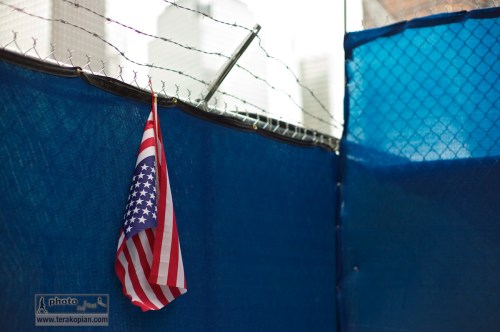
World Trade Centre, New York. A US flag is draped over a fence. New York, NY. May 19, 2011. Photo: Edmond Terakopian

World_Trade_Centre-NY-20110519-073World_Trade_Centre-NY-20110519-012World_Trade_Centre-NY-20110519-017World_Trade_Centre-NY-20110519-048World_Trade_Centre-NY-20110519-080World_Trade_Centre-NY-20110519-130
World_Trade_Centre-NY-20110519-161World_Trade_Centre-NY-20110519-362World_Trade_Centre-NY-20110519-366World_Trade_Centre-NY-20110519-355World_Trade_Centre-NY-20110519-412World_Trade_Centre-NY-20110520-004
World_Trade_Centre-NY-20110520-022World_Trade_Centre-NY-20110520-042World_Trade_Centre-NY-20110520-063World_Trade_Centre-NY-20110520-078World_Trade_Centre-20110521-005World_Trade_Centre-20110521-014
World_Trade_Centre-20110521-019NY_Street-20110521-026

World Trade Centre – NY, a set on Flickr.

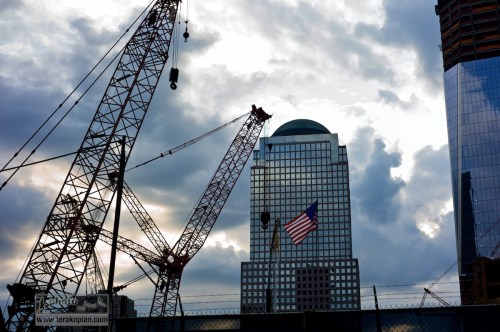
World Trade Centre Memorial Plaza, consisting of two pools with waterfalls set within the footprints of the Twin Towers. Image shows the partially completed One World Trade Centre (Freedom Tower - towards the left of the image). Construction work at the World Trade Centre, New York. May 21, 2011. Photo: Edmond Terakopian

As the tenth anniversary of the inhumanity carried out at the World Trade Centre approaches, construction workers work to finish building the various skyscrapers, including One World Trade Centre (also known as the Freedom Tower). Alongside these huge new buildings are two pools with waterfalls, placed within the footprints of the original Twin Towers. This and the memorial museum will make up the memorial plaza.

World Trade Centre, New York. New York, NY. May 19, 2011. Photo: Edmond Terakopian

This was a return visit the area; what once used the be literally awesome, where one could not see the tops of the towers from ground level and where taxi cabs were the size of ants when viewed from the roof, had now become the sad and depressing site of ground zero. The site of such inhumanity and sorrow.

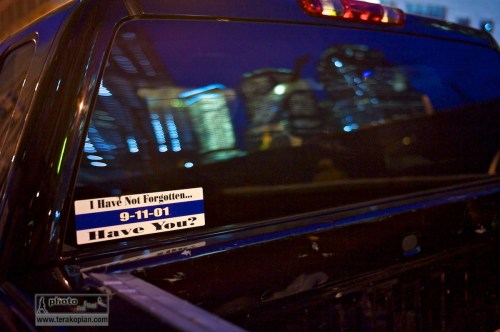
World Trade Centre, New York. A pickup truck carries a 9/11 sticker as the World Trade Centre site is reflected in its rear screen. New York, NY. May 19, 2011. Photo: Edmond Terakopian

Devastating Loss

RIP Chris Hondros and Tim Hetherington

We have lost so much. Yesterday, the 20th of April 2011, was a very dark day. The world lost two very passionate, courageous and dedicated journalists; photographer Chris Hondros from Getty Images and photographer and film maker Tim Hetherington who was with Panos Pictures.

They were more than our friends and colleagues. They were the voices of those who needed to be heard and our eyes to help us see places where we were not brave enough to go to. The world and those who need to be heard, lost a huge deal yesterday.

Amsterdam, 23-04-2006 Awards ceremony van de World Press Photo in de Oude Kerk. L-R: Chris Hondros, Mohamad Azakir, Ben Smith and Edmond Terakopian with their awards for the Spot News and Spot News Stories categories. Photo: Bastiaan Heus

I had the honour to know both Chris and Tim a little. I had met Chris for the first time in Amsterdam when we went to the World Press Photo awards ceremony. He had won second place in the Spot News category with the most heartbreaking and powerful image of a poor girl crying after her parents were killed by the US military in Iraq when their car didn’t stop when ordered to. It was an amazing image that shook anybody who saw it, leaving most teary eyed. I also met Chris again at a World Press Photo event at the University of Southern California where we got trapped along with all the other photographers there to present their work, in an elevator which had got stuck for 25 minutes. It was very funny! I won’t pretend we were close friends and alas we never worked together but these two meetings showed me that Chris was an amazing man; truly dedicated and extremely caring. I have constantly been amazed by the strength of his powerful work. He produced some stunning images in Libya on the day he was killed.

Photographer Tim A. Hetherington among rebel fighters of Liberians United for Reconciliation and Democracy (LURD) at their frontline headquarters in Tubmanberg. Photo: Tim Hetherington / Panos Pictures

Unfortunately I only met Tim once; I went to see him talk once and we had an extremely interesting conversation afterwards; it was as if we had been friends for years – in fact one of the people in teh group thought we were after listening to us. So extremely likeable, so amazingly modest and exceptionally dedicated. His talent at communicating with the still image or video goes without say. His photographs from Afghanistan, especially the World Press Winning image from 2007 just left me in awe. An image from such a dark place but so much like a poem.

When I read this terrible news from our photographers’ page on Facebook I froze. It said Tim had passed away and Chris was possibly deceased too. I have no shame in admitting that this horrific news left me crying and tearful. When it became clear that Chris had also succumbed to his terrible head wound, it was just devastating.

It’s always hard loosing colleagues. It’s hard enough finding out that a colleague has been hurt. To find out that two dear people that you know, admire and respect have been killed is just……….

Our entire community of photographers is shaken to it’s core. A candle was lit in memory at St Bride’s Church in Fleet Street. Our forums and Tweets are filled with messages of sadness, grief…..such a sour feeling. Tears, silence, disbelief.

I had recorder Restrepo when it was first shown on the National Geographic channel. For various reasons I had just never found the time to see it. Last night, teary eyed and shaken, I found the time Tim. It was so nice to hear your gentle voice as you spoke to the soldiers. I wish I could say this to you face to face; it was a magnificent film; bravo.

A day before it all ended for Tim, he made his last Tweet: “In besieged Libyan city of Misrata. Indiscriminate shelling by Qaddafi forces. No sign of NATO.”

All I wish is that neither of you amazing gentlemen suffered yesterday. I hope you didn’t feel a thing. My thoughts are with you, your families and you friends. You shone as human beings. I hope you rest in peace.

Diary (2010) from Tim Hetherington on Vimeo.

‘Diary’ is a highly personal and experimental film that expresses the subjective experience of my work, and was made as an attempt to locate myself after ten years of reporting. It’s a kaleidoscope of images that link our western reality to the seemingly distant worlds we see in the media.

Camera + Directed by Tim Hetherington

Edit + Sound design by Magali Charrier

19′ 08 / 2010

How Much Should You Charge?

Value Your Work

During workshops, presentations, organised debates, on Twitter and so on, I often come across photographers who are happy to invest money into gear, invest time into learning how to create a good photograph and then are happy to either give away their creations for free or to charge a few pounds for it. This results in the whole industry of photography becoming devalued and those of who rely on it as our only source of income to suffer. Equally, it results in the creator of the image devaluing their own work. If these few pounds were lots of pounds, then think of how much more quickly one could buy that new lens?

Every image has it's own worth. PPY exhibition. National Theatre, South Bank, London. August 28, 2008. Photo: Edmond Terakopian

If a picture is good enough to be published or be used in any way, shape, or form by a company, then it has it’s worth. Regardless of one’s position as a pro or a talented enthusiast, images are worth money.

My thoughts are that sometimes it’s hard to know what to quote or charge and perhaps this is adding to the entire industry being devalued. Here are some great resources to look at when you need to see how much to charge for a photogaph:

NUJ Freelance Fees Guide

Nature Picture Library

If you have not yet read these short posts, they are on the same subject with some useful information and thoughts:

Stand Firm

Value

Sekonic C-500 Prodigi Colour Meter

Getting Colour Right

Colour; it can be the cause of endless head aches. With digital photography, we’re in many ways quite lucky as we can set custom white balances and even dial in degrees of Kelvin (which is unit for the measurement of temperature and in our case, colour temperature).

However, most photographers are quite lazy in this and will shoot in auto white balance and hope to correct things later in post processing. This is not such a bad thing if one shoots RAW but I’ve seen many colleagues shoot jpeg and then try and correct the most horrendous colour casts and end up ruining perfectly good images as a result. Even for us who do shoot RAW, we’re still reliant on finding a neutral grey to click our white balance tool on and tweak the slider until it looks right. To do this, we’re also relying on our monitors and laptop displays to be accurately calibrated.

In the world of video it gets much more complicated and many times more time consuming. To make things worse, any extreme colour corrections can lead to a degradation in quality as unless you’re shooting with a RED One, you’re not shooting RAW.

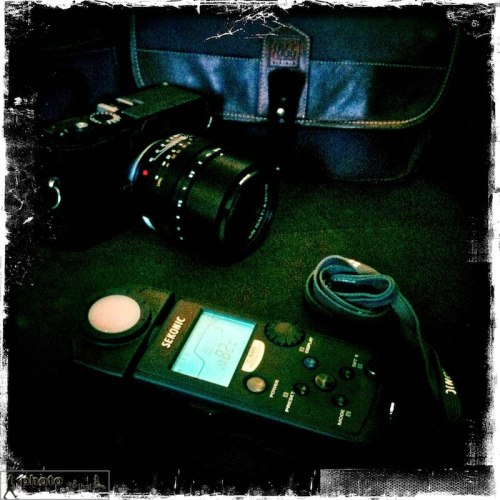
The Sekonic C-500 Prodigi Colour Meter. Photo: Edmond Terakopian

For anyone who hasn’t tried it, setting a custom white balance involves photographing a white (or grey) card and choosing that image as a custom setting. This works extremely well and allows for exact colours, even in pretty extreme lighting conditions. The only downside to this is having to stop and either use a white balance tool (EzyBalance) such as those made by Lastolite or try and find a notepad with white paper that is big enough to photograph. An extra step is then needed to set the white balance to custom and finally to choose this image as the reference for the custom white balance. It is rather longwinded.

If shooting on a tripod with creative and spot lighting, it can also be an extra head ache as the camera has to be taken off the tripod, brought to where the light is falling on the subject, white card photographed, then set and finally put back on the tripod and set up again for the shot. Even adjusting power settings or diffusion on lights can change the colour temperature.

This is where a colourmeter comes in to save the day. It involves the photographer holding the light receptor in the light being photographed, with it pointing back towards the camera. A measuring button is then pressed and it gives an exact Kelvin reading of the colour temperature. All you then have to do is to set this on the camera and shoot away. In a photographic situation I also sometimes just make a note of the temperature in different areas I’m working and then input these onto the RAW files when processing them on Aperture 3. Both systems work equally well. Naturally for video work though, one inputs the Kelvin reading into the camera before doing a shot.

Many years ago I tried using a Minolta colourmeter (designed in the days of film) with limited success; it certainly improved upon the auto setting but I still needed to tweak my shots. Sekonic, with the C-500 and C-500R (for pocket wizard connectivity) has brought out the world’s first digital and film colour meter. The spectral sensitivities of film and a digital sensor are different and by catering for both (you can change this in the mode setting) it works perfectly with digital cameras. For film shooters it can also give index readings for filters.

As is my way with tests, I took the Sekonic C-500 out with me on assignments. I used the meter with both a Canon 5D MkII (which uses a CMOS sensor) and a Leica M9 (which uses a CCD) and the results were great. On one event in the Army and Navy Club I photographed in a variety of artificial lighting conditions and the results were pretty much spot on. The meter can be tweaked to work with particular cameras even more accurately.

I also decided to do a set of video tests and using an X-Rite ColorChecker as a test subject, I shot film clips using the Canon 5D MkII in various lighting conditions from bright sunlight to extreme shade and also artificial light. The results again impressed.

All was not perfect though; although the meter has the ability to measure from 2300 to 20,000 Kelvin, it doesn’t seem to work in dim lighting and constantly gave an “Under” message. This happened even if the meter was brought right up to the light.

On the whole though, I have to say that I’m impressed with the meter and in all but the most extreme low light, it worked well. I think that any photographer who works in colour would do well to contemplate getting one of these and it’s an absolute no-brainer for anyone involved in video.

Fuji X100

Test Images From The Fujifilm X100 At High ASA

I had the opportunity to have a quick play with the new Fuji X100 over dinner and took a series of images inside a dimly lit restaurant and it’s surroundings during Focus on Imaging in Birmingham. My full and proper review will follow once I get a review sample, but wanted to share a few images. These images can be found on my Flickr Page.