Category Archives: Review

Other World Computing

The Fastest; Accelsior PCI Express SSD

Long Term Test

OWC stands for Other World Computing, a title which I felt was very apt for this article. Since I started using OWC’s adapter for modifying my Mac Pro to take multiple SSDs in the optical bay and installing their blisteringly fast SSD into the optical bay of my MacBook Pro, I’ve become a fan of this company. Their adapters and SSDs just seem out of this world; great design, well made and extremely fast.

It was with great interest when I first heard that a PCI Express SSD card was going to be introduced by the company. The advantages of using a PCI Express SSD card are numerous. Firstly, one is directly plugging into the motherboard, using the fastest interface, without having to go through the SATA connectors, adding some speed to operation. Secondly, it frees up your SATA connectors and drive bays for more SSDs or conventional hard drives for storage. In my Mac Pro, I now have four conventional hard drives in the drive bays which I use to store my RAW files amongst other data including documents, music, video and so on. I also have two SSDs installed in the optical bays. One is used to clone the Accelsior every night which is my OS drive, and the other is used for video files when editing  a project. Having FCP X run on the OWC Accelsior and the ProRes 422 video files run from a OCZ 120Gb SSD makes for a very fast and fluid editing experience.

If you’re on a PC, the Accelsior will also work. Regardless of which system you’re using, the helpful thing is the card does not need a driver, so will just work once installed. On a Mac, you will naturally need a Mac Pro as the iMac does not have PCI Express slots.

I decided to go for the 240Gb version which is enough space to store the OS, applications and Documents. Via iTunes I did move the iTunes folder to another drive though as it was simply too big. The card uses Sandforce controllers and several systems to ensure that the SSD chips are used efficiently and kept running smoothly. The SSDs themselves are on smaller circuit boards which clip into the PCI Express daughter card; this means that in time if you want to upgrade to a larger size, it’s easily done.

Speed

Using OWC’s own figures, comparing their top of the range traditional SSD (Pro 6G) to the Accelsior makes interesting reading.

OWC Mercury Extreme Pro 6G – Read 559MB/s Write 527MB/s (Peak Data Rate)
OWC Mercury Accelsior  – Read 762MB/s Write 763MB/s
Traditional 5400rpm Hard Drive – Read 75MB/s Write 77MB/s

These are test figures so real life use will vary, but it will vary proportionally, so the speed advantages are clear to see.

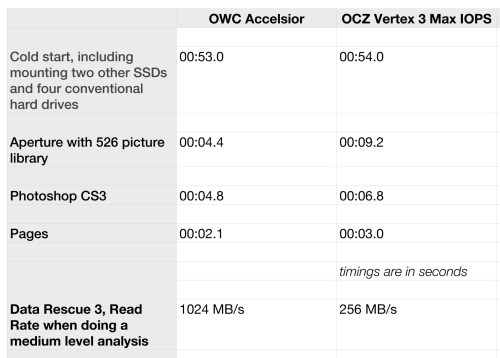
Compared to my previous OS SSD, the OCZ Vertex 3 Max IOPS which was very quick, the speed advantage of the OWC Acceslior is immediately noticeable, even without timing.

I did perform some comparisons though using my early 2009 model Mac Pro.
Reliability

Speed isn’t the only consideration to have though. I’ve had the Accelsior installed in my main imaging workstation, a Mac Pro, for three months now. It has performed without a single hiccup. I installed it when running OS Lion, cloned the OS drive onto the Accelsior using the superb CCC and upgraded to OS Mountain Lion a few days after it’s release. My Mac Pro is on 24/7, used for photo editing, photo archive use, Giclée printing, video and audio editing and general computing too. It’s hooked up to a Sonnet D800 raid with a PCI Express RAID card as well as countless other peripherals and I didn’t have a single issue at all! The Accelsior just performed with 100% absolute reliability and speed.

Final Thoughts

As new technologies come and go and we take leaps forwards, some leaps are giant. The leap to SSDs being one. They are still too costly for storage, but for using as our OS and program disks, the capacities are more than there and the prices have dropped to affordable levels. Although purely on paper the jump to PCI SSD doesn’t appear huge, it is much more than just the speed increase; it’s the convenience increase of freeing up a drive bay for storage too. I for one can’t recommend SSDs highly enough; however if you have a machine with compatible PCI Express slots, then the OWC Accelsior is an absolute no brainer. You’ll love it!

European Buyers – Macupgrade has kindly offered readers of this blog a 10% discount with the code: macupgradephoto

The Perfect Battery Accessory

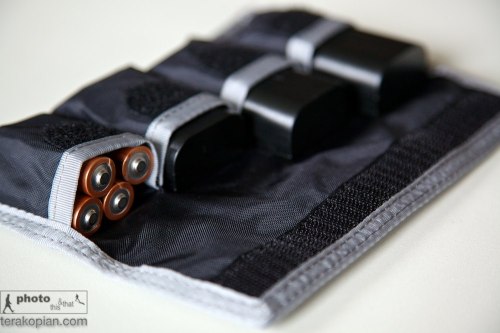
Think Tank Photo DSLR Battery Holder 4 Review

Lenses, cameras, cards, computers, software and bags – all important equipment that helps us work and make great photographs. There are those little things though that can make life so much easier, especially for the photographer on the road. Enter the Think Tank Photo DSLR Battery Holder 4.

Think Tank Photo DSLR Battery Holder 4. Photographed with Canon LP-E6 (for the Canon 5D MkII, MkIII) and a set of 4 AA Batteries in one of the compartments. July 4, 2012. Photo; Edmond Terakopian

So simple it’s perfect! Designed to take four DSLR batteries, it can also hold four AA batteries in each compartment too. Naturally smaller batteries (Micro 4/3, NEX etc.) will also fit. I bought two of these, one for my Canon gear and one to house my Leica M9 batteries. They each now stay inside the relevant camera bag.

Think Tank Photo DSLR Battery Holder 4. Photographed with Canon LP-E6 (for the Canon 5D MkII, MkIII) and a set of 4 AA Batteries in one of the compartments. July 4, 2012. Photo; Edmond Terakopian

One very cool design feature is their footprint; being thin and long, they take up minimal room and can either put upright in a shoulder bag’s main compartment, or laid flat in a front pocket. Also, they fit nicely into the lid pockets on roller bags and backpacks too.

Think Tank Photo DSLR Battery Holder 4. Photographed with a set of 4 Leica batteries for the M9. July 4, 2012. Photo; Edmond Terakopian

Not a brilliantly designed lens nor a superbly engineered camera, but nonetheless, it’s an essential bit of kit and has my absolute recommendation.

If you’re in the UK, you can order them from Snapper Stuff or check out the Think Tank Photo website for details of your nearest supplier.

ioShutter Review

The Ultimate Timelapse Tool?

It was one of those “oh, wow!” moments. In 2011, at Focus On Imaging, I was chatting with James Madelin from Enlight (the makers of the Orbis and Frio). He shared with me his plans for an iPhone app that could control remote firing a DSLR. I thought it was a cool idea to have a cable release always with you, so was impressed at this simple, yet extremely helpful idea. Then, I got more impressed as he expanded on the project, sharing that it was in fact a complete intervelometer allowing full control over time and frequency of shots.

Behind the scenes as Sotheby’s prepares the Gunter Sachs Collection ahead of the sale on May 22nd and 23rd, 2012. The IO Shutter in action with a Canon 5D MkII, on a time lapse. It is being triggered by an iPad 3 in the Sotheby’s bag. Sotheby’s, New Bond Street, London. May 17, 2012. Photo: Edmond Terakopian

I now have this rather super ioShutter cable with me and it has become part of my regular camera kit. The interface is just genius and very intuitive to use. It also works on the iPad and newer iPod Touches. To control the camera, one has to download the ioShutter app from the iTunes App Store. There is a free version with limited ability or the full on pro version offering much more control. Naturally, I would fully recommend the Pro version of the app to allow full creativity.

I had an assignment at Sotheby’s to make a timelapse video of the Gunter Sachs show being set up. I had three cameras on the go, covering various angles and rooms. For an overhead, fisheye type shot, I had my GoPro HD Hero clamped around a lighting rail using a large Joby Gorillapod (tripod). I had one of my Canon 5D MkII cameras on a tripod being triggered by a Pocket Wizard MultiMax which I’d put into intervalometer mode. On my other 5D MkII I had my iPad attached, using the ioShutter cable. First problem was finding a way to attach the iPad and a Sotheby’s carrier bag proved an elegant and workable solution!

I made sure the volume on the iPad was turned way up (as the IO Shutter cable plugs into the headphone jack), set my duration between shots to five seconds and set it to shoot. First attempt in the field and no problems. The app and cable worked perfectly.

This assignment started around 9.30am and finished around 5.00pm and the system just worked. I carry my Pocket Wizards in my location lighting bag, so unless I’m planning to use them, the Pocket Wizards aren’t always with me. With the ioShutter, I have the cable now in my Think Tank Photo Airport International roller, so it’s always there. I also always have my iPhone and usually my iPad with me, which now means that if see an opportunity for a timelapse, I can just shoot it.

Screen shots of the ioShutter Pro App.

Compared to the Pocket Wizard MultiMax, it’s also a cheaper option, with the camera control cable on the MultiMax costing considerably more. It also has various other uses, as a timer or a sound triggered release too. Lastly, it’s available for Canon and Nikon DSLRs.

Thinking back to our first chat about the ioShutter, I was very excited by the idea but had doubts about it materialising as it was just too good! Well, it’s here, it’s real and it’s genius. Very highly recommended.

If you’re in the UK, you can get the IO Shutter cable from Snapper Stuff.

Think Tank Photo Retrospective 7

The Perfect Camera Bag?

Think Tank Photo Retrospective 7 shoulder bag. Shown with two Leica M cameras; L-R: Leica M9 with 50mm Noctilux ASPH and M9-P with 35mm Summilux ASPH. May 31, 2012. Photo: Edmond Terakopian

As photographers we spent our years searching for that perfect image. Any photographer who has been in the industry for any length of time has most probably spent a sizeable amount of time also searching for the perfect camera bag!

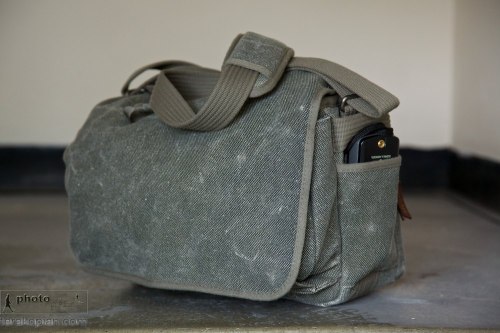
Think Tank Photo Retrospective 7 shoulder bag. Front view, showing a lightmeter in the side pocket. May 31, 2012. Photo: Edmond Terakopian

Firstly, I would say that no such thing exists as “the perfect camera bag”. It’s taken me a couple of decades to come up with this conclusion. I would say though that the perfect camera bag system does exist. One type of bag simply will not work for all situations, types of equipment or types of assignment, therefore having a system of bags is the answer. I’ve been a user of Think Tank Photo bags for many years now and was so impressed with them that I even joined the design board a couple of years ago, for a year. (I hasten to add that I’ve had no input into this bag, so it is a straight forward review). I now use a system of roller bags and backpacks which allow for transportation of gear to an assignment, and then a selection of belt pouches, chest bag (the Change Up) and shoulder bags, to work from (I choose what suits the assignment best).  I choose what will suit a particular assignment as carefully as I choose my camera or video gear. This way I can work both comfortably and quickly, with the equipment not getting in the way of the job at hand.

Think Tank Photo Retrospective 7 shoulder bag. Rear view, showing a lightmeter in the side pocket. May 31, 2012. Photo: Edmond Terakopian

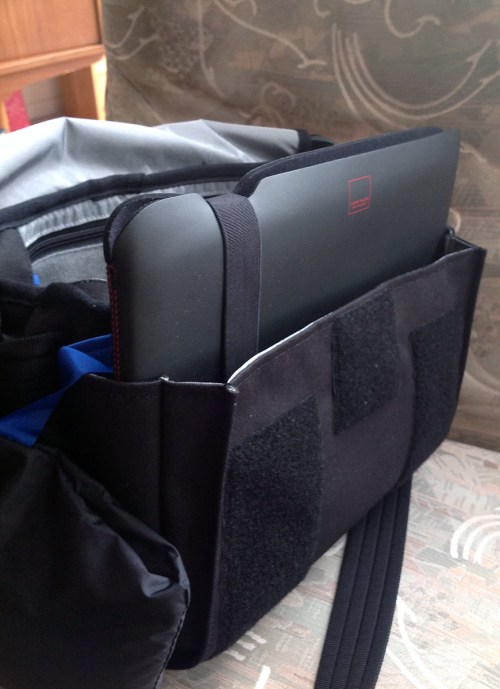
I’ve been actively using the Retrospective 7 on assignment for several weeks now and must say I am very, very impressed. It now houses my Leica M outfit, comprising of an M9, M9-P, 21mm Elmarit, 28mm Summicron ASPH, 35mm Summilux ASPH, 50mm Noctilux ASPH, 90mm Summarit, SF 58 flash and various accessories. The main thing with this bag though was that it was designed to take an Apple 11″ MacBook Air or iPad too, so depending on what I’m doing, I will slip the appropriate computer in the rear zipped and padded compartment.

Think Tank Photo Retrospective 7 shoulder bag. Rear view, showing an Apple 11″ MacBook Air in the rear pocket. May 31, 2012. Photo: Edmond Terakopian

Like the other Retrospective Bags, it’s lightweight, unconstructed and soft, with a moving base (made up of several padded sections that move with the movement of the bag). This makes the range, and this bag too, an extremely comfortable shoulder bag to work with and work from. It also has the genius silent velcro system which comes in very handy in quite press conferences (and will suit every wedding photographer when it comes to working in a church environment).

Think Tank Photo Retrospective 7 shoulder bag. Rear view, showing an Apple iPad 3. May 31, 2012. Photo: Edmond Terakopian

Although I house my rangefinder outfit in the Retrospective 7, it will also be perfect for any Micro 4/3 system by Panasonic or Olympus and the Fuji X-Pro 1 kit. It will also take smaller DSLRs (without grips), including the 5D MkIII or D800, with lenses up to the 24-70 f2.8s and smaller prime lenses. It’s an extremely versatile size and can be configured to house a wide variety of gear, including a means to edit and send pictures.

Think Tank Photo Retrospective 7 shoulder bag. Interior shot, with dividers set up specifically for a Leica M outfit. May 31, 2012. Photo: Edmond Terakopian

Is it the perfect bag? Well, I’d say it’s the perfect shoulder bag and it’s now my favourite shoulder bag of all time. Highly recommended.

The Retrospective 7, along with most of that range is available in Black, Pinestone and the new Blue Slate colours. If you’re in the UK, check out SnapperStuff where you can order directly or find your local dealer. Otherwise, check out the Think Tank Photo.

Addendum: Macjim has kindly sent me this picture showing his Retrospective 7 with the Apple 13″ MacBook Air in the front pocket. I wouldn’t say it’s ideal, but appears a workable solution if needs must.


The B&W Connoisseur’s Camera?

The  Leica M Monochrom

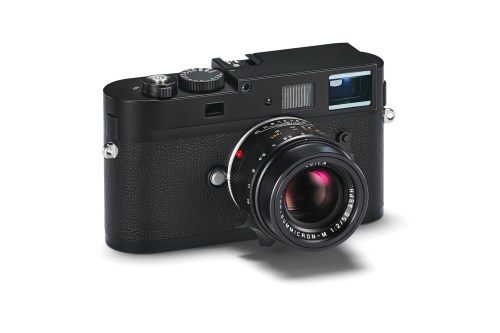
Leica M Monochrom. Photo: © Leica

It does at first glance appear a tad odd; a digital camera that only shoots in black and white. There are two types of photographer who this camera will appeal too though; the high end enthusiast who is into monochrome photography and also the established professional photographer who has made a name for themselves by shooting black and white.

I’m very much hoping to do a hands on review soon, but meanwhile, Andreas Jürgensen from the Leica Forum has done an interesting video review.

The camera certainly appears not to be a Leica M9 which just shoots in B&W. It does indeed have a brand new sensor and it’s ISO range is upped to 10,000. Watching the video and listening to Andreas’ conclusions, the camera produces noiseless images at 3200 ISO and absolutely usable images at 8000 ISO. The sensor also renders massive amounts of micro detail. This camera appears to be an astonishing tool; an interesting concept brought to life with a brave decision making by Leica and also executed in a magnificent way. I really cannot wait to shoot with this camera and make some prints on my iPF6300 and Hahnemuhle paper!

Update: I’ve just read a fantastic piece by Jonathan Slack on the Leica M Monochrom; well worth a read and definitely check out the wonderful gallery of images.

Update: There are some images by Magnum Photos photographer Jacob Aue Sobol on the Leica M Monochrom site that are well worth checking out.

Canon C300 V 5D MkII

Comparing Footage From the C300 & 5D MkII

A short clip showing a quick comparison between a Canon C300 and Canon 5D MkII. The cameras were set up as identically as possible, using the same settings. Please note that this was shot during an open day event, so not ideal conditions as the settings were constantly being changed on both cameras by attendees to the event! Lastly, there’s a clip from the C300 which is ungraded. Many have asked to see footage which hasn’t been touched, so all of these clips are straight from camera.

Featuring model Vicki Blatchley  Shot at New Day Pictures

Thoughts

Putting aside for a moment that the Canon C300 is actually a proper video camera with all the video functions, flip screen and audio abilities, not to mention the form factor, that one needs for professional video (all of which are lacking on the 5D MkII) and looking at purely the image quality, at first glance, there appears to be little difference between the two.

It’s only when we brought the image into the full editing suite that the huge dynamic range and masses of detail in the extreme highlight and shadow areas started to show the C300 as vastly superior. Even on the non flat settings, the file was just lush with detail. Although I love the 5D MkII, the C300 is just on a completely different level.

The 5D MkII does have an edge in two ways; it has that gorgeous full frame sensor as opposed to the Super 35mm of the C300 (crop factor of x1.6) and is many, many times cheaper, even when taking into account finders / EVFs, rigs and external audio that’s needed to make it usable.

The C300 does have it all though. I for one am extremely impressed by this camera; it really is rather good.

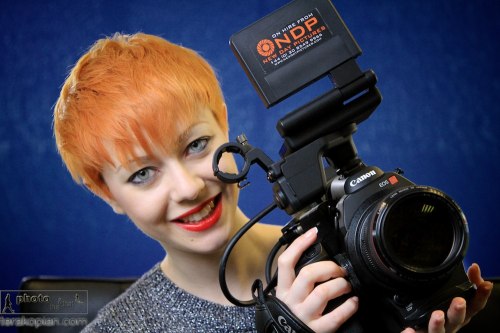
Model Vicki Blatchley at the Canon C300 Open Day and New Day Pictures, Surrey. January 26, 2012. Photo ©

Photographer and film maker Edmond Terakopian at the Canon C300 Open Day at New Day Pictures, Kingston Upon Thames, Surrey. January 26, 2012. Photo ©Model Vicki Blatchley at the Canon C300 Open Day and New Day Pictures, Surrey. January 26, 2012. Photo ©

You can see my longer, graded, demo reel from the Canon C300 below: