Category Archives: Photography

Snapseed

Nik Software Does It Again

Once in a while, a company comes up with a product that just amazes me and once I begin using it, wonder how on earth I ever did without it. One such example is Nik Software’s Viveza plugin which did away needing complicated layers and masks for colour image processing. It made the process much more natural and saved time with it’s point, click and slide approach. To my utter amazement, Nik has managed to bring a version of this to the iOS (Apple iPad, iPhone and iPod Touch) platform and it’s called Snapseed.
The iPad is definitely heading to becoming an ideal tool for photographers. It was already a great piece of equipment to use as a portfolio for photographs and video, as well as a great tool for researching stories and reading newspapers and magazines via the various Apps available. As I covered in a previous article, there are already some great image processing Apps available and once these mature and the iPad becomes more powerful and hopefully gets built in USB or an SD card reader, it will definitely become a tool more capable of image processing for the pro on the go.

Snapseed has just taken the bar set previously and raised it by a phenomenal amount. This App is practically why the iPad was invented. The touch interface works so well, that within minutes of using it, the most complex of image processing is done in a matter of seconds. User control is basically based around an up or down swipe for choosing an adjustment and a side swipe for a plus or minus value (or strength value, depending on the adjustment chosen). This way one can very quickly run through the adjustments needed and set a value. It’s so natural, simple and intuitive, with so much fine control that the user interface is simply a work of pure genius.

After the image is loaded into Snapseed, there are two sets of adjustments available; the first set are Automatic, Selective Adjustment, Tune Image, Straighten and Rotate and Crop. This set gives absolute control on the processing. The second page brings more set filters; Black and White, Vintage, Drama, Grunge, Centre Focus and Frames. Although the latter set are an automated looks, they do offer several Styles and variables that can be adjusted, with each filter having it’s own applicable set. These include Filter Strength, Saturation, Brightness, Texture Strength, Centre Size and so on.
Snapseed absolutely comes into it’s own when the Selective Adjust is used. Using the Add (a circle with a plus sign along the bottom of the screen), a spot is selected. This can for example be some blue sky, dark storm clouds, a road surface, a face in shadow and so on. This spot is where the colour to be adjusted is chosen and creates a circle, to show the area that will be adjusted. This circle can be increased or decreased using a ‘pinch’ gesture. Very usefully, as the circle size is adjusted, a red mask appears, showing which the size of the area and also which segments of the image will be covered when adjustments are made.

After the area is defined, the first setting shows a ‘B’ in a blue circle at the centre of the area, standing for Brightness. To make an adjustment, one simply touches the screen and slides left, for darker, or right, for a brighter setting. Once done, a slide upwards reveals the available adjustments available; in this case, Contrast and then Saturation. These are adjusted in a similar way. All of these adjustments only work within the defined circumference and only to the colour of the control spot chosen. If for example a blue sky over woodland is the chosen point, all the adjustments will only effect the blue sky and regardless of how complex the detail in the trees are, non of these is effected, leaving a natural and real look, without the tell tale signs of dodging and burning. It’s as simple as that and within a minute or two, a perfect image can be produced. Snapseed also has a Share button once the image is saved and will Email, Print or send the image to your Flickr or Facebook page.

The only downside to this App is what plagues all iOS photo Apps; there isn’t a single solution that does all. One has to use various Apps together to achieve the desired outcome, for example a RAW processing App (although iOS & app updates have added some RAW functionality, such as Canon and Nikon RAW file support), Snapseed and then an App that can add metadata and FTP. Depending on how many Apps are needed, the constant saving after saving of a jpeg will eventually start to degrade the image. Having said this, as an App, this is by far the most amazing photography software I have seen on the iPad, by far.

The Desktop

In January 2012 Nik Software also brought Snapseed to the Mac desktop. This standalone app works beautifully. Allowing all of the iOS adjustments but on a large desktop with huge files. It’s an absolute must have for any photographer.
Beauty Photographer’s Essential Toolkit

Must Have Photographers’ Accessories

There are some well guarded secret methods and accessories that help beauty and fashion photographers achieve the realistic looks they get in their work. Using real looking models, these techniques help convey the honest and real beauty sought after by consumers of their work.

I hope that these videos may help those wishing to break into this market 😉

Peter Macdiarmid

Year in pictures 2011

A superb selection of images, showcasing Getty Images photographer Peter Macdiarmid’s favourite shots from 2011.
 

Police Censorship

Should Police Officers Censor What Press Photographers Photograph On The Public Streets?

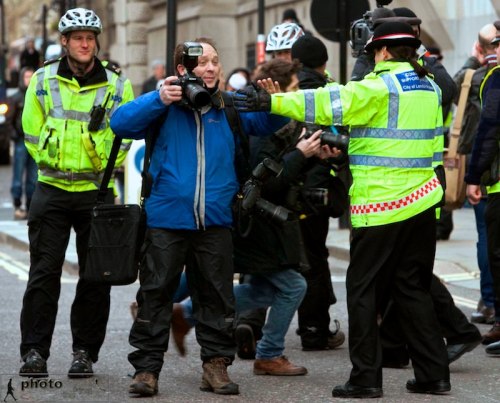
A PCSO puts her hand up to cover the lens of Nicholas Razzell, stopping him from taking pictures. The Old Bailey. January 4, 2011. Photo: Ian Vogler

It’s a very worrying question, with an extremely worrying answer coming from some members of the Police force and even more so from Police Community Support Officers. Having several friends in the Police, I know for a fact that no where in their training does it state that officers should censor this country’s free press. As long as members of the press aren’t breaking Police cordons, or on private property after being asked to leave, the Police (and I include PCSOs in this) have no power, nor rights to interfere with a photographer going about doing their job; in this case gathering news.

Sadly, last week’s court case at the Old Bailey, where two of the racist murderers of Stephen Lawrence were finally jailed, illustrated just how ill-informed some members of the Police and PCSOs are. Just what the motivation is to stop a story like this being covered is baffling.

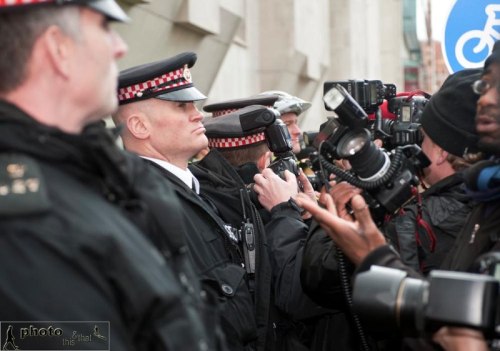
City of London police officers obstructing members of the press at the Old Bailey after the sentencing of David Norris and Gary Dobson for the murder of Stephen Lawrence. January 4, 2011. Photo: David Parker

Journalist, turned press photographer, Nicholas Razzell has been photographing high-profile criminal and civil court cases since 1999, including Jeffrey Archer, Paul Burrell, Kieran Fallon, Naomi Campbell, Paul McCartney, Charles Bronson, numerous murder and terrorism trials and more recently cases such as Julian Assange.

When asked about photographing these court cases, Nicholas says, “For most of that time the press and TV either self-police or on the odd occasion have had to work behind barriers. However, it is only in the last 5 years or so that I’ve found Policemen and particularly PCSO’s who have either no understanding of the law or it’s enforcement, getting involved”.

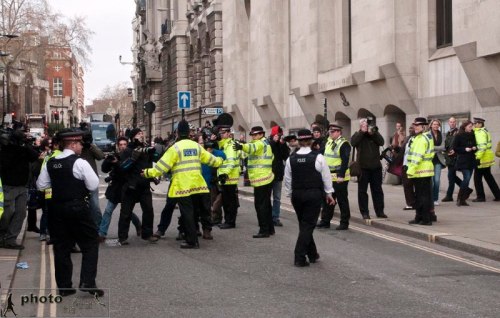
City of London police officers obstructing members of the press at the Old Bailey after the sentencing of David Norris and Gary Dobson for the murder of Stephen Lawrence. January 4, 2011. Photo: David Parker

“This came to head when Julian Assange was released from custody at the High Court in London when a Met Police Inspector (ably assisted by a Sky TV Producer) organised a “pool”…practically destroying any freelancers chance of getting a competitive picture.”

“Last week (Stephen Lawrence case, the Old Bailey) was just another occasion where we were prevented from doing our job. As yet there is no “right to privacy” in the UK (thank god) and it certainly isn’t up to uniformed and uninformed officers on the street, or PCSO’s to decide what we can and cannot photograph. Physically preventing us from getting a picture is one step away from moral and political censorship”.

City of London police officers obstructing members of the press at the Old Bailey after the sentencing of David Norris and Gary Dobson for the murder of Stephen Lawrence. January 4, 2011. Photo: David Parker

Another photographer adds, ” It was a complete joke. The Police officers couldn’t decide which side of the street to make us stand on. One officer said we couldn’t stand under the scaffolding (open to the public) on kerb opposite because “the building company haven’t given you permission” – to stand on a public street? Then they insisted we stand about 50 yards away (to do a car shot) and when the car arrived one officer followed me across the street to make sure he blocked my view. I asked another officer if this was still a public street? She refused to answer”.

One thing is for sure; a member of the Police force should not put up their hand to cover a photographer’s lens and stop images being taken. These newsworthy moments happen in a fraction of a second and are gone forever. Press photographers have a duty to bear witness, not only for the next day’s newspapers and websites, but for historical reasons too.

For any members of the Police force and PCSOs unclear about the rights of citizens (including members of the media, because we are after all, citizens too) who wish to photograph in public places, may I encourage you to read the official Met Police Photography Advice page?

Addendum:

Any member of the media, regardless of if they are a member of the NUJ or not, can report any incidents to the NUJ. Please make sure you have badge numbers and if possible, audio and/or video recordings. This will not only help the press to do our jobs properly, but will also help the Police train their officers and PCSOs better.

The Police Respond:

A City of London Police spokesperson said: “We work closely with journalists and photographers at the Old Bailey to make sure they’re able to do their job and the public are able to go about their business. We continue to liaise with journalists, photographers and the local community to ensure this is the case”.

Don McCullin Shoots

In Search Of Incredible

I’ve just come across a project shot by Don McCullin for Asus and Intel, called In Search of Incredible. There are some interesting behind the scenes videos by Clive Booth.