Photographer John Moore talks of his assignments in Egypt, Bahrain and Libya.

Photographer John Moore talks of his assignments in Egypt, Bahrain and Libya.
A fascinating behind the scenes look at how photographers cover the politicians of the US Congress.
Colour; it can be the cause of endless head aches. With digital photography, we’re in many ways quite lucky as we can set custom white balances and even dial in degrees of Kelvin (which is unit for the measurement of temperature and in our case, colour temperature).
However, most photographers are quite lazy in this and will shoot in auto white balance and hope to correct things later in post processing. This is not such a bad thing if one shoots RAW but I’ve seen many colleagues shoot jpeg and then try and correct the most horrendous colour casts and end up ruining perfectly good images as a result. Even for us who do shoot RAW, we’re still reliant on finding a neutral grey to click our white balance tool on and tweak the slider until it looks right. To do this, we’re also relying on our monitors and laptop displays to be accurately calibrated.
In the world of video it gets much more complicated and many times more time consuming. To make things worse, any extreme colour corrections can lead to a degradation in quality as unless you’re shooting with a RED One, you’re not shooting RAW.
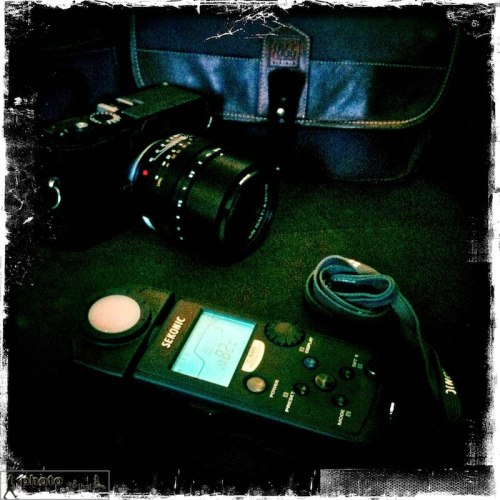
The Sekonic C-500 Prodigi Colour Meter. Photo: Edmond Terakopian
For anyone who hasn’t tried it, setting a custom white balance involves photographing a white (or grey) card and choosing that image as a custom setting. This works extremely well and allows for exact colours, even in pretty extreme lighting conditions. The only downside to this is having to stop and either use a white balance tool (EzyBalance) such as those made by Lastolite or try and find a notepad with white paper that is big enough to photograph. An extra step is then needed to set the white balance to custom and finally to choose this image as the reference for the custom white balance. It is rather longwinded.
If shooting on a tripod with creative and spot lighting, it can also be an extra head ache as the camera has to be taken off the tripod, brought to where the light is falling on the subject, white card photographed, then set and finally put back on the tripod and set up again for the shot. Even adjusting power settings or diffusion on lights can change the colour temperature.
This is where a colourmeter comes in to save the day. It involves the photographer holding the light receptor in the light being photographed, with it pointing back towards the camera. A measuring button is then pressed and it gives an exact Kelvin reading of the colour temperature. All you then have to do is to set this on the camera and shoot away. In a photographic situation I also sometimes just make a note of the temperature in different areas I’m working and then input these onto the RAW files when processing them on Aperture 3. Both systems work equally well. Naturally for video work though, one inputs the Kelvin reading into the camera before doing a shot.
Many years ago I tried using a Minolta colourmeter (designed in the days of film) with limited success; it certainly improved upon the auto setting but I still needed to tweak my shots. Sekonic, with the C-500 and C-500R (for pocket wizard connectivity) has brought out the world’s first digital and film colour meter. The spectral sensitivities of film and a digital sensor are different and by catering for both (you can change this in the mode setting) it works perfectly with digital cameras. For film shooters it can also give index readings for filters.
As is my way with tests, I took the Sekonic C-500 out with me on assignments. I used the meter with both a Canon 5D MkII (which uses a CMOS sensor) and a Leica M9 (which uses a CCD) and the results were great. On one event in the Army and Navy Club I photographed in a variety of artificial lighting conditions and the results were pretty much spot on. The meter can be tweaked to work with particular cameras even more accurately.
I also decided to do a set of video tests and using an X-Rite ColorChecker as a test subject, I shot film clips using the Canon 5D MkII in various lighting conditions from bright sunlight to extreme shade and also artificial light. The results again impressed.
All was not perfect though; although the meter has the ability to measure from 2300 to 20,000 Kelvin, it doesn’t seem to work in dim lighting and constantly gave an “Under” message. This happened even if the meter was brought right up to the light.
On the whole though, I have to say that I’m impressed with the meter and in all but the most extreme low light, it worked well. I think that any photographer who works in colour would do well to contemplate getting one of these and it’s an absolute no-brainer for anyone involved in video.
Posted in colour, Photography, Review, viewpoint
Tagged accuracy, accurate, color, color meter, colormeter, colour, colour meter, colourmeter, kelvin, measurement, measuring, white balance

I had the opportunity to have a quick play with the new Fuji X100 over dinner and took a series of images inside a dimly lit restaurant and it’s surroundings during Focus on Imaging in Birmingham. My full and proper review will follow once I get a review sample, but wanted to share a few images. These images can be found on my Flickr Page.

Posted in Camera Equipment, Photography, Pictures, Review, viewpoint
It’s not everyday that one get’s included in an app, so I was delighted when the folks at Kolekse got in touch to say they would like to feature my blog on their PhotoVerse app.
To quote the company, “PhotoVerse is a utility application developed by Photographers for Photographers. Photoverse collects information from multiple news sources and blogs related to photography, pools them and presents them to you in an easy to read scrollable list.It is a great way to keep tab of the latest happenings in Photography”.
It works perfectly and is a very neat and quick way of keeping an eye on the blogs that matter to you.
PhotoVerse works on your iPhone, iPad, iPod Touch and an Android version is in the works. You can grab it from the iTunes Store or just search for in in the App Store from your device.
To celebrate being in this app, I’m giving away five free codes for the app. I’ll randomly be choosing five people from Twitter (by Friday, March 4th, 2011) who Tweet the following:
RT @terakopian’s #blog https://photothisandthat.co.uk/ is now on the PhotoVerse App. #photography RT to win 1 of 5 free copies.
So, get Tweeting folks 🙂

Photographer and film maker Edmond Terakopian using a Canon 5D MkII, Zacuto Striker and Z-Finder Pro x2.5, Think Tank Photo Wired Up 10 bag, Zoom H4-n and Rode NTG-3 mic The wedding of Sheleen and Ben. August 28, 2010. Photo: Jeff Ascough
No one can deny the revolution that was started by Canon when it launched the 5D MkII. It certainly is a great stills camera but it was the quality of the video which stunned the world of video; everyone from the film student to the Hollywood studio.
There are some shortcomings of DSLRs for video though. The form factor being one. The image quality though is so stunning that most film makers are willing to make compromises in order to harness this unbelievable quality. To help overcome the form factor and make it easier to use the camera when handheld (or ‘run and gun’ to borrow a phrase by TV cameramen), several companies are making rigs to allow the camera to be held in a more conventional way, resembling the way a video camera is traditionally held. The two main companies making these rigs are Zacuto and Redrock Micro, with their ranges starting with minimalist hand held rigs, all the way to full on shoulder mounted and cinema rigs with follow focus units and balancing weights.
Part of the challenge for me was to find a rig that packed quite small yet gave maximum support. It needed to fit into my main work as a photojournalist yet feel at home on a short film set. After a lot of research and trying out equipment at trade shows, I had a long chat with Dave Beck at the Flash Centre and finally settled on the new Zacuto Striker as probably the ideal solution and a long term road test began in July.
Another shortcoming of these DSLRs is that the rear LCD screen is used when shooting video, making it awkward to check for focus on the fly or the checking of fine detail; these problems get even worse in bright conditions. The answer is to use a finder which attaches to the rear LCD. Zacuto are by far the leaders in this field. Their original Z-Finders required a frame to be stuck to the back of the camera and the finder attached to this. The new finders, the Z-Finder Jr and Z-Finder Pro, attach onto a frame which is held in place by a plate which screws into the tripod bush. I personally welcome this new adhesive free method as it overcomes many of the associated problems.
The Z-Finders
At £214.42 (inc VAT), the Z-Finder Jr is cheaper than the Z-Finder Pro which comes in x2.5 and x3 magnification versions, costing £326.75 (inc VAT). The main differences are the way the finder is held to the camera, with the Jr using a metal plate with a prong to clasp the eyepiece hood. This plate then needs either a tripod plate or a Gorilla Baseplate (not supplied) to attach itself to the camera. The Pro versions come with a Gorilla Baseplate which fits to the camera and then has two bushes for attaching the frame, with thumbscrews, to the back of the camera. The hood then snaps onto this frame. Whereas the Jr version is a more fiddly affair to attach and remove, the Pro versions simply snap on and off when needed. This is a huge feature in the field, especially when needing to switch to using the camera’s eyepiece for stills photography.
I found the Jr finder’s optics to be absolutely fine, but the Pro’s are better still and have a very neat focusing ring allowing you to tailor it perfectly to your eyesight. The Pro version also has an anti fogging eyepiece which is extremely useful.

Photographer and film maker Edmond Terakopian using a Canon 5D MkII, Zacuto Striker and Z-Finder Pro x2.5, Think Tank Photo Wired Up 10 bag, Zoom H4-n and Rode NTG-3 mic The wedding of Sheleen and Ben. August 28, 2010. Photo: Jeff Ascough
The Striker
I must admit that the first time I saw the prices for Zacuto gear I was shocked. On the face of it (forgetting R&D for a moment), these rigs are just bits of hollow piping with a few locking mounts, a plate, handles and so on. What becomes immediately apparent though is just how solid these locking mounts are. The last thing you need is for your camera gear to loosen and wobble around or at worst crash to the floor whilst filming. Having seen less well manufactured rigs, it became obvious why Zacuto charges the way it does; it’s an extremely well engineered product.
Road Tests
I took this kit onto the filmset for a short film by Samuela Memmo (Sten & Stef Films) which we shot over four solid days. The filming was indoors, with some outdoor work, balcony shots looking down and even some shots inside a cramped car. The four days certainly gave the gear a proper workout. Although the majority of the shots were locked on a Gitzo tripod, the Striker really helped me use a second camera and do additional footage which enriched the film.
I didn’t once find a need to tighten any of the mounting clamps and the Striker worked perfectly. I wasn’t as happy with the Z-Finder Jr which had a tendency to move around when placed down in between shots. This led me to swap it out for the Z-Finder Pro x2.5.
There have been reports about the x3 magnifying the screen a little too much to the point that one can see pixels; these reports helped me in my choice of the x2.5 version which works perfectly. The mounting method is so much better than the Jr and this point alone is worth the extra money.
The next full-on outing for the setup was a wedding I filmed along with legendary wedding photographer Jeff Ascough. The compact nature of the rig meant that we could work very quickly and cover the entire day without issue. Shots were rock solid and the gear allowed for smooth working.
In Conclusion
On the Striker I changed the positioning of the downward handle, moving this from the side to directly under the camera; this makes things better balanced and even allows one handed operation.
The Canon 5D MkII opened my eyes to the possibilities of video; the Zacuto Striker and Z-Finder Pro have given me the ability to explore these possibilities even further. For any kind of hand held shooting, a rig is absolutely essential. My choice is definitely the Zacuto Striker.
Posted in Camera Equipment, Canon 5D MkII Video, Review, Video, viewpoint
Tagged accessories, dslr, hd, hdslr, video, z-finder, zacuto


