Category Archives: education

Nik Software Webinar

Online Seminar About My Workflow

Image processed using Nik Software's Silver Efex Pro 2 and Aperture. Shot on a Leica X1. Miami skyline as the sun begins to set. June 16, 2011. Photo: Edmond Terakopian

I’m pleased to announce that I’ll be holding another free online seminar showing my workflow in Aperture, Photoshop and Nik Software’s range of plugins. With each new seminar I use new work, so even if you’ve attended one before, there will be lots of new stuff, so do join in. As always, there will be an opportunity for questions at the end. Hope to see you online 🙂

Thursday, September 29th, 2011 at 19.00 GMT

CLICK HERE TO BOOK!

My Workflow Using Aperture and Nik Software Plugins

My Workflow Using Aperture and Nik Software Plugins from Edmond Terakopian on Vimeo.

A free online webinar workshop hosted by Nik Software. I’ll show how I use Apple’s Aperture in combination with my favourite plugins from Nik Software; Viveza 2, Silver Efex Pro 2 and Sharpener Pro 3. I’ll also demonstrate how the same plugins work within a Photoshop environment. Regardless of which platform you’re on, you should find something of interest as the plugin interfaces and use are practically the same. This is the recording from the webinar on June 7, 2011.

For those who missed the live webinar on June 7th, 2011, here is a recording of the event. Due to it’s format, sadly we’ve had to cut out the Q&A session, so do keep your eyes on this blog and Nik Software’s pages to find out when the next webinar will be.

My Workflow Using Nik Software

Workflow Webinar

I’ll be holding a free webinar hosted by the lovely folks at Nik Software.

Colour processing done usng Viveza 2. Sunset, London. April 03, 2011. Photo: Edmond Terakopian

June 7th, 2011 at 7pm GMT.

TO SIGN UP, USE THIS LINK.


Black and white processing done using Silver Efex Pro 2. British street party on the occasion of the Royal Wedding of Prince William to Catherine Middleton. Photo: Edmond Terakopian

I’ll show how I use Apple’s Aperture in combination with my favourite plugins from Nik Software. I’ll also demonstrate how the same plugins work within a Photoshop environment. Regardless of which platform you’re on, you should find something of interest as the plugin interfaces and use are practically the same.

Colour processing done using Viveza 2. Glasgow skyline, comprised of industrial plants and residential blocks. February 12, 2010. Photo: Edmond Terakopian

So, do sign up and hope to see you online 🙂

We’re On An App!

PhotoVerse Includes This Blog

It’s not everyday that one get’s included in an app, so I was delighted when the folks at Kolekse got in touch to say they would like to feature my blog on their PhotoVerse app.

This slideshow requires JavaScript.

To quote the company, “PhotoVerse is a utility application developed by Photographers for Photographers. Photoverse collects information from multiple news sources and blogs related to photography, pools them and presents them to you in an easy to read scrollable list.It is a great way to keep tab of the latest happenings in Photography”.

It works perfectly and is a very neat and quick way of keeping an eye on the blogs that matter to you.

PhotoVerse works on your iPhone, iPad, iPod Touch and an Android version is in the works. You can grab it from the iTunes Store or just search for in in the App Store from your device.

To celebrate being in this app, I’m giving away five free codes for the app. I’ll randomly be choosing five people from Twitter (by Friday, March 4th, 2011) who Tweet the following:

RT @terakopian’s #blog https://photothisandthat.co.uk/ is now on the PhotoVerse App. #photography RT to win 1 of 5 free copies.

So, get Tweeting folks 🙂

Is Photojournalism Really Dead?

What Role Has Social Media Played?

A soldier from the Karabakh army makes his way toward the front line in Martakert, Karabakh. August 1994. Photo: Edmond Terakopian

A soldier from the Karabakh army makes his way toward the front line in Martakert, Karabakh. August 1994. Photo: Edmond Terakopian

The Online News Association has an interesting debate coming up on Tuesday, February 8th, 2011 at the Daily Telegraph in London. Pop by and join in the discussion.

I’ll be joining Paul Lowe and Turi Munthe on the panel and I think it’ll be an interesting conversation. Full details HERE. The evening will be chaired by Kathryn Corrick.

Final Cut Pro Training

Depending on your point of view, these are either exciting times or times filled with fear and uncertainty. All this talk of convergence of media, multimedia, video and so on either makes us smile as we realise they are new tools to allow us to tell stories or channel our creativity through, or makes us run away wishing for the good old times.
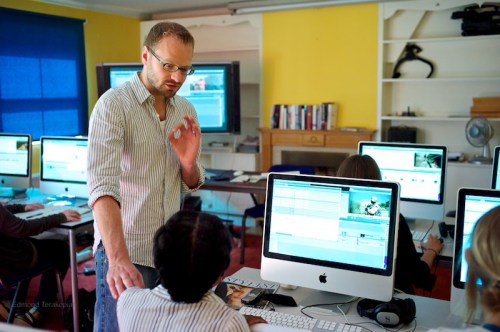
Simon Ruben commenting on an edit

Typically, the latter behaviour is often a fear of the unknown. The best action is then to learn about these tools, technologies and methods, then make up our minds.

Just as photographers we know how to edit our images; for video, we need to gain a knowledge of how to edit video. By far the most elegant way of editing video and the industry standard is Final Cut; in it’s cut down version of Final Cut Express and it’s fuller version Final Cut Pro (which comes as part of Final Cut Studio).

I’ve been using Final Cut Pro for a couple of years now, initially for doing complex photo slideshows and then for editing video. With practice and research I taught myself how to get by and even got an award for my editing. However I wasn’t fully proficient; I wanted to become efficient and take my editing to the next level. My desire was to begin editing like a professional editor.

Already a fan of The Frontline Club and a regular visitor to their excellent events of talks by prominent journalists, I was overjoyed to find that they hold Final Cut Pro Training Courses. I had already had the pleasure of meeting editor Simon Ruben, and when I realised he was teaching the course, I signed up immediately.

The course ran for five days at the club. All equipment (Apple iMacs, headphones, footage to edit with, course notes and really good coffee!) are supplied. I can’t recommend the course highly enough. Simon’s teaching style is wonderful; a very relaxed way that communicates knowledge in a way that’s natural and effortless. It’s definitely well worth taking off five days and doing the course. It’s helped me take my editing to the next level and I’m much more efficient in my workflow.

The great news is that the next course starts on October 18, so get booking!