Monthly Archives: August 2011

Installing an SSD into a MacBook Pro

Following on from my previous post on installing an SSD into my Mac Pro by utilising the optical bay (allowing a total of six drives to be installed in all) I decided to do a similar thing to my Apple MacBook Pro.

Installing an OWC Mercury Electra 6G SSD into an Apple MacBook Pro (15″, Mid 2010 model). The OWC “Data Doubler” bracket, SSD and the tools needed for the job. August 22, 2011. Photo: Edmond Terakopian

With cloud computing (storage of data, transferring data with services such as Drop Box and buying of software) and USB keys, we have become less reliant on optical drives (CDs or DVDs). It makes absolute sense to utilise this space by fitting a second hard drive. Other World Computing, or OWC, have a genius adapter called a Data Doubler which has the form factor of a laptop internal optical drive and is a bracket for holding a 2.5″ hard drive or SSD.
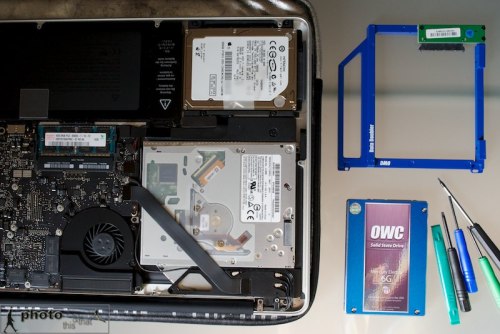
Installing an OWC Mercury Electra 6G SSD into an Apple MacBook Pro (15″, Mid 2010 model). With the cover off; the DVD drive where the SSD will be installed is on the bottom left. The OWC “Data Doubler” bracket, SSD and the tools needed for the job. August 22, 2011. Photo: Edmond Terakopian

Having found a European dealer, Macupgrade (superb service), I decided to order the parts needed for this project (You can also order direct from OWC):

OWC Data Doubler & optional USB SATA Optical Drive Enclosure
OWC Mercury Electra 6G 120Gb SSD
 

Rather handily, the Data Doubler comes with a full toolkit as well as extremely comprehensive instructions on how to fit it, covering a very large range of Mac laptops. What I found even more useful were the excellent instructional videos on the OWC site.
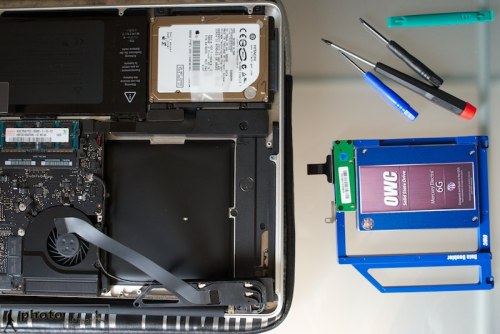
Installing an OWC Mercury Electra 6G SSD into an Apple MacBook Pro (15″, Mid 2010 model). With the cover off; with the DVD drive removed. This is where the SSD will be installed. The OWC “Data Doubler” bracket, SSD and the tools needed for the job. August 22, 2011. Photo: Edmond Terakopian

All in all, it took around thirty minutes to take out the DVD Superdrive, install the SSD and finally install the optical drive into the external USB case (which is also powered by the USB port, so no need for AC adapters). Whilst not complicated, it pays to take things slowly and follow the instructions to the letter as one is dealing with sensitive equipment with fragile wiring and circuitary.

Installing an OWC Mercury Electra 6G SSD into an Apple MacBook Pro (15″, Mid 2010 model). The OWC “Data Doubler” bracket and SSD installed, with the conventional hard drive on the right. August 22, 2011. Photo: Edmond Terakopian

What’s fantastic about this upgrade is having two separate hard drives inside a laptop. The SSD now contains OS X Lion and all my programs. It also contains my Aperture Library and images are downloaded onto the SSD for extremely speedy editing. Once I’ve done my edits, these are then exported as Projects to the conventional 500Gb internal hard drive. Also as I approach getting the SSD full, images in the Aperture Library, after backups, can either be deleted or stored on the conventional hard drive as Referenced Files and thus, still appear in the Aperture Library.

Installing an OWC Mercury Electra 6G SSD into an Apple MacBook Pro (15″, Mid 2010 model). The DVD Superdrive is then installed in the OWC external optical drive case. August 22, 2011. Photo: Edmond Terakopian

The same workflow will apply to video editing with Final Cut X; small projects will have video initially loaded into a Project on the SSD for speed and then moved onto the conventional hard drive for storage. Bigger projects will just be downloaded onto the conventional hard drive.

I’m extremely impressed with this upgrade; it has brought even more usability to my MacBook Pro and made it blisteringly fast too. Previously my boot up time (from cold) was 37 seconds; with the SSD, it’s now 12 seconds! Programs open in a flash too. I for one am hooked on this latest generation of SSDs with Sandforce controllers. Completely recommend the SSD path to anyone for whom time is precious!

Addendum:

Great news; the fabulous folks at Macupgrade have offered all readers a kind 10% discount on all items in their shop. Discount code: macupgradephoto

IMPORTANT NOTE: Depending on your model of MacBook Pro, installing the SSD in the optical bay as shown will not harness the drive’s full speed. Certain MacBook Pro models have a faster SATA speed channel for the hard drive bay than the optical bay. It’s worth researching your model of computer to ensure you gain the maximum speed benefit. For my particular laptop, the speed is identical on both SATA channels.

The regular Hard Drive is in the optical bay and the OWC SSD is in the HD Bay.

The regular Hard Drive is in the optical bay and the OWC SSD is in the HD Bay.
Leica Noctilux-M 50 mm f0.95 ASPH Review

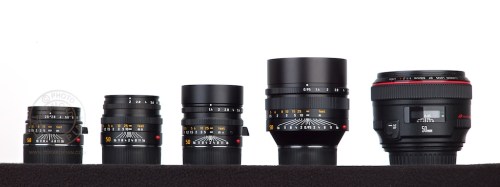
Comparison of current Leica 50mm lenses. Cheapest and smallest to the most expensive and fastest. L-R: 50 mm f/2.5 Summarit-M, 50 mm f/2 Summicron-M, 50 mm f/1.4 Summilux-M and 50 mm f/0.95 Noctilux-M, in front of a Leica M9 (Steel Grey). April 01, 2011. Photo: Edmond Terakopian

No other manufacturer offers as many 50mm lenses as Leica does for its M range. In the current line-up are four; the f2.5 Summarit, f2 Summicron, f1.4 Summilux and the f0.95 Noctilux. Along with 35mm, 50mm is the classic rangefinder focal length, so it comes as no surprise to find this many 50mm lenses available. Apart from purely the light gathering properties of them, each adds a unique signature to the image it creates; non more so than Leica’s Noctilux.

Comparison of current Leica 50mm lenses. Cheapest and smallest to the most expensive and fastest. L-R: 50 mm f/2.5 Summarit-M, 50 mm f/2 Summicron-M, 50 mm f/1.4 Summilux-M, 50 mm f/0.95 Noctilux-M and for size comparison a Canon EF 50mm f/1.2L USM lens. April 01, 2011. Photo: Edmond Terakopian

The Noctilux, meaning “Light of the night”, started in 1966 with an f1.2 version designed by Helmut Marx. A new design by Dr Walter Mandler in 1976 pushed the aperture to an astonishing f1.0 and along with redesigns of the lens body resulting in four versions, the f1.0 Noctilux continued until it was replaced in 2008 by the current f0.95 Aspherical Noctilux designed by Peter Karbe.

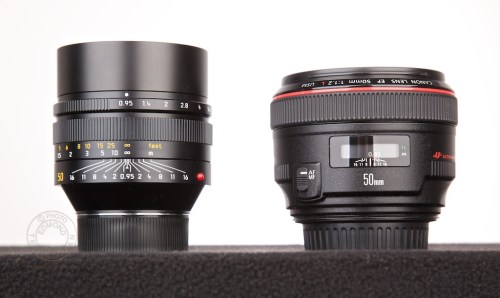
Comparison of current Leica 50mm lenses. The Leica 50 mm f/0.95 Noctilux-M and for size comparison a Canon EF 50mm f/1.2L USM lens. April 01, 2011. Photo: Edmond Terakopian

According to Stefan Daniel, Leica’s Director for Product Management, “the Noctilux 0.95/50 is one of the most demanding lenses currently in production and we can only assign production and assembly to the most experienced and skilled people in the whole company”. It is also the most expensive lens in the M and S range, costing £7348.00. It may therefor come as a bit of a surprise when one learns that it’s also one of the most in demand lenses with the longest waiting list (an honour it shares with the 35mm f1.4 Summilux-ASPH). According to the Leica Store Mayfair, one can expect up to a 12 month wait from the point of order.

English countryside, around Royston, Hertfordshire. June 13,2011. Photo: Edmond Terakopian

Although the lens itself takes 16 hours to assemble by hand, it’s the raw materials and optics, some of which have a rumoured 12 month period to cool from being cast, which add to the length of time required. There is some very exotic glass used in this lens.

Shot wide open at f0.95, using a B+W ND filter to lower the exposure and allow shooting in this way during daylight. English countryside, around Royston, Hertfordshire. June 13,2011. Photo: Edmond Terakopian

For the seeker of a Noctilux, there is the opportunity to look for one of the older f1.0 versions, which depending on model and condition seem to range in the £3-5000.00 on the used market, saving money and time. Although the f1.0 versions are fast and will allow similar use in low light, all but the current f0.95 version have a smooth. soft and “glowy” signature look when shot wide open. It’s a beautiful look that works extremely well for certain types of portrait and still life, but not suitable for everything. This limits it’s use as an every day lens and makes it a special use lens, meaning one needs a standard 50mm as well. The same is definitely not true of the current f0.95 ASPH Noctilux which not only allows photography in even lower light, but does so with such pin sharp precision that it makes the lens suitable for everything. It is in fact a superb standard lens.

Portrait of Armenian singer Charles Aznavour in his suite at the Ritz Carlton Hotel in New York, NY, USA, ahead of an event by the Fund For Armenian Relief (FAR); 20 Years Of Armenian Independence Honoring Mr Aznavour. May 20, 2011. Photo: Edmond Terakopian

In the days of shooting film, the Noctilux opened up possibilities with shooting in low light that would have been impossible, even with an f1.4 lens. However, in the days of digital, this isn’t as big a problem as one can, up to a limit, just push up the ISO. There is more to choosing a Noctilux though and I would suggest that more people choose it now days for it’s signature look than they do purely for it’s speed in low light photography.

New York Fire Department (NYFD) answer a call on the streets of New York. New York, NY. May 19, 2011. Photo: Edmond Terakopian

Apart from it’s cost, another aspect which sets it apart from the other Leica M 50mm lenses is it’s size. The Leica shooter is generally used to tiny lenses. However, to any SLR shooter, the f0.95 can actually seem small compared to the f2.8 zooms and compares favourably in size to Canon’s 50mm f1.2L lens; currently the fastest 50mm lens available for the SLR market.

In Use

Along with my M9, 21mm, 35mm and 90mm M lenses, I took the Noctilux on a four day assignment to Glasgow. The Noctilux turned out to be by far my favourite lens to work with and apart from three occasions, I came to realise that I had shot the entire assignment on it and I must say that the results looked rather special.

British street party on Enfield Road and the Lord Nelson pub, Brentford, Middlesex on the occasion of the Royal Wedding of Prince William to Catherine Middleton at Westminster Abbey on April 29, 2011 in London, England. Sisters in wedding dresses watch the wedding on a TV inside the pub. Friday, April 29, 2011. Photo: Edmond Terakopian

It takes a short while to get used to it’s size on an M camera. It’s so well made though with such a beautifully buttery focus movement that it just comes to hand very quickly indeed. One thing that constantly surprised me early on was just how little light I needed to make pictures. I was constantly taking down the ASA and in other situations where I thought I needed a flash, I kept realising that the available light was more than enough.

British street party on Enfield Road and the Lord Nelson pub, Brentford, Middlesex on the occasion of the Royal Wedding of Prince William to Catherine Middleton at Westminster Abbey on April 29, 2011 in London, England. A young girl in a wedding dress watches the wedding on a TV inside the pub. Friday, April 29, 2011. Photo: Edmond Terakopian

I have worked extensively with the 50mm Summicron and 50mm Elmarit-M f2.8. Both amazing lenses with great image rendition. However, nothing I have shot with, including Leica’s discontinued 75mm Summilux f1.4 or Canon’s 85mm f1.2L II, produce images like the Noctilux. The Noctilux’s images just pop. Your point of focus is pin sharp and rendered perfectly. Shot wide open the background blur is phenomenal and absolutely unique. Even Zeiss, which is known for its background rendition, can come close to how this lens renders.

A passer by reads the plaque by The Force of Nature II, sculpture by Lorenzo Quinn, Berkeley Square, London. March 03, 2011. Photo: Edmond Terakopian

It’s not all roses though. This lens is challenging to work with at f0.95. The depth of field is practically non-existent and one has to be absolutely spot on with focus. It’s therefor a good idea to send your Leica rangefinder back to Solms with your Noctilux to have them calibrated to match perfectly. Leica products are very accurately calibrated to within tiny tolerance margins; however, shooting at f0.95, all it takes is for the camera to be plus in the tolerance range and for the lens to be minus in the tolerance range and the image is slightly out of focus. This is an absolute must as otherwise one would just give up on the lens, judging it too challenging to work with. A big mistake, as the magic of the lens will then remain undiscovered.

Also, when at f0.95, strongly backlit subjects do sometimes suffer from purple fringing and in these situations it’s best to stop down a little.

Conclusions

The Leica rangefinder has always been a favourite with photographers who like to work with available light. The lack of a reflex mirror means that it’s much easier to hand hold at slower shutter speeds. With this ethos in mind and the fact that the f0.95 is by far the fastest lens currently available on the market for any full frame camera, it makes absolute sense to have it’s abilities. It creates beautiful images with a amazingly soft and fluid bokeh (out of focus detail rendition) that its makes your subject pop; it gives more dimension and depth to every picture. I’ve even heard people commenting on the pictures it creates as being 3D.

Shots around the book sellers on London's Southbank. July 22, 2011. Photo: Edmond Terakopian

Is it worth the asking price? Perhaps not for some photographers, as you could buy an M9 and a 50mm f1.4 Summilux-M ASPH for a fraction more. However, in a world where everyone shoots with the same equipment, with a sea of 24-70s, firstly the Leica M9 and any Leica lens will set your work apart. The Noctilux then takes this much further and makes it unique. It’s good to be an individual.

To view more images, visit my Leica Noctilux set on Flickr. This article was first published in the BJP in June 2011.

SSD – The Need For Speed

Upgrading the Mac Pro to SSD

The main cause of a sluggish computer is generally a low amount of RAM, slow processors and slower hard drives. The best advice I can give anyone who wants to speed up their machine and also make it more stable, is to upgrade the RAM to as much as can be afforded. Processors are generally hard to change out or upgrade (as this will often mean either complex adapters or a new motherboard) and hard drives usually do make a noticeable difference when going from 5400rpm to 7200rpm and then to 10,000rpm.

Upgrading the Mac Pro to SSDs. After opening the side, the DVD drawer is slid out half way to allow the bable to be unplugged from the rear of the drive before fully removing the tray. August 02, 2011. Photo: Edmond Terakopian

A few years ago I got my first ever computer with an SSD; the original MacBook Air. The speed with which it booted up and programs started up was stunning. Roll on a few years and SSDs have come into their own. They are not only much faster but have also dropped significantly in price and the best ones even maintain themselves.

Upgrading the Mac Pro to SSDs. Rather helpfully, the late 2009 Mac Pro has two SATA cables with power connectors in the DVD drive bay. August 02, 2011. Photo: Edmond Terakopian

I recently decided that I was going to upgrade my Mac Pro to an SSD drive. I use my machine to do image processing (using Aperture), hold my fully searchable archive of around half a million images (using Aperture) and also edit video using Final Cut Pro. The launch of Apple’s OS X Lion seemed like the perfect time and I set to researching the SSD market.

Upgrading the Mac Pro to SSDs. The OCZ SSDs; primary boot disk will be the 240Gb Vertex 3 Max IOPS and the secondary will be the 120Gb Agility 3 - shown with a traditional 3.5" hard drive for size comparison. The DVD tray is to the right. August 02, 2011. Photo: Edmond Terakopian

I decided to go for an OCZ Vertex 3 240Gb Max IOPS SSD. This has a Sandforce controller (fast becoming a standard and something you should go for both for speed and also maintenance abilities – basically cleaning out any garbage that is accumulated as files are deleted). This would be my boot drive. Thinking things through and being a huge fan of Final Cut Pro X, I wanted to use it as my main editing program, so realised that having a dual boot system would be best as I could then install Final Cut Pro Studio (FCP 7) on the second boot drive, giving me full access to my older video projects (Apple recommends using separate partitions or boot drives for best results). For the second drive I went for a smaller and cheaper drive; a 120Gb OCZ Agility 3 SSD.

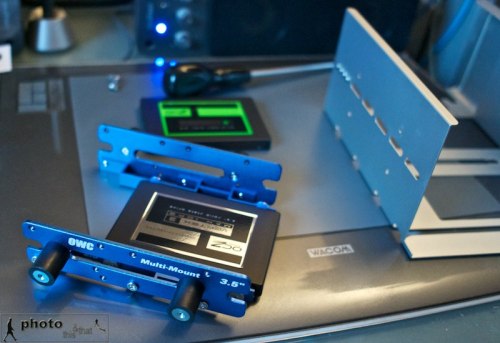
Upgrading the Mac Pro to SSDs. The OCZ Vertex 3 mounted in the OWC Multimount. August 02, 2011. Photo: Edmond Terakopian

With my Mac Pro already having all four drive bays filled, I looked to OWC for a solution. They have a very neat adapter that lets a 2.5″ or 3.5″ hard drive get mounted in the CD / DVD drive bay of the Mac Pro. I had seen this several years ago and feared it unstable because of heat buildup (This bay doesn’t have an intake fan) but knowing that SSDs produce practically no heat (and consume minimal power) meant that it was the perfect solution. Alas I ordered the mount before I had decided on having two SSDs so I also found a similar adapter in the UK made by Akasa which I promptly ordered. I must say that I do prefer the OWC method and may well get another one of their multi mounts!

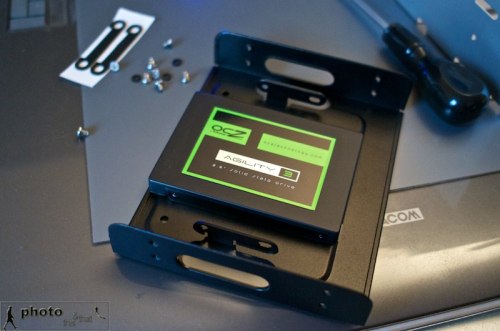
Upgrading the Mac Pro to SSDs. The OCZ Agility 3 mounted in the Akasa SSD & HDD Adapter. August 02, 2011. Photo: Edmond Terakopian

My machine is an early 2009 Mac Pro which very usefully already has twin SATA and power cables coming into the DVD drive bay. Earlier models will have the cable for the optical drive and a spare port on the motherboard, for which you will need a SATA cable and a power cable (probably with a MOLEX splitter). My other problem was that as all 4 HD bays were populated and I wanted to use both the DVD bay cables for the two SSDs; what to do about having a DVD drive? I decided to do away with it! With most software being downloaded and image delivery to clients via Cloud drives (like MobileMe and DropBox) the need for a DVD drive was not a priority. For those occasions when I might definitely need one and also for exploring making BluRay films, I decided to get a portable slimline LaCie x6 BluRay drive. This would also come in handy if I decide to fit an SSD drive in the DVD bay of my 15″ MacBook Pro someday!

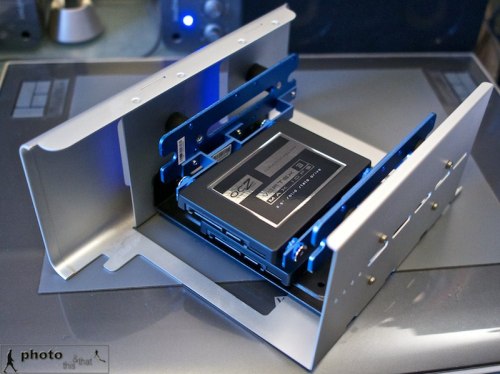
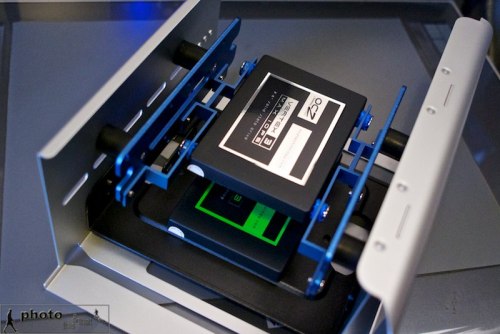
Upgrading the Mac Pro to SSDs. Both OCZ drives in their adapters, fitted to the DVD tray, ready to be installed. August 02, 2011. Photo: Edmond Terakopian

The Mac Pro case (which is a work in design genius on every level) was opened and the side taken off. The DVD tray was then pulled out sideways but only half way. The cable was pulled out from the DVD SuperDrive and the tray was removed fully. The SSDs were then installed, leaving a lot of space between them for air to circulate (even though they do run cool – the cooler, the better in my opinion). The tray was put in halfway, both SSDs were attached to the cables, tray was pushed and everything closed up.

Upgrading the Mac Pro to SSDs. Both OCZ drives in their adapters, fitted to the DVD tray, ready to be installed. August 02, 2011. Photo: Edmond Terakopian

I first started with installing Snow Leopard onto the Vertex 3 SSD and then upgrading it to OS X Lion. Setting were transferred via transfer wizard and I installed all the programs from scratch (using remote disk to access the DVD drive on another machine). I then emptied all the excess stuff from the old hard drive to make it smaller in used capacity and cloned it,  using Carbon Copy Cloner, onto the Agility 3 SSD.

Upgrading the Mac Pro to SSDs. Both OCZ drives in their adapters, fitted to the DVD tray, being installed in the Mac Pro. August 02, 2011. Photo: Edmond Terakopian

The speed difference is amazing. The OS boots up in a matter of seconds and programs open up in a flash. Extra RAM is definitely the first step to a faster and more stable system; changing out your hard drive for an SSD is a very close second!

To give an idea of speed, my old drive was an extremely fast, enterprise class WD VelociRaptor HD spinning at 10,000rpm. It has a sustained read and write speed of 126MB/s. The OCZ 240Gb Vertex 3 Max IOPS has a maximum read speed of 550MB/s and write speed of 500MB/s. That is some speed increase!

Addendum: Although for this project I used a Mac Pro, the same principle is true when  installing a compatible (most 2.5″ drives will be) SSD into a MacBook, MacBook Pro, iMac (although much more complex & possibility of voiding warranty – so do check) and PCs of most shapes and sizes. An SSD will speed up your boot time, the startup of any programs, access to any files on the SSD as well as faster shutdowns. You will also gain from less heat, no noise and less power being consumed.

Since writing this article, I have found a European dealer for OWC products called Macupgrade. The team there have kindly offered readers of the blog a 10% discount across the store. Code: macupgradephoto