Canon iPF6300

Large Format Printer Review

A while ago Canon contacted me asking if I’d be interested in evaluating a new printer they were about to launch. At this early stage things were pretty hush hush, but I showed my interest and as time went on, it turned out to be a new 24” roll printer, part of the large format printer range, the iPF6300. The main reason they had approached me turned out to be that this is the first large format printer they are pitching towards photographers as opposed to graphics studios or labs.

The Canon iPF 6300 Large Format Printer shown with a 24" roll of paper. Photo: Canon

With it’s 12 Lucia EX inks which are reported to last 120 years, the 24” width (meaning prints can be as long as the roll of paper will allow at 24” width) and infinite paper media handling abilities, it seems very apparent that this was indeed aimed at us and my appetite grew as I awaited its delivery.

As most photographers who look into printing in-house, I’d owned several A3 printers and was happy with my current printer, an A3+ capable Canon 9500 MkII. This “little” printer performed admirably, gaining complements from several quarters. However my appetite was for bigger prints and the timing of the iPF6300 was spot on perfect.

On setting up, a special calibration roll of paper needs to be installed in the printer. A special pattern is printed on this reference paper and the built in calibration device reads this pattern of shapes of colour to adjust and set itself up for all of the Canon papers for one’s geographical region. This means that as long as the correct ICC profile is chosen, the print will be perfect.

Although Canon’s gloss paper is very good and the Glacier paper (which is a heavyweight lustre paper) is now a favourite, my main interest was to try some third party papers, and specifically the Hahnemuhle range. Canon bundle a media configuration software for just this purpose when using papers outside of the Canon family. Once the roll of paper is installed (very straight forward – do use gloves though to keep your paper clean), the paper’s surface finish and weight are input into the software and an option to do an automated setup is offered; highly recommend you use this option. The printer then prints a test pattern, reading the pattern as it prints. This helps the printer set up the advance rate, vacuum strength and printer head height, optimising it for this paper. All this info is saved and sent to the printer for future use and is only done once for a new paper type. As long as this setup is done and a correct ICC profile is used, prints are printed to perfection.

One downfall of testing a printer which has not yet been announced is that ICC profiles are not easy to get hold of. Hahnemuhle kindly supplied their profiles before going live with them, but the papers I was testing from Innova and Olmec didn’t have profiles. X-Rite however came to the rescue lending me a ColorMunki calibration tool. I used the device and software to calibrate my screen and set about making my very first paper ICC profile which proved to be extremely easy. In no time I had profiled all the papers and dove into to the task of testing the printer with colour and black and white images, on 12 rolls of Canon, Hahnemuhle, Innova and Olmec papers I had to hand.

After printing my first A1+ sized print, once the awe of it’s size had subsided, I realised just how good this printer was. In my rush I’d just wanted to do a rough test print just to see. However this test print was stunning! The printer was showing it’s abilities straight from go, the media configurator and superb Canon Photoshop printer plugin working swiftly and efficiently. To finish, the ColorMunki had set up perfect ICC profiles.
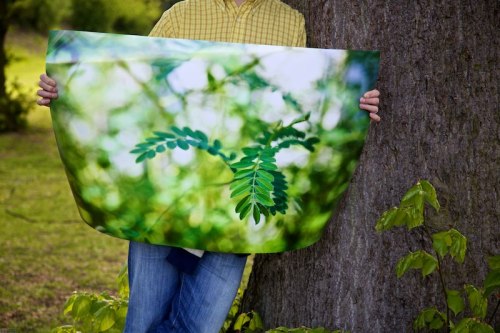
A1+ sized print, printed on Canon's Glossy Photo Quality Paper from the Canon iPF 6300, in a park. London. Photo: Edmond Terakopian

I threw image after image at the printer. Bright, highly saturated colour images, gentle, pastel coloured subtle images, contrasty and punchy black and whites and gentle and soft mono shots. Time and time again, the prints left me speechless. It didn’t matter what kind of photograph I was printing, or if the paper was matt or gloss, it performed brilliantly, time and time again. The only problems I had were one darkish and muddy print which turned out to be my fault as I hadn’t chosen the correct ICC profile in the printing plugin and an occasion where the heavyweight Innova FibaGloss 300 paper had scuff marks on one part of the print. I suspect that this is because of the curvature of the heavyweight paper and it’s gloss finish and that setting a stronger vacuum setting would hold the paper flatter. I also had issues with the Olmec Photo Satin 260 which if viewed from an angle produced a solarised look. Lastly the printer driver constantly crashed Aperture 3, but this I’m sure will be fixed by Canon in time as their other printers work perfectly with Aperture.

In the printer’s plugin (as in the print driver), there is an option to set the print quality to standard, high or highest. My initial reaction at seeing the option was to use highest for all my work but decided to explore further. Having made prints from the same image on all settings, initially I couldn’t see any difference; they all looked good. On further and close scrutiny, I began to see some very subtle differences. The image was from a model shoot on a 50 megapixel Hasselblad H3DII. On inspecting the pupil, the highest setting had rendered some of the subtle changes in tone and fine detail better; but only marginally when compared to the standard setting and the high setting produced an almost similar result. This is great news as it means that printing on lower setting produces much quicker prints and also saves on ink. On the subject of saving, apart from the initial outlay, running costs are cheaper when compared to smaller printers.

Upon ejecting the paper, the printer can be set to print an identifier barcode which contains information of the paper type and also length of roll remaining, which I found extremely useful and an idea that is to be commended; with good quality papers demanding a premium, the last thing I would want is to mix up papers which would lead to wastage.

I also must comment on the printer’s quietness in use. My office is generally pretty compact.  Considering the size of prints it’s capable of, the unit’s relatively compact and quite when printing. The fact that it’s also such a speedy machine means that the printing’s done quickly and total silence returns with haste; a must in a creative environment.

As the days went on, I began to start to admire some of the papers more than the others. I need to add though that all the papers, once setup, worked admirably well. My favourites ended up being the Canon Glacier and the Hahnemuhle Photo Rag 308 and quite possibly my absolute favourite, the Hahnemuhle Photo Rag Baryta. Every highlight detail, every shadow subtlety was printed with absolute precision.

Having been a photographer for over 20 years, I’m from the school of hand printing, for which I have a couple of Kodak Press Awards. Having spent over a month or so with the Canon iPF6300, it’s the first time that I can confidently say that I can match anything I could do in the darkroom. For me, a higher accolade for a printer would be hard to come by.

Secure Your Gear

Combination padlocks are extremely practical. Attached to a Think Tank Photo Urban Disguise shoulder bag. Photo: Edmond Terakopian

Photography equipment is expensive; everything from cameras to lenses to computers, is expensive. We often spend months or even years saving to get a particular piece of equipment and once we have it, we stop looking after our investment once at work, instead focusing on the assignment. Thankfully there are certain products and practices to help us safeguard our equipment whilst working. After all, we need to concentrate on our assignments and not on the safety of our gear. Most theft is opportunistic; these measures will stop the opportunist thief.

Out On The Street

I have known of press photographers having their backpacks containing laptops and spare camera equipment swiped off the street whilst they concentrate whilst working long doorstep type jobs (at courts, hospitals, politicians homes and so on).
It’s easy to put our bags down as fatigue sets in. A very simple precaution is to make sure that all the zips have padlocks on them. I personally use combination locks which means that there is no need for keys. This is good practice as it will stop a thief from opening your bag in crowded places like the tube.
To stop the bag from being stolen fully, I also make sure that my bags have cables with combination padlocks on them. These are available from most good outdoor shops, luggage shops or bicycle shops. All that remains is to find street furniture (fencing, posts and so on) or a tree to lock the bag too. Worse case scenario, you can also lock several bags together, making it impossible for someone to do a runner with them.

Hotels

Showing my travel set-up for an assignment in Canada using ThinkTank Photo's Airport International 2, padlocked to a bath tub handle in my hotel. Photo: Edmond Terakopian

Whilst on foreign assignments, it’s often the way that equipment is transported using roller type cases and then use either pouches or a shoulder bag to work from whilst on the ground. The roller bag then being left behind in the hotel room. We also leave the roller bag fully kitted out when popping out to eat. Again, we are taking huge risks, leaving essential gear at the mercy of anyone who has or gains access to the room.
Thankfully Think Tank Photo roller bags have built in security measures with padlock zips and importantly a security cable attached to the bag’s chassis. It’s then a matter of finding something solid in the room to padlock our cable to. My personal favourite are bathtub handles.
These same security precautions should be carried out at press conferences, fashion weeks and so on.

Cafes

Cafes have turned out to be favourite wiring places for photographers; they provide essential coffee and broadband. I was in a situation where a colleague sat in front of me in a Starbucks had his Canon 1D MkII with 70-200mm f2.8L stolen from under his chair. The thief was so gentle and swift that neither of us noticed until long afterwards. My general precaution is to make sure that I put my leg through camera and bag straps when placing items on the floor.

The Car

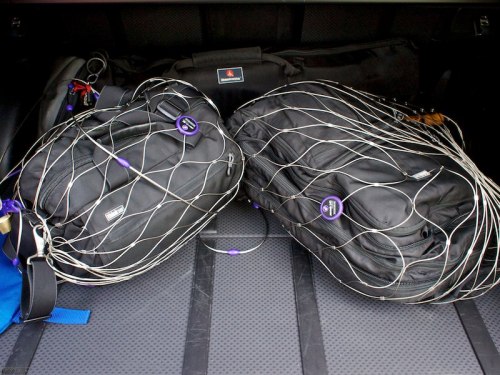
PacSafe Exomesh secures two bags to luggage hooks in the boot of a car. Photo: Edmond Terakopian

Our cars are another place where we leave lots of kit. Firstly, make sure that your doors are locked; this will stop the opportunist if they see a bag or camera on your seat when stopped at a red light or parked up in a street. Naturally, never leave any of your equipment in view, making sure that everything is in the boot, if you are parking the car and away from it. This also ensures that your insurance company will pay out if there’s a theft from an unattended vehicle.

One of the ways we are targeted by thieves is if someone observes us taking equipment from our boot; if possible, it’s always better to take away gear in a shoulder bag, or make sure no one is watching if you’re just grabbing a couple of cameras. The other is purely opportunists hoping to find a laptop; estate cars are especially at risk as the rear covers are easily ripped open after the rear window is smashed.

The cheapest way to secure your gear, especially if you have a Think Tank Photo bag is to lock it’s security cable to a luggage hook; this will stop the opportunist especially if they set off your car alarm. The next best and more secure way is to use a PacSafe Exomesh which covers your bag and allows you to attach it’s cable to a luggage hook in the car. The advantage with system is that it’s mobile so you can take a PacSafe Exomesh with you when abroad and use it in hire cars. They are also useful for hotel rooms.

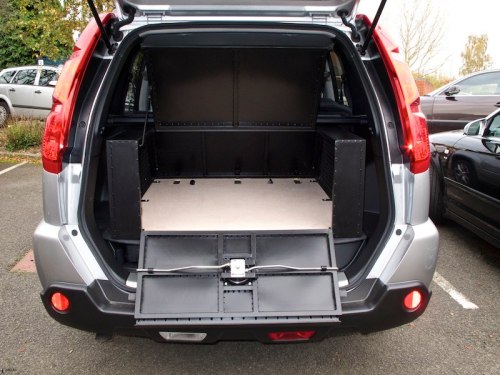
ATHAG Guardsman custom made security cage. Photo: Edmond Terakopian

Next comes the more secure metal cage approach. These are custom made for your needs and for your car. Anything from small hatchbacks to large estate cars and 4x4s are catered for. These are then secured to luggage hooks or even to the car’s chassis making them extremely secure. To top things off, they have multi point locks making the opening solid and secure. The two leaders in this field are Athag (my personal choice) with their Guardsman range and Barjo.

Look after your gear so you can get the job done.

Season’s Greetings

Click on the image for a video message! Wishing you all a very merry Christmas and a superb new year 🙂

Leica M9 Titanium

My day with one of the most exclusive digital cameras ever made

World Exclusive

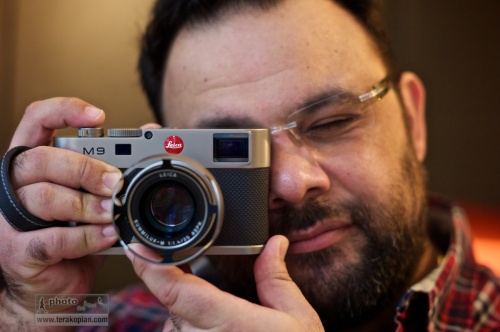
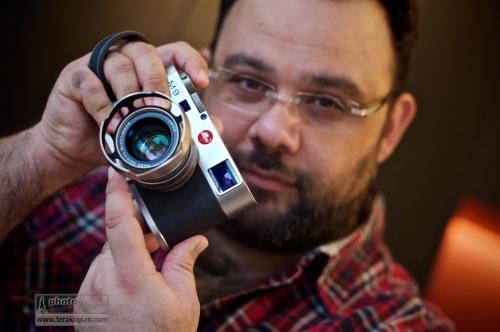
Photographer Edmond Terakopian tests the limited edition Leica M9 Titanium. November 12, 2010. Photo By Brett

There were rumours abound before Photokina 2010 about Leica bringing out a new camera; talk of an M9.2, a different digital M and even a digital body that would take the Leica R lenses. Well, the different digital M turned out to be right, but who would have thought it would be anything like the Leica M9 Titanium, or Titan as it’s also called?

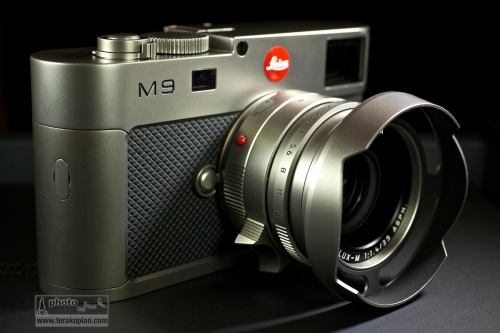
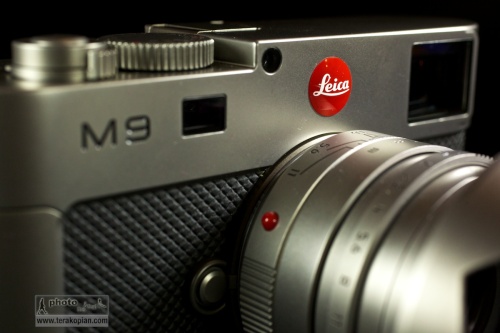
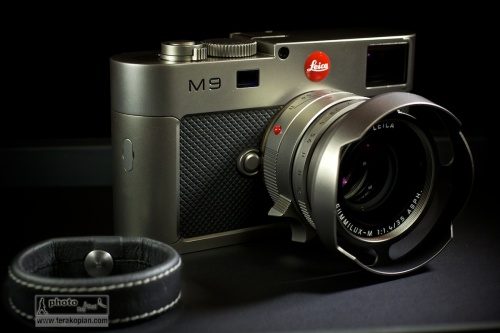
The limited edition Leica M9 Titanium, complete with Summilux-M 35mm f1.4 ASPH in Titanium. November 12, 2010. Photo: Edmond Terakopian

I must admit to not being a big fan of the limited editions that companies produce; I’m a photographer and want tools which are reliable and produce the utmost in imaging quality. I’ve often sighed to myself when I’ve seen limited editions of the M6 or M8. My thoughts at the time were always the wish that Leica would stop concentrating on these and put all their energy into making a ‘proper’ digital rangefinder. For me, the M8 and M8.2 just didn’t cut it. Well, the M9 certainly does cut it and ever since reviewing it for the BJP at launch, I’ve been saving for my own M9 which I recently bought. Leica has changed a lot in recent years; fresh thinking has brought amazing products like the S2 and some stunning M optics as well as the wonderful M9. So, considering the current lineup, I didn’t sigh when I first saw pictures from the launch, but was rather intrigued.

The M9 Titanium though is an absolute departure from putting exclusive leathers and other materials onto the normal camera’s outer casings. Although it has an M9 at it’s heart, it has a completely a new casing, even down to the base plate. There is also some new technology in the viewfinder, more of which later. As it’s name suggests, the material is Titanium; tough and light – pretty much ideal for a camera. Every piece of exterior metal is made from solid Titanium and the body is covered in beautiful high grade leather.

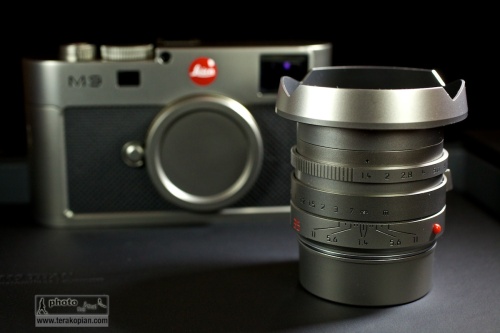
The limited edition Leica M9 Titanium, complete with Summilux-M 35mm f1.4 ASPH in Titanium. November 12, 2010. Photo: Edmond Terakopian

So, what to do about designing the camera? Well, the answer surprisingly was to approach a car designer; to quote Leica:

“The exclusive special edition Leica M9 “Titanium” is the result of a collaboration with Walter de’Silva, the prominent automobile designer. Responsible for groundbreaking design concepts for the latest models from the Volkswagen Group, the chief designer and his Audi Design Team have re-interpreted the design of the LEICA M9 just as he envisaged it. The outcome is a unique camera with a new interpretation of the characteristic features of Leica rangefinder cameras, which lends precision engineering, unique style and solid titanium to extraordinary formal design.”

It may seem a strange thing to do as cars and cameras are so extremely different, but seeing the camera, I must say that the collaboration is an absolute success. In the pictures first released, the camera and lens looked good, but in real life, it looks and feels superb.

In the days of film, I used to have a Leica 35mm f1.4 Titanium lens – I must say I always loved the way it felt. Well, this camera takes that feeling and multiplies it many times over. I can’t think of anything that can make an M9 feel cheap, but the M9 Titanium does just that! As much as I admire the look and the feel of the camera, I also absolutely adore the lens. The ‘kit’ lens is Leica’s extraordinary Summilux-M 35mm f1.4 ASPH. This too is created using solid Titanium and also comes with a beautifully crafted Titanium lens hood, specifically made for the camera. Even the red Leica badge is custom made from resin and hand-engraved with enamel for the camera. There is also an interesting leather holster for the camera, which again was specifically designed and made for the camera. All of this is packaged up in the most beautiful of presentation boxes, including a gorgeously printed book showing the journey of the camera’s design, from concept to reality.

The limited edition Leica M9 Titanium. Summilux-M 35mm f1.4 ASPH in Titanium. November 12, 2010. Photo: Edmond Terakopian

The good news for the collector is that there are only 500 of these to be made. As I mentioned earlier, this isn’t one of the ‘normal’ limited editions, but a completely new design of camera, in solid Titanium. Price of such exclusivity is £19,800.00. I’m not really a collector, so don’t know much about such things when looked at as investment, but to me, a completely unique camera does make investment sense. Now, if only I could win the Lottery!

In Use

Thanks to the wonderful folks at Leica UK and the Leica Store Mayfair, I was able to spend a day with the M9 Titanium. Naturally all the testing was done in the office; even if Leica would allow it, I wouldn’t feel comfortable taking such an exclusive and irreplaceable camera out on the street. I need to add though that this camera isn’t part of the 500 but a pre-production proof of concept model; after all, the Leica Stores need to have cameras to show collectors before orders are placed. The one I used had the serial number 6.

Photographer Edmond Terakopian tests the limited edition Leica M9 Titanium. November 12, 2010. Photo By Brett

In the hand, this camera really feels great. The weight and feel of the materials is just perfect. Aesthetically, I think, it works really beautifully, but the feel of the thing is also spot on. Every part of the body, and that gorgeous lens just work. It’s form, function and material in perfect harmony.

Test images shot with a Leica M9 Titanium. Photographer Brett from the Leica Akademie. November 12, 2010. Photo: Edmond Terakopian

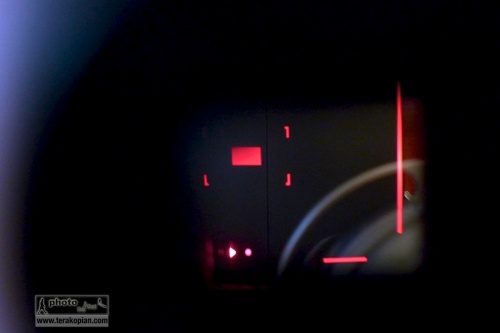
One of the first things I wanted to see were the new LED illumintaed frame lines in the viewfinder. Traditionally, these are bright-line overlays. In use, these have served me well for a decade; however, in very bright conditions where the subject has a very light coloured background, they can disappear. The M9 Titanium has a completely new system where LEDs are used for illuminating red frame lines. These are much easier to see; very crisp and accurate. It took a few minutes to get used to, but I think I would welcome this system in future M cameras. Aesthetically this removes the need for an illumination window on the front of the camera, adding to a cleaner look.

The limited edition Leica M9 Titanium. LED bright line frame lines. Unfortunately I couldn't photograph it showing the entire frame, so this image shows the bottom right hand corner. November 12, 2010. Photo: Edmond Terakopian

One thing which did surprise me was that the frame lines still showed the lens pairings as they have traditionally done, e.g. 28mm and 90mm. I was expecting that the system would show just one set of frames for the mounted lens. I guess though that this would need to read the 6-bit coding to differentiate between the lens pair. Perhaps in the evolution of the M line we shall see this function.

Looking at the outside, one thing which is absent is the manual frame-line selector lever. There are some die-hards on certain forums which mourn it’s loss, but I for one have never found a need for it. I already know the field of view a 50mm is going to give me compared to say a 28mm; the need for changing this manually before choosing lenses is, I think redundant. The M9 Titanium looks so much better and cleaner for not having it.

The Summilux-M 35mm f1.4 ASPH is a superb lens; the results just sing. To have it made from Titanium just makes it feel even better in the hand. It’s an absolute joy operating this camera, looking through that superb viewfinder and focusing this gem of a lens; it just feels absolutely spot on.

Test images shot with a Leica M9 Titanium. November 12, 2010. Photo: Edmond Terakopian

Apart from the material and design differences, it just handles like an M9; it just feels even better in the hand. I walked around the office taking portraits of some of the folks there and also some shots of the studio and other shots through an open window. I must admit that it’s the first time in my 21 years as a photographer that I’ve felt privileged using a particular camera; it was a real treat.

The Carrying and Holding Concept

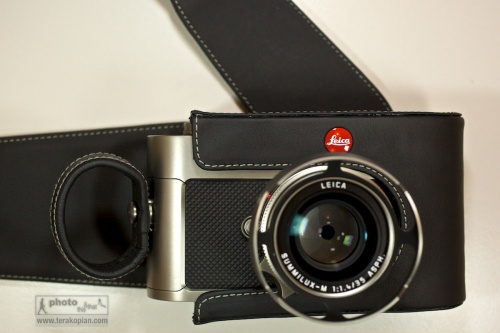
The limited edition Leica M9 Titanium. November 12, 2010. Photo: Edmond Terakopian The limited edition Leica M9 Titanium. The carrying system comprising of the leather holster and the finger loops. November 12, 2010. Photo: Edmond Terakopian

I think one of the obvious things is that this camera will probably never really be used as a photographic tool, but more of a collector’s piece. As a result, I’m looking at these ideas as concepts and not as real world suggestions for working with the camera. As concepts, they are very interesting. The holster is a new approach and is made beautifully out of very high grade leather. I for one would never use it in real life situations though.

The limited edition Leica M9 Titanium, complete with Summilux-M 35mm f1.4 ASPH in Titanium. The finger loop is shown on the bottom left. November 12, 2010. Photo: Edmond Terakopian

The finger loops, which are metal and covered in leather (and come in two sizes) are slightly more usable. The very first time I held the camera (you insert two fingers through the loop), it felt strange but quickly became quite comfortable. With use, one acknowledges that it’s actually quite a neat system and very secure. I would probably opt for the included carrying strap though as I’m just used to having a camera on my shoulder. This new one sided mounting system does away with the traditional strap lugs at either side, again making for a very clean look.

Reality

I would love an M9 Titanium in black paint. I generally shy away from shiny cameras for my work. The less attention, the better considering some of the environments I work in. Titanium is wonderfully strong and light and is the perfect metal for these tools of ours. Alas, it’s expensive and harder to work with, needing special tooling. The M9 Titanium also has a special hard coating which is applied in Switzerland, so this camera, even if mass produced will never be cheap. Still, as a photographer, a black, or very dark and matt coloured Titanium Leica would be fabulous.

Test images shot with a Leica M9 Titanium. Photographer Brett from the Leica Akademie. November 12, 2010. Photo: Edmond Terakopian

The current M9 Titanium is a thing of beauty. Everything about it is pure elegance; not just elegance though as it’s combined with absolute usability and stunning design which marries the aesthetic with the practical. As someone who prefers black, I can look at this camera and I still appreciate it’s gorgeous looks and even the colour. How good does it feel? Just think about my earlier comment that it makes the regular M9 feel cheap.

For a set of picture taken with and of the Leica M9 Titanium, please visit my Flickr page.

©Edmond Terakopian

Autumn

Autumn_Leaves-2010-076

Here’s a quick slideshow I put together of images of autumn shot on a Leica M9 with a 35mm Summicron ASPH, 50mm Elmar-M and 50mm Nokton.

The whole thing was edited in Aperture 3. The slideshow, text and music were done in Aperture 3 also. The black and white conversions at the end were done using Nik Software’s Silver Efex Pro.


Canon Pro Photo Solutions 2010

Business Design Centre, Islington,
London, 26 & 27 October

Canon Pro Photo Solutions is now in it’s second year and I have to say, its the best trade show I have ever been to. It’s more focussed towards professional photographers and enthusiasts who are at the top of their game. I really can’t urge you enough to check it out.

The format is in two basic forms; a large number of seminars and also exhibitors showing off their newest kit.

This slideshow requires JavaScript.

Photos By: Ant Upton, Antje Bormann, Jeff Ascough, LP & Luke MacGregor.

I’ll be there presenting my work and workflow (both photographic and video) in a seminar called “Moving Forwards With Photography & Video” over both days, in Seminar Room 1 from 14.00 to 14.50.

I’m also going to be with SnapperStuff (stand 49) showing my favourite ThinkTank Photo bags and helping anyone with their questions to do with bags or anything else to do with photography or video. Definitely try and pop by and see the new Retrospective and Sling range.

Hope to see you there!