Category Archives: Review

We’re On An App!

PhotoVerse Includes This Blog

It’s not everyday that one get’s included in an app, so I was delighted when the folks at Kolekse got in touch to say they would like to feature my blog on their PhotoVerse app.

This slideshow requires JavaScript.

To quote the company, “PhotoVerse is a utility application developed by Photographers for Photographers. Photoverse collects information from multiple news sources and blogs related to photography, pools them and presents them to you in an easy to read scrollable list.It is a great way to keep tab of the latest happenings in Photography”.

It works perfectly and is a very neat and quick way of keeping an eye on the blogs that matter to you.

PhotoVerse works on your iPhone, iPad, iPod Touch and an Android version is in the works. You can grab it from the iTunes Store or just search for in in the App Store from your device.

To celebrate being in this app, I’m giving away five free codes for the app. I’ll randomly be choosing five people from Twitter (by Friday, March 4th, 2011) who Tweet the following:

RT @terakopian’s #blog https://photothisandthat.co.uk/ is now on the PhotoVerse App. #photography RT to win 1 of 5 free copies.

So, get Tweeting folks 🙂

Zacuto Striker & Z-Finder Review

Photographer and film maker Edmond Terakopian using a Canon 5D MkII, Zacuto Striker and Z-Finder Pro x2.5, Think Tank Photo Wired Up 10 bag, Zoom H4-n and Rode NTG-3 mic The wedding of Sheleen and Ben. August 28, 2010. Photo: Jeff Ascough

No one can deny the revolution that was started by Canon when it launched the 5D MkII. It certainly is a great stills camera but it was the quality of the video which stunned the world of video; everyone from the film student to the Hollywood studio.

There are some shortcomings of DSLRs for video though. The form factor being one. The image quality though is so stunning that most film makers are willing to make compromises in order to harness this unbelievable quality. To help overcome the form factor and make it easier to use the camera when handheld (or ‘run and gun’ to borrow a phrase by TV cameramen), several companies are making rigs to allow the camera to be held in a more conventional way, resembling the way a video camera is traditionally held. The two main companies making these rigs are Zacuto and Redrock Micro, with their ranges starting with minimalist hand held rigs, all the way to full on shoulder mounted and cinema rigs with follow focus units and balancing weights.

Part of the challenge for me was to find a rig that packed quite small yet gave maximum support. It needed to fit into my main work as a photojournalist yet feel at home on a short film set. After a lot of research and trying out equipment at trade shows, I had a long chat with Dave Beck at the Flash Centre and finally settled on the new Zacuto Striker as probably the ideal solution and a long term road test began in July.

Another shortcoming of these DSLRs is that the rear LCD screen is used when shooting video, making it awkward to check for focus on the fly or the checking of fine detail; these problems get even worse in bright conditions. The answer is to use a finder which attaches to the rear LCD. Zacuto are by far the leaders in this field. Their original Z-Finders required a frame to be stuck to the back of the camera and the finder attached to this. The new finders, the Z-Finder Jr and Z-Finder Pro, attach onto a frame which is held in place by a plate which screws into the tripod bush. I personally welcome this new adhesive free method as it overcomes many of the associated problems.

The Z-Finders

At £214.42 (inc VAT), the Z-Finder Jr is cheaper than the Z-Finder Pro which comes in x2.5 and x3 magnification versions, costing £326.75 (inc VAT). The main differences are the way the finder is held to the camera, with the Jr using a metal plate with a prong to clasp the eyepiece hood. This plate then needs either a tripod plate or a Gorilla Baseplate (not supplied) to attach itself to the camera. The Pro versions come with a Gorilla Baseplate which fits to the camera and then has two bushes for attaching the frame, with thumbscrews, to the back of the camera. The hood then snaps onto this frame. Whereas the Jr version is a more fiddly affair to attach and remove, the Pro versions simply snap on and off when needed. This is a huge feature in the field, especially when needing to switch to using the camera’s eyepiece for stills photography.

I found the Jr finder’s optics to be absolutely fine, but the Pro’s are better still and have a very neat focusing ring allowing you to tailor it perfectly to your eyesight. The Pro version also has an anti fogging eyepiece which is extremely useful.

Photographer and film maker Edmond Terakopian using a Canon 5D MkII, Zacuto Striker and Z-Finder Pro x2.5, Think Tank Photo Wired Up 10 bag, Zoom H4-n and Rode NTG-3 mic The wedding of Sheleen and Ben. August 28, 2010. Photo: Jeff Ascough

The Striker

I must admit that the first time I saw the prices for Zacuto gear I was shocked.  On the face of it (forgetting R&D for a moment), these rigs are just bits of hollow piping with a few locking mounts, a plate, handles and so on. What becomes immediately apparent though is just how solid these locking mounts are. The last thing you need is for your camera gear to loosen and wobble around or at worst crash to the floor whilst filming. Having seen less well manufactured rigs, it became obvious why Zacuto charges the way it does; it’s an extremely well engineered product.

Road Tests

I took this kit onto the filmset for a short film by Samuela Memmo (Sten & Stef Films) which we shot over four solid days. The filming was indoors, with some outdoor work, balcony shots looking down and even some shots inside a cramped car. The four days certainly gave the gear a proper workout. Although the majority of the shots were locked on a Gitzo tripod, the Striker really helped me use a second camera and do additional footage which enriched the film.

I didn’t once find a need to tighten any of the mounting clamps and the Striker worked perfectly. I wasn’t as happy with the Z-Finder Jr which had a tendency to move around when placed down in between shots. This led me to swap it out for the Z-Finder Pro x2.5.

There have been reports about the x3 magnifying the screen a little too much to the point that one can see pixels; these reports helped me in my choice of the x2.5 version which works perfectly. The mounting method is so much better than the Jr and this point alone is worth the extra money.

The next full-on outing for the setup was a wedding I filmed along with legendary wedding photographer Jeff Ascough. The compact nature of the rig meant that we could work very quickly and cover the entire day without issue. Shots were rock solid and the gear allowed for smooth working.

In Conclusion

On the Striker I changed the positioning of the downward handle, moving this from the side to directly under the camera; this makes things better balanced and even allows one handed operation.

The Canon 5D MkII opened my eyes to the possibilities of video; the Zacuto Striker and Z-Finder Pro have given me the ability to explore these possibilities even further. For any kind of hand held shooting, a rig is absolutely essential. My choice is definitely the Zacuto Striker.

Olympus E-P2 Full Review

A man feeds bread to seagulls at London's Southbank by the River Thames. January 30, 2010. Photo: Edmond Terakopian

Evolution is a wonderful thing. My first introduction to the Olympus E-P2‘s forefather, the E-P1, left me impressed. This camera has now evolved into a very lovely camera. I’ve been testing the E-P2 for a couple of weeks now and I’m completely taken by it. The obvious first difference is that it now comes in black; actually more of an attractive gun metal dark grey. This was something most pro photographers, myself included, had been asking for. The other major change, this time a little less noticeable is the inclusion of a data port on the rear of the camera, just below the hotshoe. This brings some superb accessories to the E-P2, making it rather unique and infinitely more usable.

The Micro 4/3 interchangeable lens camera works without a mirror, so the whole camera is smaller as are the optics. With the announcement of the E-P2, Olympus also added to it’s current Micro 4/3 lens line-up of the the 17mm f2.8 pancake and 14-42mm f3.5-5.6 zoom lens, two new zooms; 9-18mm f4-5.6 and a 14-150mm f4-5.6. My review was done with the excellent 17mm (equivalent 34mm) pancake and the surprisingly good 14-42 (equivalent 28-84mm).

Images around London's Southbank. With the Panasonic 20mm f1.7 lens. May 08, 2010. Photo: Edmond Terakopian

One of the beauties of the Micro 4/3 system is the ability to use lenses from both Olympus and Panasonic who have developed this system. I was extremely keen on trying out the Leica designed Panasonic 45mm f2.8 Macro lens which Panasonic kindly supplied along with the DMW-MA2ME Leica M to Micro 4/3 adapter, allowing me to use my Leica M lenses on the camera; naturally in manual focus. This ability to get the best optics on the camera, add to this camera’s attractiveness as a quality creative tool. There are also countless other adapters around for mounting a variety of 35mm camera manufacturers lenses, including a couple from Olympus allowing the use of OM lenses as well as 4/3 lenses on the E-P2.

That Data Port Thing

When I used the E-P1, the ability of adding other manufacturer’s manual focus lenses seemed a good one, but slightly lost on me, as I like to shoot using an eyepiece and not the camera’s back. With this little data port comes the optional VF-2 electronic viewfinder which mounts on the hotshoe. This allows you to see through the lens. During my testing of the camera, I attached my Leica 35mm f2 ASPH Summicron to the E-P2 and produced some stunning images. Using the VF-2 I could focus on the run and shoot just like a “normal” camera, without having to hold it like a digital compact. We all have our favourite old lenses in the back of our cupboards and this camera will let you use them again. Its not all rosy though as firstly the focal length is doubled, and secondly focusing can be a little tricky. When using the supplied Olympus lenses in manual focus mode, the slightest touch of the focus ring magnifies the image, allowing for precise focusing. As the camera is not aware that you are manually focusing when using a lens on an adapter, this magnification doesn’t happen. I imagine that this can easily be fixed with firmware and the handy “Fn” button could perhaps be programmed to magnify the screen to aid focusing.

London's Southbank by the River Thames. January 30, 2010. Photo: Edmond Terakopian

However the one thing that truly sets this camera apart from the E-P1 and Panasonic GF1 is its ability to use external microphones for video, using the optional SEMA-1 microphone adapter set. This is a very neat adapter which sits in the hotshoe. It comes with a tiny stereo microphone which plugs straight into the adapter, or can be placed closer to the sound source by using the supplied extension cord and lapel clip.

In Use

This is such a well made and nicely designed little camera. Just like the E-P1, it just encourages you to pick it up and go shooting. The viewfinder adds so much to the appeal and usability of the camera. It also makes using zoom lenses a possibility. As I’ve mentioned in previous articles, I am of the school where a camera is held up to the eye and not at arm’s length. Whilst initially I would still have preferred to have optical finders matched to fast prime lenses, the electronic finder has made me change my mind. It’s not completely perfect as it blacks out at the moment of exposure (just like an SLR) and very fast panning causes a little blurring which resolves itself in a millisecond. However it opens up so many other uses, and the ability to use manual focus lenses with the camera to the eye has sold me on the idea.

I’ve been using the camera mainly in aperture priority and must say that the exposure meter is superb. There were occasions when I used the perfectly placed exposure compensation button (just by the shutter release) but in large, it’s spot on. Image quality from 100 to 1250 ASA is great with 1600 ASA being usable.

The AF is very snappy. Although with the E-P1 I missed a small percentage of shots due to the AF, the E-P2 works better for me. I’m not sure if anything has been changed in this respect, but just having an electronic viewfinder and seeing exactly where the focus point is makes a world of difference; with the E-P1 and the optical finder it was a case of guessing where the point was when set to centre.

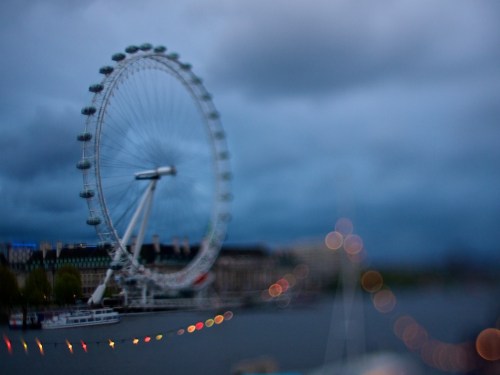
Images around London's Southbank. (Images shot with Tilt and Shift adapter and not enhanced). The London Eye. May 08, 2010. Photo: Edmond Terakopian

The Leica designed Panasonic 45mm f2.8 Macro lens was stunningly good. Pin sharp, great contrast and tone with pleasing bokeh. The only thing I had against the lens was the rather slow focusing. Portraits sang and macro shots stunned. It’s a lens I would definitely recommend for considered photography.

Video on this little camera is astonishingly good. It shoots 720p HD video. Viewing some test footage on a 46” Plasma TV left a very pleasing feeling. It’s no Canon 5D MkII when it comes to video, but it really is impressive. The ability to plug in an external microphone makes this a capable tool for video. The optional stereo microphone which comes with the adapter captures too much ambience. However when I plugged in my Rode VideoMic (which is a shotgun type) the difference was unbelievable.

The E-P2 just makes photography fun. It’s so straight forward and simple, feeling like an extension to one’s eye. It makes you less the “camera guy” and more the photographer; you just take nice picture after nice picture. Can’t ask more of a camera.

Links:

More images on my Flickr E-P2 Set

Homage, a short film shot on the E-P2

Leica M9 Titanium

My day with one of the most exclusive digital cameras ever made

World Exclusive
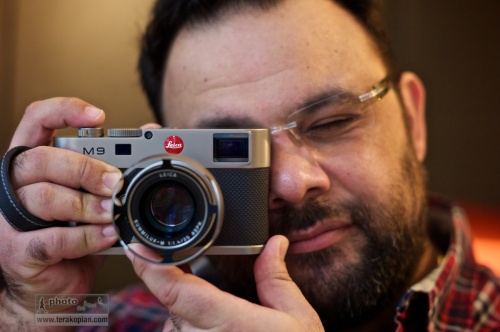
Photographer Edmond Terakopian tests the limited edition Leica M9 Titanium. November 12, 2010. Photo By Brett

There were rumours abound before Photokina 2010 about Leica bringing out a new camera; talk of an M9.2, a different digital M and even a digital body that would take the Leica R lenses. Well, the different digital M turned out to be right, but who would have thought it would be anything like the Leica M9 Titanium, or Titan as it’s also called?
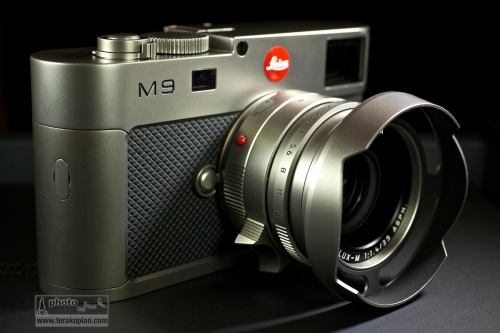
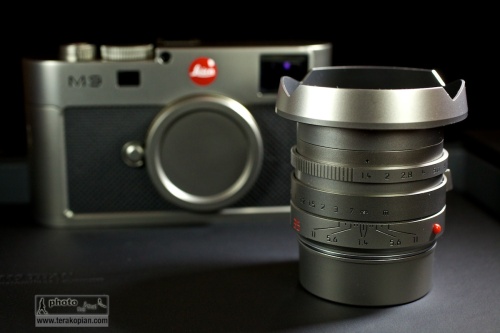
The limited edition Leica M9 Titanium, complete with Summilux-M 35mm f1.4 ASPH in Titanium. November 12, 2010. Photo: Edmond Terakopian

I must admit to not being a big fan of the limited editions that companies produce; I’m a photographer and want tools which are reliable and produce the utmost in imaging quality. I’ve often sighed to myself when I’ve seen limited editions of the M6 or M8. My thoughts at the time were always the wish that Leica would stop concentrating on these and put all their energy into making a ‘proper’ digital rangefinder. For me, the M8 and M8.2 just didn’t cut it. Well, the M9 certainly does cut it and ever since reviewing it for the BJP at launch, I’ve been saving for my own M9 which I recently bought. Leica has changed a lot in recent years; fresh thinking has brought amazing products like the S2 and some stunning M optics as well as the wonderful M9. So, considering the current lineup, I didn’t sigh when I first saw pictures from the launch, but was rather intrigued.

The M9 Titanium though is an absolute departure from putting exclusive leathers and other materials onto the normal camera’s outer casings. Although it has an M9 at it’s heart, it has a completely a new casing, even down to the base plate. There is also some new technology in the viewfinder, more of which later. As it’s name suggests, the material is Titanium; tough and light – pretty much ideal for a camera. Every piece of exterior metal is made from solid Titanium and the body is covered in beautiful high grade leather.
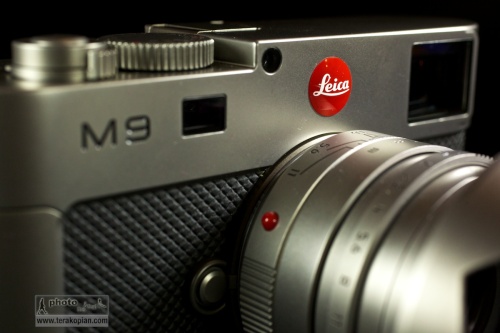
The limited edition Leica M9 Titanium, complete with Summilux-M 35mm f1.4 ASPH in Titanium. November 12, 2010. Photo: Edmond Terakopian

So, what to do about designing the camera? Well, the answer surprisingly was to approach a car designer; to quote Leica:

“The exclusive special edition Leica M9 “Titanium” is the result of a collaboration with Walter de’Silva, the prominent automobile designer. Responsible for groundbreaking design concepts for the latest models from the Volkswagen Group, the chief designer and his Audi Design Team have re-interpreted the design of the LEICA M9 just as he envisaged it. The outcome is a unique camera with a new interpretation of the characteristic features of Leica rangefinder cameras, which lends precision engineering, unique style and solid titanium to extraordinary formal design.”

It may seem a strange thing to do as cars and cameras are so extremely different, but seeing the camera, I must say that the collaboration is an absolute success. In the pictures first released, the camera and lens looked good, but in real life, it looks and feels superb.

In the days of film, I used to have a Leica 35mm f1.4 Titanium lens – I must say I always loved the way it felt. Well, this camera takes that feeling and multiplies it many times over. I can’t think of anything that can make an M9 feel cheap, but the M9 Titanium does just that! As much as I admire the look and the feel of the camera, I also absolutely adore the lens. The ‘kit’ lens is Leica’s extraordinary Summilux-M 35mm f1.4 ASPH. This too is created using solid Titanium and also comes with a beautifully crafted Titanium lens hood, specifically made for the camera. Even the red Leica badge is custom made from resin and hand-engraved with enamel for the camera. There is also an interesting leather holster for the camera, which again was specifically designed and made for the camera. All of this is packaged up in the most beautiful of presentation boxes, including a gorgeously printed book showing the journey of the camera’s design, from concept to reality.
The limited edition Leica M9 Titanium. Summilux-M 35mm f1.4 ASPH in Titanium. November 12, 2010. Photo: Edmond Terakopian

The good news for the collector is that there are only 500 of these to be made. As I mentioned earlier, this isn’t one of the ‘normal’ limited editions, but a completely new design of camera, in solid Titanium. Price of such exclusivity is £19,800.00. I’m not really a collector, so don’t know much about such things when looked at as investment, but to me, a completely unique camera does make investment sense. Now, if only I could win the Lottery!

In Use

Thanks to the wonderful folks at Leica UK and the Leica Store Mayfair, I was able to spend a day with the M9 Titanium. Naturally all the testing was done in the office; even if Leica would allow it, I wouldn’t feel comfortable taking such an exclusive and irreplaceable camera out on the street. I need to add though that this camera isn’t part of the 500 but a pre-production proof of concept model; after all, the Leica Stores need to have cameras to show collectors before orders are placed. The one I used had the serial number 6.
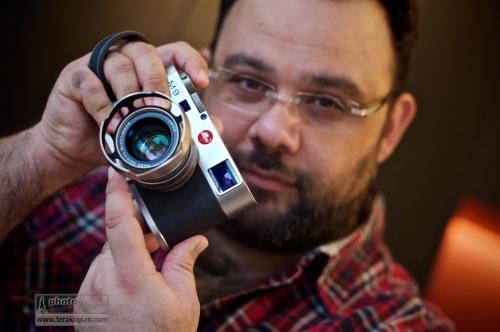
Photographer Edmond Terakopian tests the limited edition Leica M9 Titanium. November 12, 2010. Photo By Brett

In the hand, this camera really feels great. The weight and feel of the materials is just perfect. Aesthetically, I think, it works really beautifully, but the feel of the thing is also spot on. Every part of the body, and that gorgeous lens just work. It’s form, function and material in perfect harmony.

Test images shot with a Leica M9 Titanium. Photographer Brett from the Leica Akademie. November 12, 2010. Photo: Edmond Terakopian

One of the first things I wanted to see were the new LED illumintaed frame lines in the viewfinder. Traditionally, these are bright-line overlays. In use, these have served me well for a decade; however, in very bright conditions where the subject has a very light coloured background, they can disappear. The M9 Titanium has a completely new system where LEDs are used for illuminating red frame lines. These are much easier to see; very crisp and accurate. It took a few minutes to get used to, but I think I would welcome this system in future M cameras. Aesthetically this removes the need for an illumination window on the front of the camera, adding to a cleaner look.
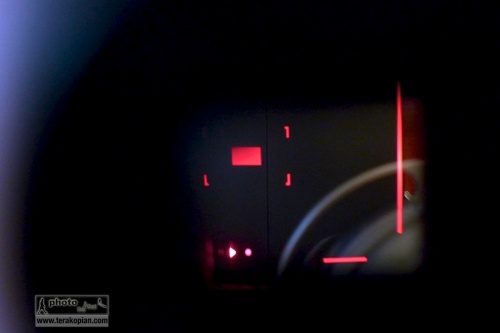
The limited edition Leica M9 Titanium. LED bright line frame lines. Unfortunately I couldn't photograph it showing the entire frame, so this image shows the bottom right hand corner. November 12, 2010. Photo: Edmond Terakopian

One thing which did surprise me was that the frame lines still showed the lens pairings as they have traditionally done, e.g. 28mm and 90mm. I was expecting that the system would show just one set of frames for the mounted lens. I guess though that this would need to read the 6-bit coding to differentiate between the lens pair. Perhaps in the evolution of the M line we shall see this function.

Looking at the outside, one thing which is absent is the manual frame-line selector lever. There are some die-hards on certain forums which mourn it’s loss, but I for one have never found a need for it. I already know the field of view a 50mm is going to give me compared to say a 28mm; the need for changing this manually before choosing lenses is, I think redundant. The M9 Titanium looks so much better and cleaner for not having it.

The Summilux-M 35mm f1.4 ASPH is a superb lens; the results just sing. To have it made from Titanium just makes it feel even better in the hand. It’s an absolute joy operating this camera, looking through that superb viewfinder and focusing this gem of a lens; it just feels absolutely spot on.
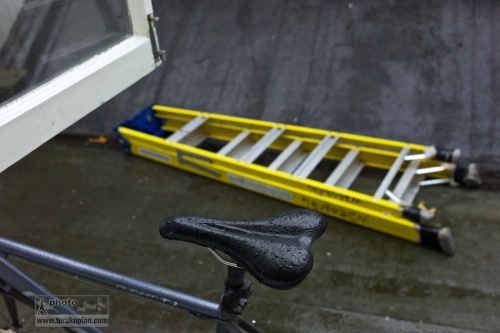
Test images shot with a Leica M9 Titanium. November 12, 2010. Photo: Edmond Terakopian

Apart from the material and design differences, it just handles like an M9; it just feels even better in the hand. I walked around the office taking portraits of some of the folks there and also some shots of the studio and other shots through an open window. I must admit that it’s the first time in my 21 years as a photographer that I’ve felt privileged using a particular camera; it was a real treat.

The Carrying and Holding Concept
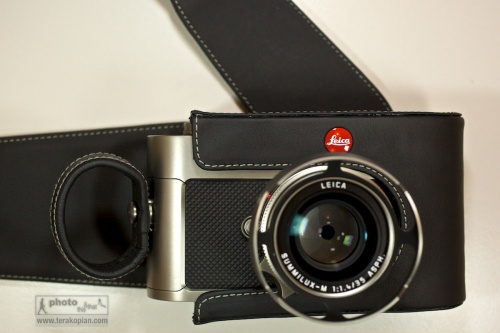
The limited edition Leica M9 Titanium. November 12, 2010. Photo: Edmond Terakopian The limited edition Leica M9 Titanium. The carrying system comprising of the leather holster and the finger loops. November 12, 2010. Photo: Edmond Terakopian

I think one of the obvious things is that this camera will probably never really be used as a photographic tool, but more of a collector’s piece. As a result, I’m looking at these ideas as concepts and not as real world suggestions for working with the camera. As concepts, they are very interesting. The holster is a new approach and is made beautifully out of very high grade leather. I for one would never use it in real life situations though.
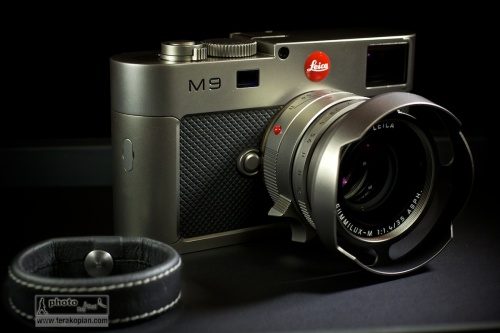
The limited edition Leica M9 Titanium, complete with Summilux-M 35mm f1.4 ASPH in Titanium. The finger loop is shown on the bottom left. November 12, 2010. Photo: Edmond Terakopian

The finger loops, which are metal and covered in leather (and come in two sizes) are slightly more usable. The very first time I held the camera (you insert two fingers through the loop), it felt strange but quickly became quite comfortable. With use, one acknowledges that it’s actually quite a neat system and very secure. I would probably opt for the included carrying strap though as I’m just used to having a camera on my shoulder. This new one sided mounting system does away with the traditional strap lugs at either side, again making for a very clean look.

Reality

I would love an M9 Titanium in black paint. I generally shy away from shiny cameras for my work. The less attention, the better considering some of the environments I work in. Titanium is wonderfully strong and light and is the perfect metal for these tools of ours. Alas, it’s expensive and harder to work with, needing special tooling. The M9 Titanium also has a special hard coating which is applied in Switzerland, so this camera, even if mass produced will never be cheap. Still, as a photographer, a black, or very dark and matt coloured Titanium Leica would be fabulous.
Test images shot with a Leica M9 Titanium. Photographer Brett from the Leica Akademie. November 12, 2010. Photo: Edmond Terakopian

The current M9 Titanium is a thing of beauty. Everything about it is pure elegance; not just elegance though as it’s combined with absolute usability and stunning design which marries the aesthetic with the practical. As someone who prefers black, I can look at this camera and I still appreciate it’s gorgeous looks and even the colour. How good does it feel? Just think about my earlier comment that it makes the regular M9 feel cheap.

For a set of picture taken with and of the Leica M9 Titanium, please visit my Flickr page.

©Edmond Terakopian

Altered Realities

Tilt & Shift Adapter

I’ve always like the tilt and shift look. Like a fish eye, if used properly, sparingly and for the right occasion, it can help produce some beautiful and interesting images. Although having used Canon’s brilliant 45mm TS-E lens, I could never quite justify getting one as it is costly. A colleague of mine, Dan Chung let me know about a very cool little adapter for Micro 4/3 cameras made by an Italian firm called Adriano Lolli.

This slideshow requires JavaScript.

The great thing with this adapter is that it’s cheap and let’s you attach lenses by Canon, Leica, Nikon, Olympus and so on, by specifying the mount you need when ordering. The very cool thing with it is that it’s not a tilt and shift adapter as such, but a 360 degree tilt adapter. Think of it as a Lensbaby with a proper and interchangeable lens on the front. The adapter has a handy lever that locks the movement once you have chosen the tilt that you need.

Forgive the rushed, hand held video which acts as purely an illustration on the adapter’s abilities. Video edited on Aperture 3.

I’m very impressed with this little adapter and it’s helping me make some very interesting images using a bag of old Nikkor AIS lenses. The images you see here were done with the 24mm f2 (which equates to a 48mm view on the Olympus E-P2 – as well as any Micro 4/3 cameras). I really can’t recommend this little tool enough!

Addendum: I have added more images to the set, so visit my Flickr set.

Leica S2 Review

My name is Edmond Terakopian and I love Leica. There, I’ve said it. However, as with any relationship involving the heart, all has not always been perfect. I loved my M4-2 and my M6. I loved my 21mm Elmarit, 35mm Summicron, 50mm Summicron and didn’t mind my 75mm Summilux. Didn’t ever like the 90mm Summicron or 35mm Summilux (but the ASPH version was ok). Also, I loved my R6.2 and the 28mm and 90mm Elmarits I had for it, but hated my R4. Phew, I feel better getting that off my chest.

This slideshow requires JavaScript.

As with most people who have used or follow Leica, every once in a while the company makes a decision which just leaves one speechless. Some of the bizarre limited editions are one such thing (pushing up prices across the range and more or less guaranteeing that working photographers will no longer be able to afford the standard cameras) and strange things like the R8 and R9 and the Digital Module R. The M8 and M8.2 followed bringing for me a head scratching response. Then the most bizarre and unbelievable news that Leica were going to bring out a medium format SLR! I didn’t believe it, thinking it was a hoax. It became apparent that it was true though. I was so saddened. For me, Leica has always really been about the M range and I’ve always wanted a proper digital M – thankfully the M9 has now answered that prayer (however at a price). Still, I wished that Leica would stop wasting money and effort on lost causes and just concentrate on the M range.

In November 2009 I got an invite from the Leica Store to try out the S2 (almost final firmware and production) and with curiosity I accepted. I went knowing that I would laugh at this ridiculous notion of a medium format Leica. I had recently shot with the excellent Hasselblad H3DII-50 and thought it silly that Leica would even attempt to get into this arena.

I’m Edmond Terakopian and how wrong was I? I had it completely wrong. I admit it; the S2 is brilliant.

It looks so much bigger in the pictures than it really is. Think of it as roughly the same size as a Canon 1D MkIV or a Nikon D3, with the standard lens being roughly the size of a 24-70mm f2.8. It fits in the hand perfectly and handles just like a “normal” 35mm DSLR. This is majorly important as you have to remember that it isn’t a normal DSLR like a Canon or Nikon, but is in fact a medium format camera. The sensor size is much bigger (60%) than a full frame 35mm sensor, coming in at 30x45mm with a healthy 37.5 megapixels. It has a wide (in medium format terms) ASA range of 80 to 1250.

It has a wonderfully responsive and surefooted AF system that performed flawlessly in the studio and in the corridors of the store. It just felt right in the hand and the shutter release was absolutely smooth as, well, a very smooth thing. Whilst Hasselblads with prism finders and motorwinder grips are comfortable, they are nowhere near as comfortable as the S2. You can literally just pick it up and start shooting. It feels so right that I would comfortably even take it into a news situation; something I would never dream of with any Hasselblad.

Whilst the handling was superb, the image quality had to be tested out. I shot a series of images of a model in the store’s studio, using studio lights and also took the model into an area with available light to test out the higher ASAs. All I can say is that I was stunned by the image quality. Whilst I was in awe of the Hasselblad H3DII range at the lowest ASA, anything higher proved an absolute no no, with 400 ASA images showing really bad noise. Not with the Leica S2; this machine produced amazingly beautiful images all the way to 320 ASA, nice looking 640 ASA shots and usable images at 1250 ASA. Whilst compared to a Canon 1D MkIV or 5D MkII this may seem like not such a big deal, in medium format terms it’s a first.

The S2 is brilliant; it’s fabulous; the camera had proven to me that my initial thoughts were way off and this new format and camera actually made sense. As with most things in life though, there is a little but – it is rather pricey.

Visit my Flickr page to view a set of images taken on the Leica S2.