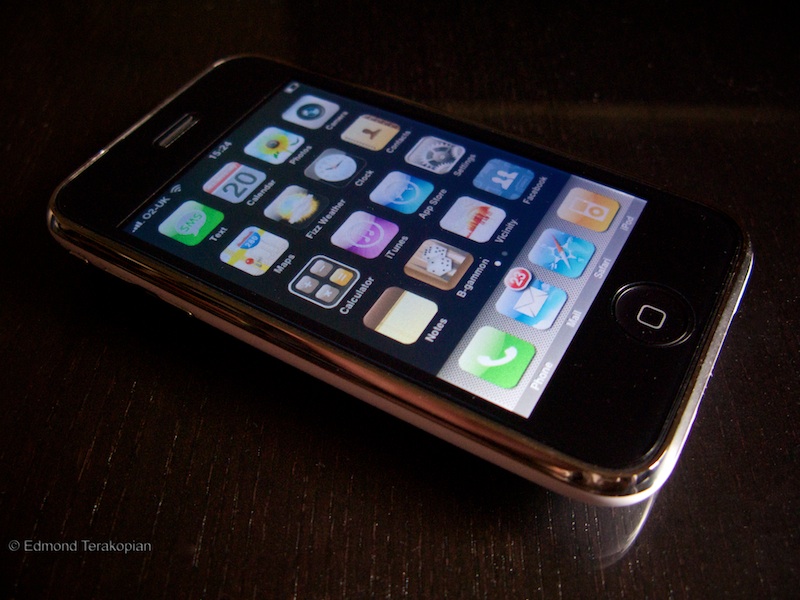
iPhone 3G

Well, it was inevitable. After my appreciation for the way the iPod Touch works, it was only a matter of time before I gave in and got myself an iPhone 3G. After around a 30 minute process, I left the Apple Store with my shiny white 16Gb iPhone 3G.

I don’t want to go over matters already explored in the iPod Touch articles here and here, but all of these naturally apply to the iPhone 3G.
With the roll out of MobileMe (daft name, great service), any individual can now have a fully synced range of computers and iPhones (and iPod Touches) where all your contacts and calendar entries, Safari bookmarks, along with email accounts are all identical, on all machines. Those working in corporate environments have had this for a while; the necessary thing being an Exchange server (with which the iPhone 3G is compatible). Now, with nothing more than an annual subscription to MobileMe, this service is open to individuals. There are other benefits too like an email address, web space and a virtual 20Gb hard drive (for backing up important documents, off-site).
In use, the iPhone is pure elegance. Everything’s intuitive and like most things Apple, just works. After syncing with iTunes, all my email settings were copied over, contacts, calendars and bookmarks also followed suit. The only thing that I had to do manually was choose which music and presentation slideshows I wanted copied over, as the space on the unit is limited to 16Gb.
I’m still getting used to the keyboard, but its not too bad. The way the phone works in perfect harmony with its other apps is very neat. If you see a number on a web page, just hit it and the phone will ring it.
The GPS is quick, and very quick if WiFi is also turned on. It found my position accurately within 15 seconds of starting from cold. The inclusion of Google Maps is very handy and will serve navigating tiny streets in The City well, when away from my car and its Sat Nav.
I also really like the way it stores texts between you and individuals as conversations. No more trying to figure out what one word answers were about.
Safari works perfectly and having a 3G phone now means I’m not in search of hotspots.
With O2, all tariffs include unlimited UK data. Email and surf to your hearts content; you won’t be paying a penny extra. You also get use of The Cloud and BT OpenZone hotspots thrown in the deal.

Call quality on the handset is superb. Even with around 3 bars reception, all the calls I made were crystal clear, both for me and the recipient.
Its early days, so I can’t comment on how good O2’s service is going to be. I just wish that the iPhone 3G was available on Vodafone. Now that Apple’s mobile works more like traditional mobile manufacturers business models, I do hope that these exclusive deals will stop and the phone will be rolled out on other networks.
My only other wish at present is that battery technology catches up with the demand the phone makes. Hammering the phone with 3G and WiFi switched on, whilst playing music, games and other apps, making calls and sending texts, the battery got down to a quarter power in half a day. I realise this isn’t typical day to day usage, but I would advise always having a car charger handy and never travelling without a charger (or at least the USB charging cable for attaching to a laptop).

Since last writing, I’ve found a few more apps which are keepers:
AP Mobile News Network – bit US based, but a good source of international news.
Fizz Weather – very accurate.
Wiki Me – Finds articles to do with your location.
Chopper – great little game!

Apple has produced an amazing product. Married to MobileMe, its untouched in the market place. This is even more astonishing when you realise that this is only the company’s second phone!

UPDATE: Now that I’ve had the phone for a few days, I can comment properly on battery use. After the initial couple of days of constantly fiddling with the phone, things have settled down to me using the phone as I would normally. I’ve kept the 3G and WiFi on constantly and used it day to day to keep up with emails, surf the web, play music now and again and play the occasional game. I’m actually surprised that by the end of the day (around 11pm) I still have around a quarter power left in the battery. As I mentioned, part of this is the device being used as the tool it is, as novelty wears off and also because the battery’s had a few charge cycles and begins to bed in.

My second comment is to do with MobileMe syncing. At one point my iCal entries (there were two) weren’t being synced. The way I got this to work was switching off syncing on the iPhone itself (Settings/Mail, Contacts and Calendars/My .Mac Account and then slid the Calendars switch to off. Then press the home button). After a minute, I switched it back on and in a few seconds it synced everything up fully. This same trick should work with Mail, Contacts and Bookmarks.

So, What’s This Copyright Thing Then?

When I got into photography as a profession, it was my dream come true. I couldn’t believe that I was actually getting paid to do my passion every day; to take pictures and meet some really interesting people; to learn so much about life and cultures and experience customs. How wonderful!

Alas, as with most things, life’s not so simple. There’s paperwork and accounts, times of total unemployment, moral issues to deal with and on top of this, papers and agencies who will try and steal from you what’s rightly, morally and legally yours; your intellectual rights and copyright to your work.
Firstly, to clear a few things up. In the UK, staff photographers’ copyright automatically transfers to their employer. This has always been the way, and is the norm. However, in Norway, this isn’t the case and its great to see the rights of staff photographers upheld in such a way.
As a freelance photographer, by law, every image you create is your work; its your copyright.
The only time this changes is if you’re short sighted enough to sign a contract handing over your rights. As I mentioned, a lot of places are handing out these contracts and bullying photographers into signing them, in exchange for the promise of working for a big agency or paper, and the bright lights of London – this is just wrong.
A lot of employers are targeting younger photographers and college leavers; the simple reason being that they can pay less and also count on these contracts being signed because of a lack of understanding of the situation.
To clarify, when you get paid a shift rate, you are being paid for your time, skill and license of usage. This shift rate doesn’t cover the buying of the copyright or your intellectual rights to your work.
The better contracts I’ve seen, say that the copyright remains with the author, but the paper will have rights to syndicate the work and pay a percentage to the author.
In years to come, if you decide to do a book or an exhibition, you’ll have to get permission from your employer and also probably have to pay for the honour of using your own work in your book; how ludicrous is that?! Some of these contracts are so tightly written that you’ll also have to pay to use your work on your own web site!
Traditionally, one’s archive has always been seen as a pension scheme. Once you retire, you look through your work and sell images as prints or to agencies. If you hand over your copyright, you can wave that good bye.
As a day to day thing, depending on the agreement you have with your employer, you are also free to syndicate any “overs” from a job (a day after) that you have not supplied. I know a lot of friends who make a sizeable income by doing this. Again, wave this good bye if you sign over your copyright.
I think its really important for us to realise our legal rights and to stick together, and defend these rights. Please send this link to any photography students or young photographers so they know their rights.

Its very simple; its your copyright. Treasure it.

UPDATE: Came across an interesting article on how to combat copyright infringement by web sites on Black Star Rising.

Music To The Ears

I’ve always enjoyed music. I have a smallish vinyl collection, a respectable CD collection and a relatively descent music system. Over the years though, I now find myself listening to MP3s, either ripped from my CDs or bought from iTunes. I do this in the car, on my iPod or on the computer when editing.

I found that I rarely switched on my music system as it just seemed too much hassle to have to change records or CDs!
Things have changed though! Apple released a free bit of software for the iPhone and iPod Touch on their App Store called Remote. In a nutshell it lets your iPod Touch or iPhone connect to your iTunes music library and controls it fully. Its as if you were sat in front of your computer. This sounded great for anyone with Apple TV, but it wasn’t until a good friend of mine (cheers Rene!) made the suggestion that I get an Airport Express that I began to realise how revolutionary this set up was.
I can now sit in the lounge where my music system is and using my iPod Touch, running Remote, fully control my iTunes music library which is on my iMac (and in the office), and have the music wirelessly streamed to my amplifier. No more getting up to change CDs!
Setting up is simplicity in itself. You basically plug a lead (3.5mm jack to x2 phono) into the Express and plug the unit into the mains. The other end of the lead plugs into an input on the amplifier. Then using Apple’s Airport Utility software, you set up a connection with the Airport Express (from your Mac or PC). Lastly, you choose on iTunes where you want the music sent to (in this case, the Airport Express).
After a couple of minutes of setting up, get a photography book or some wine, sit on your couch and using Remote on your iPhone or iPod Touch, listen to anything you like! Absolutely superb!!

Need A Mobile PC Workstation??

I used to always look at the 17″ laptops and wonder who on earth would use such a huge laptop; it kind of defeated the mobile aspect of laptops. That was until I saw the 17″ MacBook Pro in action in the press room at the Mandela Concert in the hands of an AP photo editor.

These beasts are far too big and heavy, with terrible battery life, to be used by photographers in the field, but for an editing station at an event like the World Cup or the Olympics, they do come into their own.
Naturally the larger screen makes editing much easier. Also these models generally have more power and can speed through tasks quicker than conventional laptops.
Lenovo (who bought out IBM’s ThinkPad range) has just announced an amazing 17″ laptop specifically targeted at photographers; the ThinkPad W700.
It can be specced up with an Nvidia Quadro graphics card which runs at 1920×1200 on its 17″ display, but has the power and capability of driving an external 30″ monitor.
It can have up to 10Gb of RAM (including 2Gb of Intel Turbo memory), have dual hard drives, a Blue Ray writer and built in CF and SD card reader. Amazingly, it also has a built in Wacom tablet and an X-Rite screen calibrator! This works when you shut the lid and calibrates the screen in around 80 seconds. With all these goodies though, the price does rise to the $6000 mark.

Beijing Olympics by Reuters

Anyone who watched the opening ceremony couldn’t help but be absolutely amazed. The creativity in my opinion was unparalleled.

Reuters has some very interesting posts on the Olympics; some behind the scenes stuff and some very interesting images from the games.


Also well worth a look are the Reuters slideshows.

Do keep an eye on their blog for more updates and pictures from the event.

R.I.P. Richard Mills, Photographer With The Times

It was with great sadness that I heard of Richard’s passing. I didn’t know him very well but on the several occasions that we had met he had been extremely kind and welcoming to me. A truly lovely gent.

Richard passed away whilst on assignment for The Times in Zimbabwe. His funeral was held last week. He will be missed by many.

The BPPA have a slideshow of his work here.

The Times obituary can be read here.