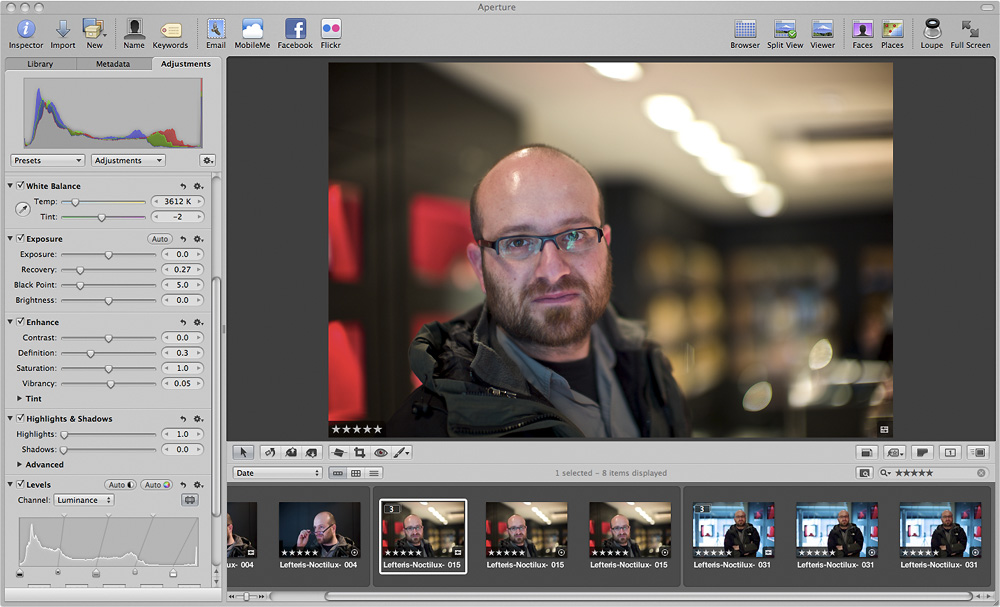
Aperture 3 – Quick Performance Tips

No doubt most Mac users have been trying out Aperture 3.0. On Twitter and some forums, there has been the occasional users who have upgraded to version 3 reporting slower performance to what they expected. The majority of what I’ve read though is reporting faster performance, which is something I totally agree with.


I have two tips to help out those who may be experiencing slow systems; before that though, you should ideally upgrade to 4Gb of RAM. Being a 64-bit program it can manage extra RAM extremely well, so the more loaded your system, the more obvious speed gains you will see.

Tip 1: In Preferences go to the Previews tab and only tick “Use embedded jpeg from camera when possible” and if you don’t need it, choose to ‘Never’ share previews with iLife and iWork.

Tip 2: Aperture 3.0 now has the Faces feature. It has to be seen to be believed; it still amazes me how it can pick out faces throughout my Library and start to recognise people after they have been tagged a few times. Whilst this feature will be of great use to some, you need to realise that it’s a very computer intensive process the first time it runs after an upgrade, or if you are using a trial and have imported many thousands of images. My suggestion would be to switch off the feature when you’re using the program and then switch it on to run over night. Once it has catalogued the many thousands of faces, you won’t notice a performance hit.

During my beta testing period, I used a 15″ MacBook Pro with 2.53GHz Intel Core 2 Duo and 4Gb of RAM. It’s definitely not the fastest in Apple’s line-up but by following the above suggestions, runs extremely fast with Aperture 3.0.

Lastly, check out Mac Create for some great information on Aperture 3.0.

Apple Launch Aperture 3.0

Regular readers will know that by far my favourite imaging program is Aperture; well, the best just got better.
I’ve been very fortunate in having been included in the beta testing for Aperture 3.0 and I must say that the past few months have been an absolute joy. Version 3 brings a huge number of new features with it and It’s even much faster and snappy, being 64-bit.

The Faces Feature

As a news photographer, the biggest things for me are speed and quality. The new import dialogue, which is pure genius, allows me to begin my edit of the entire shoot even before the card has downloaded. It also can automatically split two assignments into different Projects by setting the time gap between each job. Also included are a host of brushes, so having to export into another imaging program is a thing of the past. The adjustments presets are also extremely handy and beautiful in their execution. They now have “Quick Fixes” and white balance presets too.
Multimedia journalists will love the video editing and audio slideshow generating features – these really work a treat in deadline situations. It’s alls o quick and easy to put these quick packages together now. Transitions, titles and even fading audio on slideshows – brilliant!
Faces and Places are also extremely neat. You can now add GPS data to your images by dropping a pin on a map. Faces is also very neat as it goes through your library of images picking out faces. After a few are tagged, it begins to tag the rest itself.
To top it off for Curves users, it also now has Curves alongside Levels (which is what I use).

The Places Feature

Aperture 3.0’s even more elegant and flowing than version 2; it allows you to do what you want, when you want and in the way that suits you.

Don’t just take my word for it though, grab the trial of Aperture 3.0.

Addendum: There’s a lot of good information here on Mac Create.
_________________________________________
Press Release:

Apple Releases Aperture 3
New Features Include Faces, Places & Brushes
CUPERTINO, California—February 9, 2010—Apple® today introduced Aperture™ 3, the next major release of its powerful photo editing and management software, with over 200 new features including Faces, Places and Brushes. Building on the innovative Faces and Places features introduced in iPhoto® ’09, Aperture 3 makes it even easier and faster to organise large photo libraries. Aperture 3 introduces new tools to refine your photos including Brushes for painting image adjustments onto parts of your photo, and Adjustment Presets for applying professional photo effects with just one click. Stunning new slideshows let you share your work by weaving together photos, audio, text and HD video.
“Millions of people love using iPhoto to organise, edit and share their digital photos,” said Philip Schiller, Apple’s senior vice president of Worldwide Product Marketing. “Aperture 3 is designed for both professionals who edit and manage massive libraries of photos and iPhoto users who want to take their photos further with easy-to-use tools such as Brushes and Adjustment Presets.”
“Aperture 3 gets it right,” said National Geographic photographer, Jim Richardson. “The image editing tools are exactly what I have been asking for, they’re so easy to use and give me a level of control that I never even thought possible.”
“I chose Aperture because it was the most powerful archiving application around, but it’s now an unbelievable imaging tool as well,” said Bill Frakes, Sports Illustrated staff photographer. “I am beyond impressed with the massive changes made in Aperture 3.”
Aperture 3 allows you to organise large photo libraries with even more flexibility using Projects and the new Faces and Places. Faces uses face detection and recognition to find and organise your photos by the people in them. You can view faces across your entire photo library or view just the faces that appear in selected projects. In a new view that speeds up the organisation process, Aperture 3 displays faces that have been detected but haven’t yet been named. Places lets you explore your photos based on where they were taken, and like in iPhoto, Places automatically reverse geocodes GPS data into user-friendly locations. In Aperture 3, you can assign locations by dragging-and-dropping photos onto a map or by using location information from GPS enabled cameras, tracking devices or your iPhone® photos.
The new Brushes feature allows you to add professional touches to your photos by simply painting effects onto the image. Aperture 3 includes 15 Quick Brushes that perform the most popular tasks like Dodge, Burn, Polarize and Blur, without the complexity of layers or masks. Brushes can automatically detect edges in your images to let you apply or remove effects exactly where you want them. Aperture 3 includes dozens of Adjustment Presets that apply a specific style or look to the entire image with just a click. You can create your own custom presets or explore the techniques of other photographers by importing theirs.
Aperture 3 makes it easy to share your work with stunning slideshows that weave together photos, audio, text and HD video. You can select one of six Apple designed themes or choose your own transitions, background, borders and titles, and even add your own soundtrack. You can export your slideshows directly to iTunes® to take with you on your iPhone or iPod touch®. You can also share photographs as beautiful prints, create custom-designed hardcover books and publish to online photo sharing sites like Facebook and Flickr, right from Aperture 3.
Pricing & Availability
Aperture 3 is available through the Apple Store® (www.apple.com/uk), Apple’s retail stores and Apple Authorised Resellers for a suggested retail price of £169 (inc VAT) and existing Aperture users can upgrade for a suggested retail price of £79 (inc VAT). A downloadable 30-day trial version is available at www.apple.com/uk/aperture/trial. Aperture 3 runs as a 64-bit application on Mac OS® X Snow Leopard® on Macs with Intel Core 2 Duo processors. Full system requirements, online tutorials and more information on Aperture 3 can be found at www.apple.com/uk/aperture.

Leica M9 Review by Digital Rev

Thought I’d share this rather fun and funny, yet accurate review of the Leica M9.
You can read my own review in the BJP and view some photographs on my Flickr.

Canon & Vimeo Film Contest

The Story Beyond the Still “The Cabbie” – Behind The Scenes from Vincent Laforet on Vimeo.

Introducing the first user-generated HD Video Contest where photographers become filmmakers, and we all see beyond the still. To kick off the contest, Canon asked me to interpret what story I saw beyond the still, and to tell that story with the new Canon EOS 7D. My short film will be the first chapter of seven, each ending with a still photograph for the next aspiring filmmaker to interpret. Posing the question to everyone, what do you see beyond the still?

Learn more about the contest and watch my short film “The Cabbie” here – vimeo.com/groups/beyondthestill

This video was Directed, Shot and Edited by Blake Whitman. Additional cameras by Brian King and Sean O’Brien.

Friend and colleague Vincent Laforet has announced a fascinating and ground breaking film contest on his blog.

In a nutshell, it involves films being made which take on the story from the end frame, a still image, on the film shot by the previous person. Watch the film and visit his blog for full details.

Storage For Photographers

Your Hard Drive Will Fail;

It’s Just A Question Of When


A yawn is the typical reaction from my colleagues when the topic of digital storage, archiving and backing up is talked about. That is, until one of them loses their work, because they weren’t paying attention to the need for a reliable back-up strategy. The yawns are then replaced by much shouting of obscenities and tears.

In this day and age of digital photography, the obsession of ever increasing megapixels, the need to shoot video and record audio, one thing is for certain; we need somewhere to store it all. The lazy and stupid will leave it all on their laptop until the disk’s full and then drag it off in a hurry, onto an external drive, usually losing stuff. Sometimes they’ll even be stuck on a job with no choice but to delete older stuff just so they can download the latest job and process it. I’ve even seen colleagues work straight of a CF card when in a hurry send a low res jpeg, forget to download the card and then format it. Disaster.
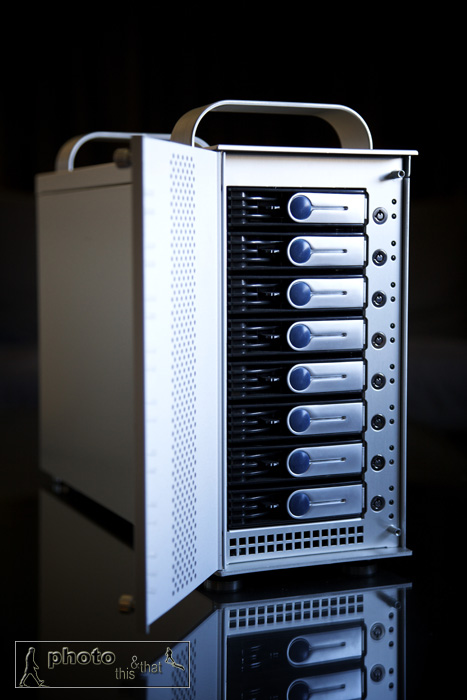
Sonnet Tech Fusion D800 RAID Sata 8 drive external box. Photo: Edmond Terakopian

Although it’s a pain, at the end of a long day, it still pays to have a system. My personal way is to never format my CF cards until I have the same work on at least two hard drives. If it’s just on my MacBook Pro, then the CFs remain in my belt pouch until this has been backed up at home. I have a ThinkTank Photo Pixel Pocket Rocket which is always full of CF cards. I make it a point to have more than enough cards with me. I always have one small external hard drive with me too, so I might back up onto this. When on foreign assignments, I carry two external drives and back up onto these (these portable drives are never stored with my laptop. I’ll leave one in my luggage and have the other with me if leaving the laptop in a hotel or car). Once home, after a typical day in town or a trip, I’ll back up the assignment onto my Mac Pro’s Aperture Library.

I’m a big fan of Aperture and have it on all my machines. Apart from RAW processing, Aperture also acts as a fully searchable image database. At the moment I have more than 385,000 images in my Aperture library, and this number is constantly growing. RAW images are stored on an internal drive, in separate Project folders which are derived from the assignment. These are titled using a date and a name. An example would be “2009-09-28 Gordon Brown”. These Projects (with consolidated masters) are then backed up onto a Sonnet Technologies external SATA RAID box (more on which later). The same Project is also backed up onto an external hard drive which is kept off-site. It’s important to have off-site storage to secure the safety of data in the event of fire or theft. Lastly, important images, documents, video and audio are backed up to “The Cloud” (more on which later).

What’s New?

The old ways to back up were CDs and then DVDs. Blu-Ray doesn’t seem to have caught on, even though a double sided disc offers 50Gb of storage. The problem with optical storage, apart from the slow speed of writing, is that they don’t seem to have the longevity needed. I’ve had top brand CDs, kept upright in their cases and stored in cool, dark and dry conditions become unreadable after a few years. There is a 500Gb optical disc that’s being talked about, but again, how long is any media stored on that going to last? I for one certainly hope that it has proper archival stability, as it really would be useful to have.

My thoughts are that using several hard drives which are swapped out every three to four years, is the best method available. This provides speed and security. It also offers value for money, as drive prices continue to fall, with speed and capacities rising.                 
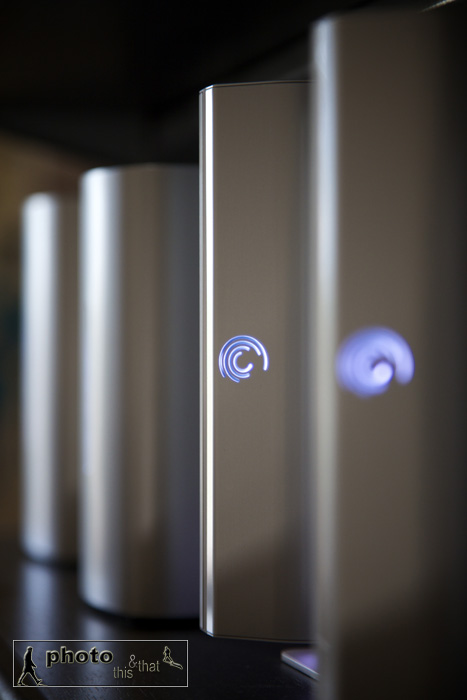
External Seagate hard drives, with Western Digital drives in background. Photo: Edmond Terakopian

If you’re wondering why I seem to have an obsession with several hard drives, and a golden rule that everything is kept on three drives at least, it’s because hard drives fail. It’s an absolute given. Anyone in IT will tell you that hard drives fail, it’s just a question of when. I’ve personally had a major brand name drive fail after 3 months of use whilst sat on a desk, but had others which have worked solidly for many years. It’s always a gamble, and you should be well prepared.

At the moment, I have 12 external drives in my office and all the associated cabling and power bricks cluttering up the floor area. After some research, I recently decided to go for a Sonnet D800 Fusion RAID ( www.sonnettech.com ). This is an external SATA RAID box with eight drive bays. This means that it will hold eight hard drives, connect to my MacPro (its multi platform) using eSATA cables (connecting to its own controller card which installs inside your computer) which means that it’s blisteringly fast, and has only three cables; two eSATA cables and one power cable. To say that it’s a neat and tidy solution would be an understatement. I’ve recently finished moving my archive over to this system and will do away with most of the external drives. This also makes the office more quite and power-efficient.

I have the drives in the D800 set up in pairs of RAID 1 (also known as Mirror RAID). This basically means that everything that is saved on the drive (and you will only see one of the drives on your computer), is automatically copied onto its partnered drive. This is transparent, automatic and at the same speed. This protects the data from a hardware failure. I then manually back up data from this unit onto an external drive via FW800. This ensures that if by accident I erase an image, or an image gets corrupted, I can get it back from this back-up. These back-up drives are then stored off-site.

In use the system is amazing. Accessing images or video on the unit is blisteringly fast as it’s working over SATA, which is much quicker than even FW800. I’ve had the unit running for weeks without powering down and it’s been absolutely stable on the Mac Pro running Leopard.

The other new term you may have heard is “The Cloud”. This is virtual storage that’s kept on servers, somewhere in the internet, sometimes even in different countries. The Cloud’s not such a new thing, but with faster broadband, it’s now becoming more usable. Apple has had “.Mac” (now called “Mobile Me” www.me.com ) for years. Part of this service has been the iDisk which has been a virtual drive, available for use by Mac and PC users. I’ve been using this system for many years, and although a little slow, it’s been solid and stable.

The other Cloud system I’ve been using for around a year is Amazon’s S3 via Jungle Disk ( www.jungledisk.com ). This mounts a virtual drive onto your desktop (it’s multi platform) and allows you to use it like any other drive. It’s a faster system than iDisk and allows you to pay for the storage you use. At the time of writing, this is $0.15 per Gb per month. Your data is then saved on Amazon’s servers either in the USA or in Europe at locations which are not disclosed.

I’ve been using the Cloud in two ways. When on assignment, if I’ve shot a particularly important image, I’ve been saving them immediately to my iDisk. This has been for back-up purposes. Also, if I’ve got documents to which I need access, as well as having copies with me, I’ve also got them on my iDisk. This also includes email and FTP account details, which means if my laptop gets stolen, I can still function by accessing this information from another machine.                                                                                              
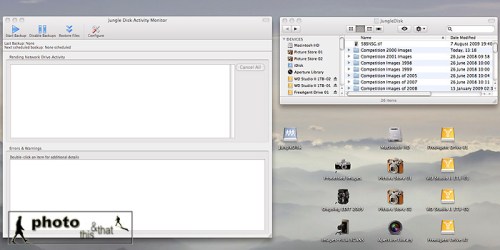
Screenshot from an Apple Mac running OS X showing Jungle Disk which is used for accessing Amazon S3’s Cloud service.

As my working year continues, every few weeks, I upload the edited pictures from assignments to my Amazon S3 drive. At the end of the year, like most photographers, I look through that year’s work and select my best work for competitions. Once I have this edit sorted, and the images processed to perfection, I take the contents of this folder and also upload it to Amazon S3. This gives me an off-site back-up of the year’s de facto most important and best work.

Lastly, a word on automated back-ups. I use Apple’s Time Machine to back up everything apart from my work images. This includes emails, invoices, letters, music, family snaps and so on. It’s saved me twice so far after I accidentally deleted important information. You can get back-up software for any platform, and I urge you to also have this system in place. For me, I use a separate FW800 drive for this purpose.

One thing’s for sure; as prices tumble for memory cards and hard drives, there’s no excuse not to have a solid and dependable back-up strategy. A little time spent planning and executing this strategy will save much stress and tears; trust me, I’ve seen enough colleagues suffer.

This article was originally published in the BJP on October 07, 2009.

Season’s Greetings To All

Try JibJab Sendables® eCards today!

I wanted to wish everyone a peaceful holiday season. A very merry Christmas to all who celebrate and a happy holiday season to all. I wish the new year to bring you all joy and good health; wisdom and luck too 🙂

Take care and keep well 🙂