I was one of a few fortunate photographers who were invited to take part in Apple’s Aperture 3 beta program a couple of months before launch. As a result I’m in a unique position as being the longest user of Aperture 3 in the UK.
Up until Apple released Aperture in November 2005, photographers were using three programs to do their image editing. A browser like Photostation which was later over-taken in use by Photo Mechanic for editing and batch captioning, a RAW converter like C1 Pro and finally an image editor for final processing in the shape of Photoshop. Aperture changed all of that bringing editing, captioning and processing under one roof with the need for Photoshop on some images. By March 2008 and the adjustments plugin architecture of Aperture 2.1 products like Nik software’s Viveza made using Photoshop practically unnecessary.
The beauty of Aperture has always been that all the adjustments you do, and all the versions you create of the same image within Aperture, never take up any extra space as these are just instructions which are applied once the image is exported for use. This is not true if one needs to export into Photoshop or a plugin such as Nik’s Viveza; in these circumstances a second version of the image is created and the change applied to this second version is permanent and cannot be undone once applied.

Aperture 3 as an image editor, raw converter and processor
Perhaps the biggest and most genius change to Aperture is the addition of non-destructive brushes which allow the photographer to dodge and burn, polarise and smooth to their heart’s content, straight “onto” the RAW image. The beauty of this is that any of the multitude of brushes is non-destructive and just stores the instruction for the change as opposed to modifying the original image file. What’s more is that almost all of the adjustments can be applied by using these non-destructive brushes. This new technology now means that having to create new versions of the image by exporting to Photoshop or a plugin is no longer necessary, as most things can now be done in Aperture’s non-destructive environment. If this wasn’t enough, these brushes also have edge detection which stops the action being performed from bleeding over.
For me, the next most impressive and helpful thing is the way that importing images has been changed. The way it works is by downloading all the jpeg previews from your RAW files. These pop up almost instantly as you plug in your card. This allows the photographer to begin editing images, captioning and even adding adjustments whilst the images are still downloading! Whilst the previews download and we edit, the RAWs are then downloaded. It’s absolutely astonishing to see. Another very neat addition to the importing feature is letting the program split images into different Projects automatically based on time or date differences. To add to this one can have a preset, either user generated or one of the program’s own, added to the files as they import.
These presets are extremely useful and range from correction type presets to creative ones like cross-processing and toy camera. Naturally these can be applied freely.
My preferred way of editing, after I’ve done my rough first edit, is to place the cursor on the part of the image which has to be critically sharp. I would then hit the ‘Z’ key to zoom into 100%. The helpful addition to Aperture 3 is that if now I hit a cursor key to edit through my images, all the zoomed in actions will be done to the same point. This saves an enormous amount of time and added to the blisteringly fast importing means that an edit is done in no time.
The zoom feature has been further improved by allowing zooming in further than 100% which is very helpful when retouching very fine detail. This was one of the reasons why I had a need for Photoshop – no matter how fine the dust particle might be, I can now handle it in Aperture, saving time and disk space.
For users with smaller screens like the 13” MacBooks Pros, working in full screen now allows access to all the controls one would get in the normal view.
Faces has to be seen to be believed; with an enormously high accuracy rate this feature trolls through the hard drive picking up almost every single face. Not only obvious ones such as in a portrait, but faces in the background in crowds and so on. Once the user begins to tag these faces, the program gets more accurate at spotting them and tagging them. On exporting an image, these names are written to the Keywords in the metadata. Naturally inside Aperture they can be used to locate people. On large libraries this is an intensive process the first time you do it so I’d advise setting aside some time and allowing your machine to run overnight.
Places is also extremely useful for attaching GPS tags to your images. These can come from your camera if it has this function, from an iPhone 3G if you were to take a shot at the same location or it can be manually done using map views inside the application.
Although a “Levels” man myself, I know some of my colleagues prefer to work in “Curves” which is also now supported.
Lastly, for photographers who take advantage of social networking, FaceBook and Flickr integration are now built in.
Not All Smooth Sailing
Before the release of the 3.0.1 update recently, there were reports from users on the web experiencing issues. Some of the issues with version 3.0 were problems with upgrading libraries from version 2 and the other was a memory leak experienced by users with very heavy retouching. Out of three machines, two of mine upgraded smoothly but the third machine with a library of over 380,000 referenced images and over 44,000 managed files did experience issues with the upgrade. After I repaired permissions and rebuilt the Library in Aperture 2 and with the release of Aperture 3.0.1, the upgrade went smoothly, taking around four days to complete. Some user intervention before upgrading is a must. I do recommend you read my extensive tips on upgrading on my blog http://www.photothisandthat.co.uk/ The 3.0.1 update has also fixed the memory hole.
Aperture 3 as a video editing program
The ‘M’ Word
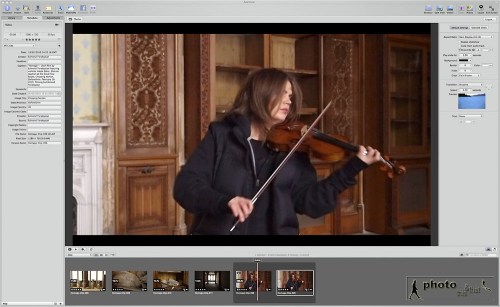
Yes indeed, the word is multimedia. We’ve all been thrown into the deep end of audio and video along with our photography. Good news is that Aperture 3 can now handle all of this and has become the hub of all my multimedia work. You can download all your video and audio files into Aperture 3. Video, including HD, can even be trimmed for basic editing and exported into a video editing program like iMovie or Final Cut Pro, or exported out for use in various forms. The same is true for audio files. Great news is that for backing up, you can export the project, consolidating the master files and use these as your backup.
For my short film Homage, I chose all the best clips by star ratings in Aperture 3 and used the caption field to make necessary notes. When in Final Cut Pro, these notes made it very easy to edit.
It’s also now extremely easy to put together audio slideshows, blending photos, multi-layered audio and text together and allowing effects like “Ken Burns”. The slideshow can then be exported as a QuickTime movie and uploaded to the web.
Conclusion
Aperture 3 has over 200 new features and I’ve run out of space. Having used the program for real day to day work for several months I can’t express how enthusiastic I am about this application. For today’s multimedia photographer it’s an absolute must. It takes a little bit of care when upgrading, but apart from that I cannot fault Aperture 3. It ticks all the boxes.
This article originally appeared in the BJP in April 2010.
Update
A lot has changed since I originally wrote this article. At the time of this update, Aperture is up to version 3.0.3 and is solid and speedy. There have been more improvement done to the batch metadata system and neat touches like a centre line showing in the straighten tool which allows for getting horizons straight very easily.
I have not only been using it as my image processing and multimedia hub, but also to create audio visual slideshows and even to give presentations from. I was very impressed with and embraced Aperture before, but with version 3, it would be safe to say that I love it (as much as a man could love software!).


 Photo This & That