Category Archives: Computers and Software

Aperture 2.1 Article in Hotshoe Magazine

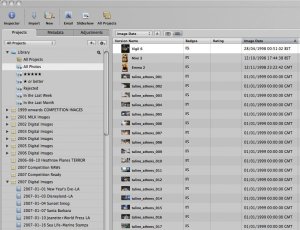
A couple of months ago I did an article for Hotshoe magazine on Apple’s Aperture:

Photographers are a creature of habit. We find a system that works and stick with it until absolutely necessary. This way we can concentrate on the assignment and the equipment is just an extension to the photography. The downside is that often we don’t embrace the newest of technologies. Therefor the decision to switch to anything new doesn’t come easily.


Working for the wire services and newspapers, for me speed and quality are of the utmost importance. In this day and age of evening papers, national and international clients, there are always deadlines to meet. Speed means publications.


I used to shoot RAW for around 15% of my assignments, when the deadline was days away, not minutes away. Then, a couple of years ago, I came across Apple’s Aperture which was at version 1.5. Shooting RAW has its obvious advantages but its always been just a little too slow to process. My old work flow for RAW used to include five different software packages. Now with Aperture I’ve cut this down to three.


Initially I had a bit of a steep learning curve to conquer. Aperture did things differently to the way I worked. However, after a few days of using it, I was smitten. I sold my PC laptop, embraced my new MacBook Pro and added Aperture to my arsenal.


My workflow with Aperture begins when I plug a card in; images are downloaded to a folder which I create for every assignment. I choose to use the referenced file method and not the Aperture library. You can choose which ever method suits you best. After this, I can quickly do a batch caption to all the images and rush through the images tagging the ones I need for my edit. Once I have my final choices, I use the adjustment tools available to polish up the image. Initially I used to shoot most of my images in jpeg format for speed, and use Aperture to process these. When I realized just how fast Aperture deals with RAWs, I’ve switched over to shooting RAW 100% of the time. The real beauty of the software is how elegant it is in operation. It can make the most subtle of corrections, leaving the image looking natural.  The other great feature is the way you can export your image into a wide range of formats and sizes; these can be pre-set by the user. I have a list of export preferences I use for my various clients. The only downside to the program is that you will need a recent Mac with at least 2 Gb of RAM to make it work efficiently.


I’ve been a big fan of Aperture since version 1.5 and have since completely switched my computer platform over to Apple Mac. A lot has changed since then with version 2 and now 2.1 being released. The program runs a lot faster and has made big advances in editing speed. Even on my tightest deadline I use Aperture without hesitation. Its elegance, speed, robustness, full control over RAW and jpeg editing, plug-in architecture and digital asset management are unique.

Aperture’s plug-in structure allows the program to use third party plug-ins. Apple provide their own sample plug-in for dodging and burning. This architecture has opened the doors for some excellent plug-ins and I find needing Photoshop less and less. With version 1.5, I used to use Photoshop around 10% of the time. Now that’s probably down to 3%.


I’ve been using Nik Software’s Viveza plug-in for around a month and its now part of my workflow.

Its absolute genius; in Aperture you click edit with Viveza which creates a copy of your original (keeping the original RAW or jpeg untouched) and opens the image in its own window, after applying any adjustments you have made in Aperture. You then click on control points and select the area of the image you need to change.

The control point then gives you a set of sliders which choose circle size (which is feathered), brightness, contrast and saturation. By clicking on the colour you want to change, it only makes these changes to that particular hue and the surrounding area of the same value, within the circle diameter you choose. Very easy, fast and accurate. Its much faster and more elegant than exporting into Photoshop. Darkening a sky for example, no matter how complex the skyline, is done in a matter of seconds. After saving, it adds the new modified image back into your Aperture library.

The other plug-in which has become part of my workflow is Picture Code’s Noise Ninja. Being a long time user of the software I’m delighted that its available for Aperture. 


Looking into the plug-ins scene, there are more than 70 available. Apple lists these on their web site http://www.apple.com/aperture/resources/plugins.html

You can get free trials of Aperture and all the plug-ins mentioned and I definitely recommend giving these a go.
400Gb Blue Ray Disc

Pioneer has showcased its 16-layer 400Gb Optical Disc at the Taipei IT fair.

Its due for launch in 2008-2010 in a read only version, but there are plans for re-writeable discs in 2010-2012 and a 1Tb version is destined to follow in 2013.

Whilst optical discs like CDs and DVDs have proven not to be the best solution for archiving digital media, here’s a chance for Pioneer to concentrate on not only making these large discs (which are so much better than using hundreds of CDs or DVDs) but also put emphasis on trying to make them archival in nature. Lets keep our fingers crossed!

Does The Apple Mac Need Antivirus Protection?

The short answer is possibly. For many years the Mac has survived the constant barrage of PC viruses and worms. However, as the platform grows in popularity, spreading outside of creative circles into most people’s lives and work, it becomes a target for virus writers.

OS X is still a much more secure and solid operation system than its competitors, which needs user verification before it installs anything. Common sense will prevail; don’t open or install anything that you weren’t waiting for or that looks either too good to be true, or dodgy!

In all my years of computing, I have only heard of a small handful of malicious codes in the wild (virus, worms etc), but my strategy, as well as Apple’s, is better safe than sorry. Apple themselves recommend Intego, McAfee and Symantec. Read this article for more details.

Addendum 1: Apple have since removed the article saying that it was old and inaccurate.

Addendum 2: Here’s an interesting article on this subject at TidBITS.

Aperture 2.1 – Digital Asset Management

As regular readers will know, I’ve been using Apple’s Aperture for a couple of years now. I was so impressed by it I even switched computer platforms as a result. With its speed, ease and
 flexibility of workflow, accuracy, robustness and plug-in architecture, I use it quite happily on deadline and shoot everything in RAW. Its such a capable program that I find I need Photoshop for perhaps three percent of my work.
I did however keep all my images from the PC days on a PC server on 6Tb of drives set in RAID 1 (Mirror) and would access these files on my Mac using Expression Media. I would search for them in catalogues (split up by year, as the software has a limit of how many images you can have in a catalogue, rather annoyingly!), then find it in the finder and copy it to a local folder and then import it into Aperture to work on; very long winded workflow, but it worked.
I had a bit of a brain wave a few days ago; why not import all these images into Aperture on my Mac Pro? One aspect of Aperture is that its a very powerful DAM (Digital Asset Management) for images.
I decided to give it a try. My 3Tb of images resided on my HP server, so I set up dated folders within the Aperture library for each year. Then I imported files and folders into the relevant dated folders. The beautiful part however was being able to keep the originals on the RAIDs on the server (which you can choose on the import files and folders dialogue – also make sure you keep file names as they were originally named). What this means is that I have access to all my images, can perform full IPTC searches, apply any and all adjustments and then export the image into whatever format and size needed.
As this importing was over ethernet, naturally it took a while. I did a year at a time and after around four nights, all images were in Aperture.
At the moment my Aperture library has 342,953 images to which I have total and full access.
A tip to anyone who has a similar set up; once you have imported the images in chunks (in my case, by year), keep the server logged on as in the background Aperture will create:

i) thumbnails for all the images, and
ii) previews as well.

Once this has been done (which took another day or so – to check its status, go to Window and then Activity), you can switch off the server and still have access to searching and previewing images. If you find something that you need, then you can switch on the server and access the original image and carry on working with it. You can also use this method on external drives, be they a PC format or a Mac format.

Absolute genius (Aperture, not me!).

Addendum – Although the building of thumbnails takes a day or so, the building of previews has taken a couple of days more for my library; there are around 130,000 still left to do. However, this all happens in the background so you can still use Aperture (the program automatically pauses the preview building if it sees that you’re working on something else – also, if you need to shut down the program, it’ll pick up where it left off). Its important to let the program do all this as it will allow you to see images properly when your server or external hard drives are off-line. Also, its worth pointing out that if you’re going to do this for external drives, the procedure will be much faster than doing it over ethernet (which is what I’m doing).
I have to add that I’ve been doing this for a fair few days of solid importing and thumbnail and preview building, whilst also working on Aperture; I’ve even done some video work and the Mac Pro and Aperture have been solid as a rock – that’s what you call well engineered!

Need Faster Broadband ADSL?!

Firstly, I have to say I haven’t tried this, so can’t make any personal comments. I will probably be ordering one though.

Its a little plate that fits into your BT phone socket box and provides a better way of filtering out line interference. Judging by the customer reviews, it seems to work for the majority of people.

Want 6Gb RAM For Your MacBook or MacBook Pro?!

Its the one thing in the Apple laptop range which I wish was different; that RAM didn’t max out at 4Gb. Well, Other World Computing (OWC) can now supply 6Gb of RAM for the latest and previous generation of MacBooks and MacBook Pros!